
Shadow





What is Shadow?
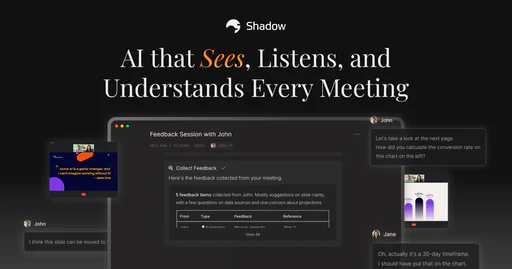
Shadow is an innovative AI meeting assistant[1] designed to enhance your meeting experience by capturing everything that is said and shown. Unlike traditional note-taking, Shadow remembers the complete context of meetings, ensuring that you can follow up flawlessly every time. With its ability to transcribe conversations and capture visual content, Shadow transforms the way professionals manage their meeting follow-ups and insights.
How to use Shadow?
- Sign up for an account on the Shadow website or app.
- Connect Shadow to your preferred meeting platforms such as Zoom, Microsoft Teams, or Google Meet.
- Once connected, Shadow will automatically detect meetings and start capturing audio and visual content.
- After the meeting, utilize Shadow's features to generate follow-up notes, action items, and insights based on the captured data.
What are the main features of Shadow?
- Automatic Transcription[2]: Shadow transcribes all spoken words during meetings, ensuring no detail is missed.
- Visual Capture[3]: It captures screenshots of shared content, providing a complete context.
- Action Item Extraction[4]: Automatically identifies and records action items with due dates and assignees.
- Key Insights Extraction: Pulls critical insights from conversations for easy access and updates.
- Speaker Identification: Detects and labels speakers in real-time for clarity on who said what.
- Post-Meeting Tasks: Allows users to create AI tasks that Shadow runs automatically.
Who is Shadow for?
Shadow is designed for professionals and teams who frequently participate in meetings and need to manage follow-ups effectively. This includes project managers, sales teams, and anyone who requires precise documentation of discussions and decisions made during meetings. Shadow is ideal for users looking to streamline their workflow, reduce manual note-taking, and ensure that important information is never lost.
What are the use cases of Shadow?
- Sales Meetings: Capture client discussions and extract key insights to inform follow-ups and proposals.
- Team Collaboration: Document team meetings to track decisions, action items, and project updates effortlessly.
- Client Interviews: Record interviews and automatically format responses for quick reference and reporting.
Product Images

Shadow Pros and Cons
Pros
- Comprehensive Meeting Capture: Shadow captures everything said and shown during meetings, ensuring no context is lost for follow-ups.
- Automatic Transcription: The tool automatically transcribes discussions and captures screenshots, making it easy to reference key points later.
- Seamless Integration: Works with popular platforms like Zoom, Microsoft Teams, and Slack, allowing for smooth operation without interruptions.
Cons
No cons data detected for this tool
Shadow Pricing
Free
Unlimited recording & transcription. AI features *(Skills & Chat)* for your first 25 meetings.
Plus
Unlock everything. For power users who want unlimited AI features, and more. All Free Features + Unlimited AI Meeting Notes, Unlimited AI Skills, Unlimited AI Chat.
For the latest pricing, please visit this link: https://www.shadow.do/
Prices are subject to change. Please visit the official website for the most up-to-date pricing information.
Analytics of Shadow
Shadow Website Traffic Analysis
Visits Over Time
Traffic Sources
Nov 2025 - Jan 2026 Worldwide Desktop Only
- Direct: 43.74%
- Search: 34.53%
- Referrals: 10.26%
- Social: 9.64%
- Paid Referrals: 1.22%
- Mail: 0.13%
Top Keywords
| Keyword | Volume | CPC | Estimated Value |
|---|---|---|---|
| shadow | 147.36K | $1.05 | $180.00 |
| obsidian ai | 12.25K | $3.17 | $230.00 |
| shadow.do | 200 | $0.00 | $190.00 |
| shadow meeting | 120 | $0.00 | $110.00 |
| shadow.do vs. granola | 110 | $0.00 | $110.00 |





Shadow Social Listening
Middle-earth: Shadow of War Re...
Middle-earth: Shadow of War re...
Shadow of the Tomb Raider Revi...
A bigger world, higher stakes,...
【零基础】2026最新保姆级纯小白节点搭建教程,人人都能学会...
教程代码:https://bulianglin.com/g/...
Unlock to view 40 social media results.