

Ideator





What is Ideator?
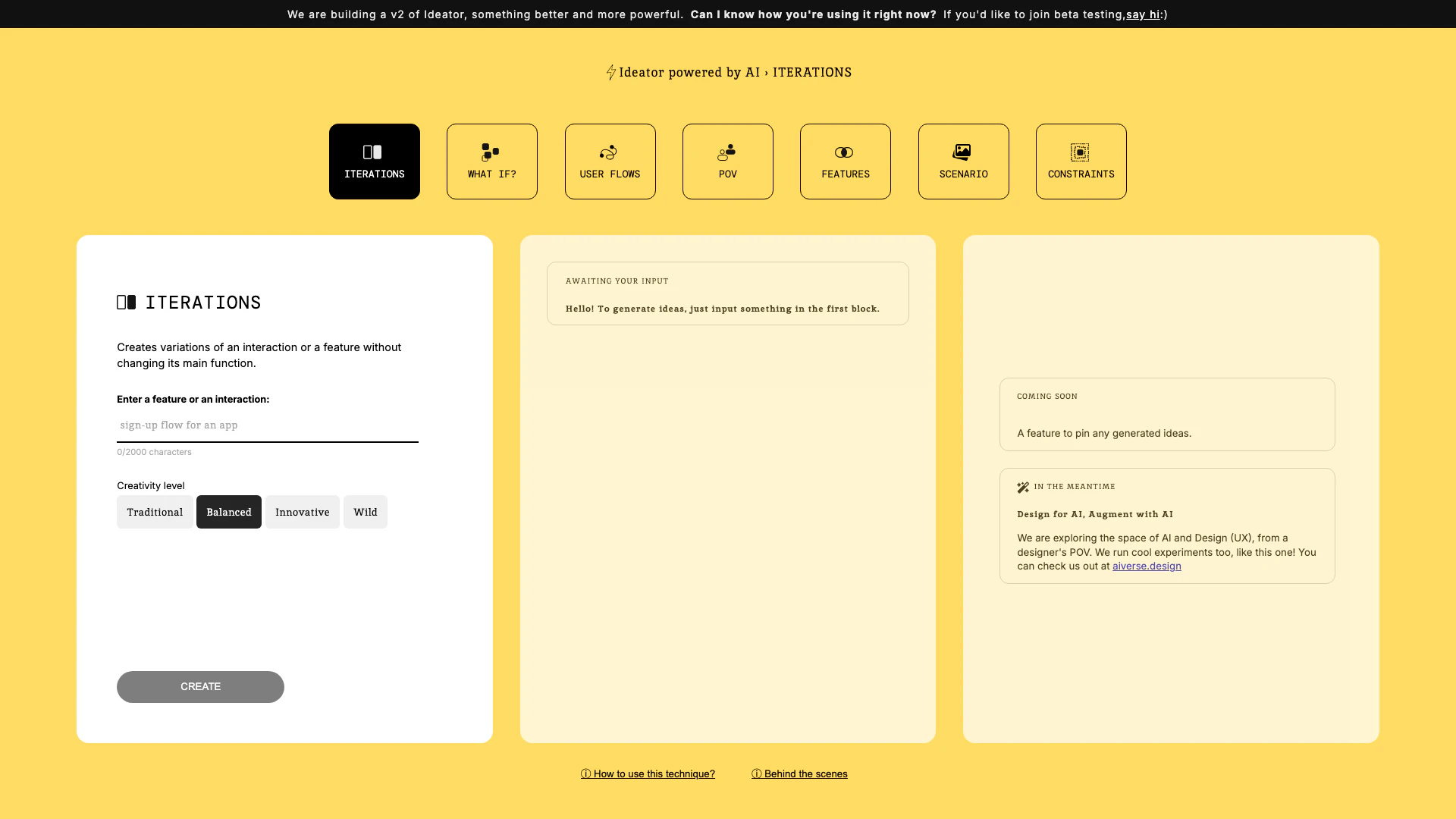
Ideator is an innovative AI-powered[1] tool designed specifically for designers and innovators. It leverages advanced AI capabilities to help users generate creative ideas and concepts, particularly in the realm of user experience[3] (UX) design. By allowing users to create variations of interactions and features without altering their core functions, Ideator enhances the design process, making it more efficient and imaginative. The tool is currently in development for a more powerful version, aiming to expand its functionalities to better serve the creative community.
How to use Ideator?
- Visit the Ideator website and sign up for an account if you haven't already.
- Input a feature or interaction idea into the designated input block (up to 2000 characters).
- Choose a creativity level from options like Traditional, Balanced, Innovative, or Wild.
- Click on the 'CREATE' button to generate variations based on your input.
- Review the generated ideas and select the ones that resonate with your design objectives.
What are the main features of Ideator?
- Iterations: Generate multiple variations of a feature or interaction without altering its main function.
- Creativity Levels[4]: Choose from different creativity levels to tailor the idea generation[2] process.
- User Flows[5]: Visualize user journeys to enhance design decisions.
- Scenario Planning: Create scenarios to explore various design outcomes.
- POV (Point of View): Analyze ideas from different perspectives to broaden creativity.
Who is Ideator for?
Ideator is tailored for designers, UX professionals, product managers, and innovators who seek to enhance their creative processes. It is especially beneficial for those working in design teams or individuals looking to brainstorm new ideas and solutions in product development. The tool is ideal for anyone wanting to leverage AI to augment their design capabilities and streamline the ideation process.
What are the use cases of Ideator?
- Design Brainstorming: Use Ideator to generate a variety of ideas for new product features or enhancements during team brainstorming sessions.
- User Experience Design: Create multiple user flows to explore different interactions and improve the overall user experience.
- Scenario Testing: Develop scenarios to test design concepts against various user needs and constraints, ensuring a comprehensive design approach.
Product Images


Ideator Pros and Cons
Pros
- AI-Powered Design Assistance: Ideator utilizes AI technology to assist designers and innovators in generating creative ideas and variations, enhancing the design process.
- Versatile Iteration Features: The tool allows users to create multiple iterations of a feature or interaction without altering its core functionality, promoting creativity.
- User-Centric Design Exploration: Ideator focuses on user experience (UX) by enabling designers to explore ideas from a user's perspective, fostering innovative solutions.
Cons
No cons data detected for this tool
Analytics of Ideator
Ideator Website Traffic Analysis
Visits Over Time
Traffic Sources
Nov 2025 - Jan 2026 Worldwide Desktop Only
- Search: 50.39%
- Direct: 30.34%
- Referrals: 11.67%
- Social: 4.98%
- Paid Referrals: 1.23%
- Mail: 0.19%
Top Keywords
| Keyword | Volume | CPC | Estimated Value |
|---|---|---|---|
| ideator | 500 | $0.00 | $90.00 |
| ideators | 190 | $0.00 | $0.00 |





