




Twitter-color Created with Sketch. Amazon-color Created with Sketch. Facebook-color Created with Sketch. github [#142] Created with Sketch. meta_fill Pinterest-color Created with Sketch. ProductHunt-color Created with Sketch. Spotify-color Created with Sketch. Threads Logo Streamline Icon: https://streamlinehq.com Yelp-color Created with Sketch. Youtube-color Created with Sketch.
TopAIToolsTopAITools
  • Free Tools
  • Category
  • Leaderboard
  • Deals
  • Submit
EN
TopAIToolsTopAITools
TopAI

TopAITools

TopAITools, The Best Top AI Tools

AI Glossary|English简体中文繁體中文한국어日本語PortuguêsEspañolDeutschFrançaisTiếng Việt|Map

© 2026 TopAITools. All rights reserved.

About

  • Privacy Policy
  • Terms of use

Contact Us

business@topaitoolsreview.com
Home
AI Document Reader
Askdocs
Last updated: June 7, 2026
Askdocs logo

Askdocs

Get deal
5.0|0 Comments|0 Saved
Introduction:
AskDocs is an AI-powered tool for instant document analysis and summaries.
Launch Date:
October 4, 2011
Social links:
Monthly Visits:
3.2K
Inputs:
ImageTextTabular
Outputs:
TextTabular
Supported Languages:
EN
AI Models:
GPT3.5GPT4GPT4o MiniGPT4o
Website
Free Trial
💼Work🎨Creativity
AI Document Reader33AI Productivity Tools313AI Information Management Tools162AI Document Processing Tools90AI PDF Interaction Tools27
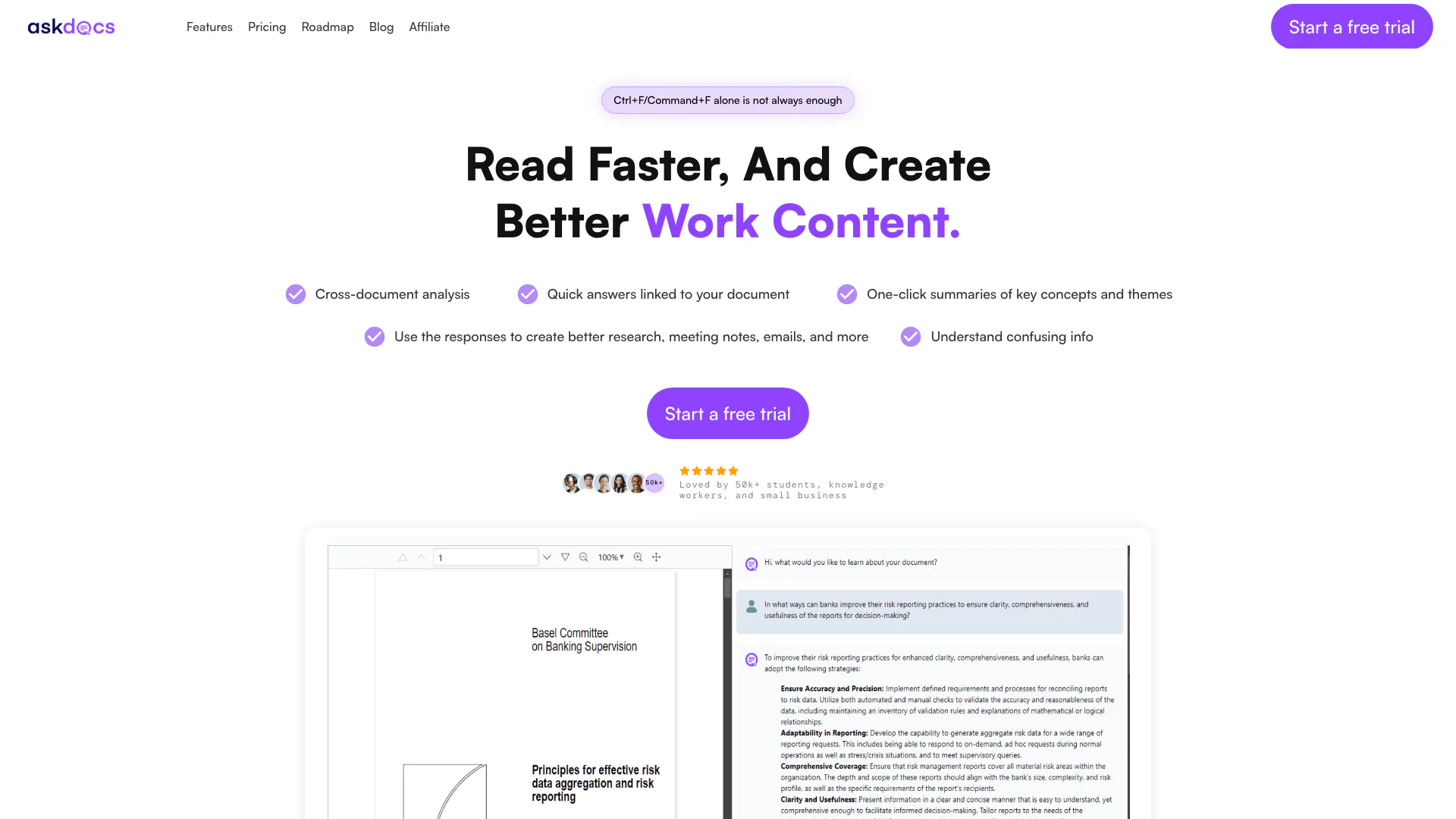
Askdocs website screenshot showing AskDocs is an AI-powered tool for instan... interface and features
Use tool
Update this tool
Bbc logo

Bbc

Stay updated with reliable news from around the world.

Emailwhiz For Gmail logo

Emailwhiz For Gmail

EmailWhiz for Gmail™ - Google Workspace Marketplace

Deepseek logo

Deepseek

DeepSeek focuses on pioneering general AI technologies and models.

Google logo

Google

AI Time Manager offers AI-driven tools for better time management.

Linkedin logo

Linkedin

Connect with professionals worldwide on LinkedIn.

Askdocs Overview

What is AskDocs?

AskDocs, also known as "Ask Documents," is a cutting-edge generative AI tool designed for PDF and document research. It enables users to ask questions about their documents and receive instant answers along with one-click summaries of key concepts. This tool is perfect for those looking to streamline their research process, making it easier to find and understand information quickly. AskDocs is positioned as a reliable assistant for students, researchers, and professionals who need to extract insights from large volumes of text efficiently.


How to use AskDocs?

  1. Upload your documents: Begin by easily uploading the PDF or other supported file types that you want to analyze.
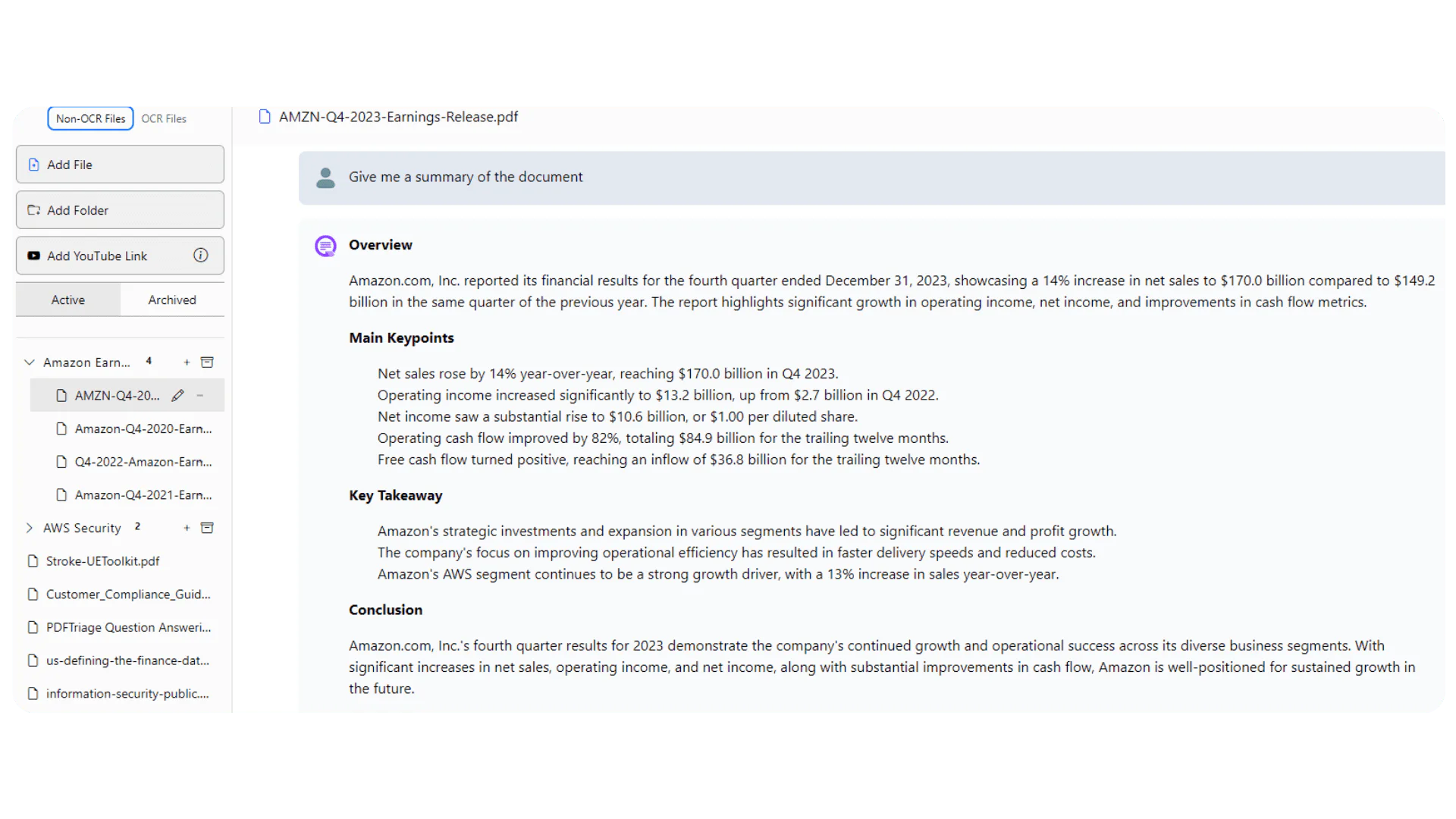
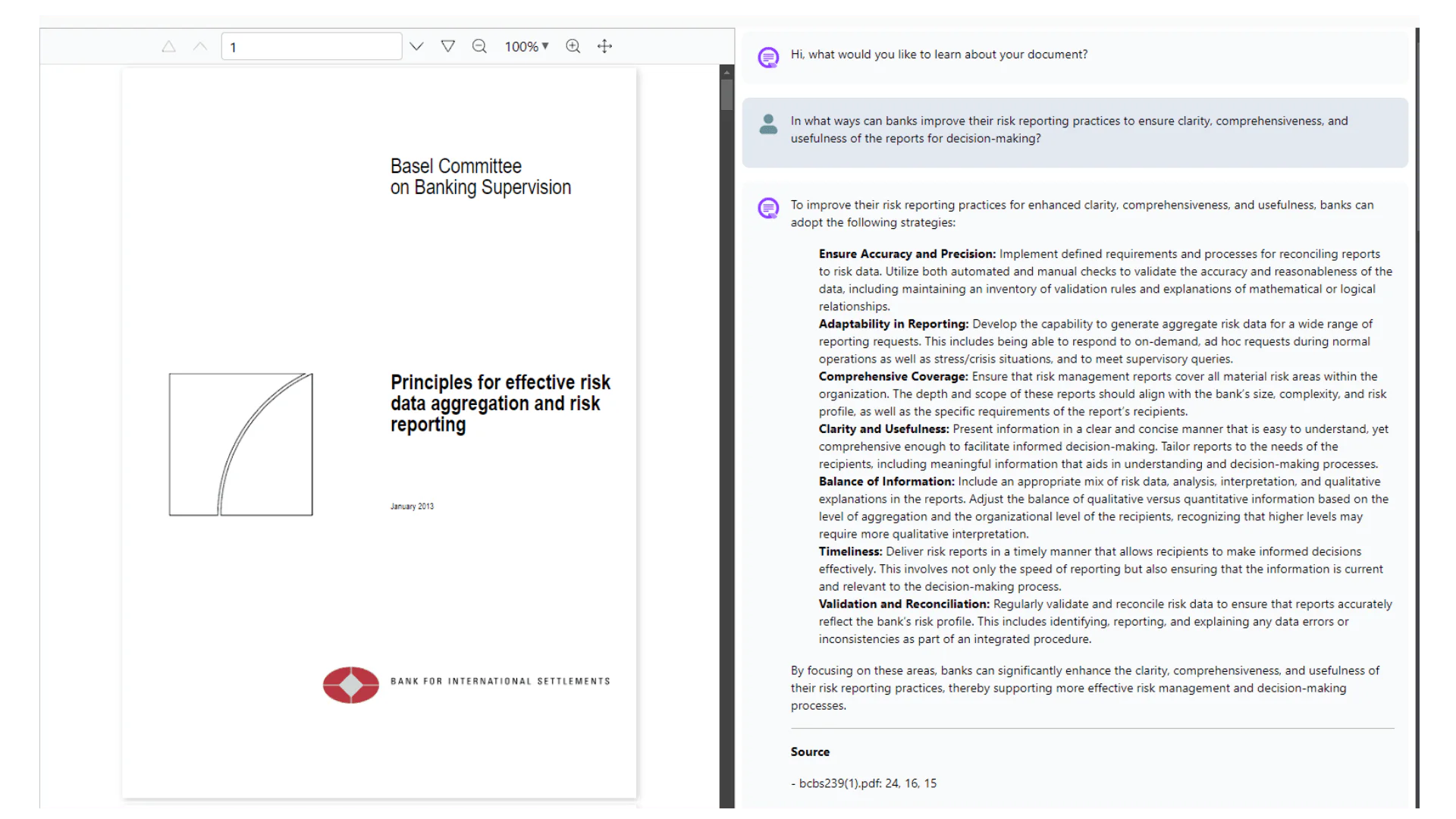
  2. Ask the AI Assistant: Use the chat interface to ask specific questions about the content of your documents. The AI will provide instant answers linked directly to the relevant sections of the text.
  3. Explore Answers: Utilize the responses to create expert-level content such as emails, presentations, or reports, enhancing your productivity and understanding of the material.

What are the main features of AskDocs?

  • Instant Answers: Get quick responses to your questions directly from your documents.
  • One-Click Summaries: Generate concise summaries of key concepts with a single click, saving time on manual reading.
  • Cross-Document Analysis: Analyze multiple documents simultaneously to discover new insights and connections.
  • File Compatibility: Supports various file formats including PDF, DOCX, TXT, CSV, and more, making it versatile for different users.
  • Voice Queries: Ask questions using voice commands for added convenience.
  • Smart Text Reading: Understand both text and images within documents, ensuring comprehensive analysis.

Who is AskDocs for?

AskDocs is tailored for a diverse audience, including students, researchers, knowledge workers, and small business owners. It is particularly useful for individuals who frequently handle large volumes of documents and require efficient ways to extract and synthesize information. Whether you are a student preparing for exams, a researcher conducting literature reviews, or a professional drafting reports, AskDocs serves as a valuable tool to enhance productivity and streamline your workflow.


What are the use cases of AskDocs?

  1. Research Assistance: Quickly summarize and analyze academic papers or reports to aid in research projects.
  2. Meeting Preparation: Generate meeting notes and insights from lengthy documents to facilitate better discussions and decision-making.
  3. Content Creation: Use the tool to draft emails, presentations, and other professional documents based on extracted information from source materials.

Product Images

AskDocs document upload interface
AskDocs AI assistant question interface
AskDocs feature demonstration
AskDocs summary feature overview
AskDocs use case example
AskDocs application scenario
AskDocs product interface overview
AskDocs user scenario image
1 / 8

Askdocs Pros and Cons

Pros

  • Quick Document Summaries: AskDocs provides one-click summaries of key concepts and themes from documents, allowing users to quickly grasp essential information.
  • Cross-Document Analysis: The tool enables users to chat with multiple documents simultaneously, facilitating the comparison of information and spotting new ideas.
  • Supports Various File Formats: AskDocs supports a wide range of file formats including PDF, DOCX, TXT, CSV, and images, making it versatile for different document types.

Cons

No cons data detected for this tool

Askdocs Pricing

Plus

$8/month

Everything you need to get started with AI-powered research including generous features. 5,000 questions per month, Max 50MB file size, Unlimited files upload, Chat with multiple documents, Support different file formats (PDF/DOCX/TXT/CSV), Support images (png, jpeg, jpg), OCR Support, Share your chatbot, Embed your chatbot on your website, Access to GPT3.5, GPT4, GPT4o Mini, GPT4o.

Pro

$21/month

For professionals and small business who needs advanced features. Unlimited questions per month, Max 150MB file size, Unlimited files upload, Chat with multiple documents, Support different file formats (PDF/DOCX/TXT/CSV), Upload image files (png, jpeg, jpg), OCR support, Share your chatbot, Embed your chatbot on your website, Access to GPT3.5, GPT4, GPT4o Mini, GPT4o.

For the latest pricing, please visit this link: https://www.askdocs.com/#pricing

Prices are subject to change. Please visit the official website for the most up-to-date pricing information.

Analytics of Askdocs

Askdocs Website Traffic Analysis

Visits Over Time

Oct 2025 - Dec 2025 All Traffic
--
AI Tools Rank
3.22K
Monthly Visits
44.91%
Bounce Rate
1.59
Pages Per Visit
0:11
Visit Duration
5.42M
Global Rank
2.97M
Country Rank

Traffic Sources

Oct 2025 - Dec 2025 Worldwide Desktop Only

  • Search: 39.56%
  • Direct: 38.98%
  • Social: 12.97%
  • Referrals: 6.82%
  • Paid Referrals: 1.48%
  • Mail: 0.07%

Top Regions

Oct 2025 - Dec 2025 Desktop Only
RegionPercentage
🇮🇳
India
47.03%
🇺🇸
United States
42.45%
🇩🇪
Germany
10.52%
  1. India: 47.03%
  2. United States: 42.45%
  3. Germany: 10.52%

Top Keywords

KeywordVolumeCPCEstimated Value
generative ai prompts for summaries books and extract the most important points0$0.00$210.00
docs ai1.44K$0.34$0.00
ask doc860$0.00$20.00
how genai improves productivity60$0.00$40.00
ask docs40$0.00$40.00

Askdocs Compare

Tool NameIntroductionPricing
Type
RatingLaunch DateLearn more
Quillbot Paraphraser logo
Quillbot Paraph...
Paraphrasing Tool (Ad-Free and No Sign-up Required) - QuillBot AI
Free
💼Work🎨Creativity
December 31, 1984
Get deal
Ecommerce Prompt Generator logo
Ecommerce Promp...
2Mn+ readymade ChatGPT prompt ideas built by prompt engineers, using insights from eCommerce experts - that really work!
Free
💼Work🎨Creativity
February 6, 2023
Get deal
Pixelhunter logo
Pixelhunter
🧠 AI-powered image resizer for social media
Free
💼Work🎨Creativity
June 8, 2021
Get deal

Info current as of post date. Offers and availability may vary by location and are subject to change.

Askdocs Q&A

Great question. AskDocs is laser-focused on one thing: getting answers from your documents. It uses foundational models from providers including OpenAI. Upload your files and watch AskDocs pull exact answers with page numbers – like having a research assistant who's actually read everything. Unlike ChatGPT, we show you precisely where each answer comes from, and you can view your documents right alongside the chat.

For more FAQs, please visit this link: https://www.askdocs.com/#faq

Askdocs Launch embeds

Use website badges to drive support from your community for your TopAITools Review. They're easy to embed on your homepage or footer.

FEATURED ONTopaitoolsreview.com

Askdocs Alternatives

Gemini screenshot

Gemini

Discover Gemini, Google's versatile AI assistant for writing and planning.

Website
Free
💼Work
Productivity & OfficeAI Productivity ToolsAI Business Planning ToolsAI Prompt Management Tools
  • Productivity & Office
  • AI Productivity Tools
  • AI Business Planning Tools
  • AI Prompt Management Tools
Use tool
2068.6M
Direct77.40%
Search17.27%
Referrals4.45%
Notion 1771246560178 screenshot

Notion 1771246560178

Notion AI enhances productivity by integrating AI tools directly into your workspace.

Website
Free
🙋‍♂️Personal💼Work🎨Creativity
Productivity & OfficeAI Productivity ToolsAI Information Management ToolsContent Management Tools
  • Productivity & Office
  • AI Productivity Tools
  • AI Information Management Tools
  • Content Management Tools
Use tool
178.3M
Direct81.45%
Search10.98%
Referrals7.05%
Notion screenshot

Notion

Notion is an AI-powered workspace that automates tasks and enhances team collaboration.

Website
Free
💼Work🎨Creativity
Productivity & OfficeAI Productivity ToolsAI Information Management ToolsAI Task Management Tools
  • Productivity & Office
  • AI Productivity Tools
  • AI Information Management Tools
  • AI Task Management Tools
Use tool
159.0M
Direct81.12%
Search11.13%
Referrals7.29%

Askdocs Tags

AI Document AnalysisInstant SummariesCross-document AnalysisGenerative AIDocument SummarizationSmart Text ReadingFile Format SupportVoice Query

Also used for

AI Document Reader33AI Productivity Tools313AI Information Management Tools162AI Document Processing Tools90AI PDF Interaction Tools27AI Identity Protection5AI Security Tools2AI Keyboard Tools6AI Spreadsheet Tools27AI Spreadsheet Automation Tools29AI File Management Tools22AI Business Planning Tools59AI Pitch Deck Generators37AI Branding Tools6AI Knowledge Base Organizers17Visual Coding Tools2AI Personality Assessment Tools9
Askdocs logo
AskdocsFree
Get deal

Askdocs Comments (0)

Your rating

?
0/2000

No comments yet

Be the first to share your thoughts!

Askdocs Prompts (0)

Prompts And Results

Add your own prompts and outputs to help others understand how to use this AI.

🚀0
🚀0