Best 35 AI Document Reader Tools in 2026

Lilysai, Papermark, Edubrainai, Summarize, Myreaderai, Limbiks, Explainpaper, Myreader Ai, Studix, Aipdfai are the best paid / free AI Document Reader tools.

AI Document Reader is a powerful tool designed to streamline the process of extracting and understanding information from complex documents. Its intelligent algorithms quickly analyze text, images, and formatting to deliver accurate insights in seconds. Ideal for professionals who need to process large volumes of data efficiently, it supports various file formats and enhances productivity by reducing manual effort. Whether it's legal contracts, financial reports, or technical manuals, this solution ensures clarity and precision. By integrating AI-driven analysis, it empowers users to make informed decisions, save time, and maintain high accuracy in document interpretation.

Lilysai

Accelerate your learning with AI-powered insights from various sources.

5
0 views
0 saved
1.6M

Free

0.00 USD free

Unlimited AI reports & Chat, File Uploads (YouTube links, Video, Audio, PDF, Recordings, Websites, Texts), Various AI tools (report templates, translation, deep search, etc.), 10 speed boosts per month.

View Pricing

Starter

4.99 USD monthly

Everything in Free + Amazingly smart and fast AI, Unlimited Advanced Model application, Export reports (PDF, Markdown, docx), Upload larger files, 50 speed boosts per month.

View Pricing

Basic

11.99 USD monthly

Everything in Starter + Utilize smart AI features to the fullest, Unlock various advanced features, Upload more files, 1000 speed boosts per month.

View Pricing

Pro

39.99 USD monthly

Everything in Basic + Generous usage, perfect for work, Upload larger files, Unlimited Speed Boost.

View Pricing

Business

19.99 USD monthly

Everything in the Basic plan + Safe and efficient plans for teams and companies, Centralized subscription & payment management, More file uploads, Team shared workspace, SAML SSO, SOC2 TYPE II certification, More AI features for teams, Team usage monitoring.

View Pricing

For the latest pricing, please visit this link: https://lilys.ai/en/pricing

Prices are subject to change. Please visit the official website for the most up-to-date pricing information.

What is Lilysai?

Lilysai is an innovative AI-powered tool designed to enhance knowledge acquisition and reporting. It allows users to transform various types of content, including videos, audio files, PDFs, websites, and text, into actionable insights and comprehensive reports. By leveraging advanced AI technology, Lilysai enables users to quickly and effectively gather and synthesize information, making it an invaluable resource for leaders, researchers, and learners seeking to improve their understanding and decision-making capabilities.

Pros

  • Comprehensive Source Integration: Lilysai allows users to import various sources including videos, PDFs, and websites, enabling a deeper understanding of complex materials.
  • Rich Visual Reports: The tool generates visually appealing reports with mind maps, infographics, and other visual elements, enhancing information retention.
  • Source Credibility and Accuracy: Lilysai provides precise source links for every sentence and ensures accurate real-time transcription and translation, improving trust in the information presented.

What are the main features of Lilysai?

  • Multi-source integration: Import content from various formats such as videos, PDFs, and websites.
  • Visual report generation: Create rich, visual reports with templates that include diagrams, images, and quizzes.
  • Source-grounded insights: Each report provides precise source links for every sentence, ensuring credibility and traceability.
  • AI coaching: Engage with Lily for personalized assistance, from report writing to editing and note-taking.
  • Team collaboration tools: Share reports and insights with team members, and organize projects using collections and tags.
Papermark

Papermark AI is an advanced assistant for managing and interacting with documents and data rooms.

5
0 views
0 saved
382.8K

Free

0.00 EUR monthly

No credit card required. 1 team member included, 50 links, 50 documents, unlimited visitors, page-by-page analytics, document sharing controls.

View Pricing

Pro

24.00 EUR monthly

Everything in Free, plus: 1 team member included, unlimited links, 100 documents, large file uploads, custom branding, Papermark branding removed, videos and more file types, creating folders.

View Pricing

Business

59.00 EUR monthly

Everything in Pro, plus: 3 team members included, 1000 documents, custom domain for documents, multi-file sharing, unlimited folder levels, require email verification, allow/block list, screenshot protection, webhooks.

View Pricing

Data Rooms

99.00 EUR monthly

Everything in Business, plus: 3 team members included, unlimited data rooms, custom domain for data rooms, advanced dataroom branding, data room analytics, NDA agreements, dynamic watermark, granular file level permissions, data room groups, 24/7 email support.

View Pricing

For the latest pricing, please visit this link: https://www.papermark.com/pricing

Prices are subject to change. Please visit the official website for the most up-to-date pricing information.

What is Papermark AI?

Papermark AI is an advanced AI document assistant designed to facilitate interaction with data rooms and documents. It enables users to chat with their data and provides a seamless experience for managing and sharing documents securely. Papermark AI aims to enhance productivity by allowing users to create personas that can review and engage with their documents, making it a powerful tool for teams involved in deals and due diligence.

Pros

  • Advanced AI Document Assistant: Papermark AI serves as an advanced assistant for managing documents and data rooms, enabling users to interactively chat with their content.
  • Enhanced Document Review: The tool allows users to create personas for reviewing documents, streamlining the document analysis process.
  • Compliance and Security Features: Papermark is compliant with SOC2, HIPAA, GDPR, and CCPA, ensuring that user data is handled securely and in accordance with regulations.

What are the main features of Papermark AI?

  • AI-driven chat interface for interacting with documents and data rooms.
  • Custom persona creation for tailored document reviews.
  • Secure document sharing with compliance to standards like SOC2, HIPAA, and GDPR.
  • Easy setup of data rooms for fundraising and due diligence processes.
  • Integration with various platforms to streamline document management.
Edubrainai

Edubrainai is a free AI tool that provides step-by-step homework solutions without sign-up.

4
0 views
0 saved
236.4K

Free plan

0.00 USD free

Unlimited use with ads included. Free access to all AI tools. Download all responses (answers, presentations, flashcards, etc.). Share responses with others.

View Pricing

Expert help

3.99 USD monthly

Choose a service: Presentations (human-made), Homework help, STEM support, Writing assistance, Editing & proofreading.

View Pricing

For the latest pricing, please visit this link: https://edubrain.ai/pricing/

Prices are subject to change. Please visit the official website for the most up-to-date pricing information.

What is Edubrainai?

Edubrainai is a free AI homework helper designed to assist students with their academic challenges. It allows users to upload pictures or PDFs of their homework assignments and receive step-by-step solutions for a wide range of subjects without requiring any sign-up. This tool is particularly beneficial for students seeking immediate help with their homework, as it provides detailed explanations and answers quickly, making learning more accessible and efficient.

Pros

  • Free and Accessible: Edubrainai offers a free AI homework helper with no sign-up required, making it easily accessible for all users.
  • Step-by-Step Solutions: The tool provides clear, step-by-step solutions for a wide range of subjects, helping students understand complex concepts better.
  • Supports Multiple Formats: Users can upload pictures or PDFs of their homework, allowing for flexible input methods and accommodating various learning styles.
  • Wide Subject Coverage: Edubrainai covers a vast array of subjects, including STEM, humanities, and languages, making it suitable for diverse academic needs.

What are the main features of Edubrainai?

Edubrainai offers several key features that enhance the learning experience: - Instant Solutions: Provides quick answers to homework questions by analyzing uploaded files. - Step-by-Step Explanations: Breaks down complex problems into understandable steps, making it easier for students to learn. - Multiple Subject Support: Covers a wide range of subjects including math, science, humanities, and languages. - Flexible Input Options: Allows users to upload various file formats such as images and PDFs or type questions directly. - Privacy Assurance: Ensures that uploaded files are processed securely and deleted after use.

Summarize

Summarize.ing offers quick AI summaries of YouTube videos.

5
0 views
0 saved
115.6K

Free

0.00 USD monthly

5 video summaries per day, Videos under 30 minutes, Slow Generation, ChatGPT Powered, No ads

View Pricing

Pro

7.49 USD monthly

50 video summaries per day, Videos under 60 minutes, Fast Generation, Claude 3.5 Sonnet Powered, No ads

View Pricing

Premium

15.70 USD monthly

100 video summaries per day, Videos under 120 minutes, Fast Generation, Claude 3.5 Sonnet+GPT4 Powered, No ads

View Pricing

For the latest pricing, please visit this link: https://summarize.ing/pricing

Prices are subject to change. Please visit the official website for the most up-to-date pricing information.

What is Summarize?

Summarize is an innovative AI-driven tool designed to provide quick and effective summaries of YouTube videos. With its ability to deliver concise highlights, mind maps, and segmented summaries, Summarize enables users to grasp key content from lengthy videos in under a minute. This service is particularly valuable for individuals looking to save time and enhance their learning experience by focusing on essential information without the need to watch entire videos.

Pros

  • Quick Summarization: Summarize.ing provides AI-driven summaries of YouTube videos in under a minute, allowing users to grasp key contents swiftly.
  • Comprehensive Features: The tool offers detailed highlights, mind maps, and segmented summaries, enhancing understanding of complex topics.
  • Free Standard Use: Summarize.ing is free for standard use, making it accessible for users who need quick summaries without any cost.

What are the main features of Summarize?

  • Comprehensive Summaries: Get thorough, AI-generated summaries of YouTube videos, transforming lengthy content into concise digests.
  • Detailed Highlights and Mind Maps: Access highlights and mind maps that enhance understanding of complex topics.
  • Segmented Summaries: Summaries are broken down into sections for easier digestion, perfect for educational content.
  • Key Concepts & Keywords: Extracts and explains main concepts and keywords to aid in grasping central themes.
  • Common Questions & Answers: Generates relevant questions and answers based on the video content for quick understanding.
  • Advanced AI Technology: Utilizes Claude 3.5 Sonnet for superior summarization quality, ensuring high accuracy and relevance.
Myreaderai

An AI reading assistant for instant summaries and audiobooks.

5
0 views
0 saved
73.1K

FREE

0.00 USD free

5 queries per day, 250,000 characters (~100 pages), 10 MB file size limit, Listen to audiobooks, Add article links, Add Youtube videos, OCR for scanned documents, Bulk upload. For free plan, we delete books after 7 days of inactivity.

View Pricing

LITE

6.00 USD monthly

100 queries per day, 25 million characters (~10,000 pages), 250 MB file size limit, Listen to audiobooks (10 hrs), Add article links, Add Youtube videos, OCR for scanned documents, Bulk upload.

View Pricing

PRO

12.00 USD monthly

1000 queries per day, 75 million characters (~30,000 pages), No size limit, Listen to audiobooks (30 hrs), Add article links, Add Youtube videos, OCR for scanned documents, Bulk upload.

View Pricing

For the latest pricing, please visit this link: https://www.myreader.ai/pricing

Prices are subject to change. Please visit the official website for the most up-to-date pricing information.

What is Myreaderai?

Myreaderai is an innovative AI-powered reading assistant designed to enhance the reading and learning experience for users. This tool allows individuals to upload a variety of documents including books, PDFs, articles, and even YouTube videos. With Myreaderai, users can obtain instant answers, concise summaries, and convert texts into audiobooks, all driven by advanced AI technology. It is particularly beneficial for students, researchers, and professionals who aim to streamline their reading processes and extract valuable insights quickly.

Pros

  • AI-Powered Document Interaction: Engage with your entire library through AI-powered chat, allowing users to ask questions and receive instant summaries and insights.
  • Universal Document Support: Supports a wide range of document formats including PDFs, EPUBs, Word docs, and even YouTube videos, making it versatile for various users.
  • Text to Speech Functionality: Converts text into natural-sounding audio in over 50 voices and 30 languages, enhancing accessibility and convenience for users.

What are the main features of Myreaderai?

  • Universal Document Support: Upload and manage various formats such as PDFs, EPUBs, Word docs, and more.
  • AI-Powered Chat: Engage with your entire document library, asking questions and receiving insightful answers.
  • Text to Speech: Convert any text into natural-sounding audio in over 50 voices and 30 languages.
  • Smart Citations: Jump directly to the exact pages or sections in your documents with accurate citations.
  • Organized Library: Keep your books organized into collections and access them from any device.
  • Private & Secure: Enjoy privacy as your documents are not shared with other users.
Limbiks

Limbiks quickly creates flashcards from various file types for effective studying.

4
0 views
0 saved
72.4K

Free

0.00 USD monthly

Free plan with limited uploads and full access to most Limbiks features. Number of Uploads / Generations: 10 / month, Pages and slides per upload: 5, Flashcards Study Tool, Spaced repetition, Download Flashcards, Sync to Anki, Multiple Choice Questions: 100 / month, Practice Tests: 10 / month, Questions per Practice Test: 10.

View Pricing

Pro

5.00 USD monthly

Pro plan with enhanced features. Number of Uploads / Generations: 100 / month, Pages and slides per upload: 200, Add Learning Objectives, Add Custom Instructions, Flashcards Study Tool, Spaced repetition, Download Flashcards, Sync to Anki, Multiple Choice Questions: Unlimited, AI Generated Study Guides, Practice Tests: Unlimited, Questions per Practice Test: 100, Hints and Explanations, Number of Generations: 500 / month.

View Pricing

For the latest pricing, please visit this link: https://www.limbiks.com/pricing

Prices are subject to change. Please visit the official website for the most up-to-date pricing information.

What is Limbiks?

Limbiks is an innovative AI Flashcard Generator[1] designed to streamline the process of studying by transforming various types of documents into comprehensive flashcards. Users can upload PDFs, PowerPoint presentations, notes, images, and even content from YouTube videos or Wikipedia articles. In just seconds, Limbiks generates a complete deck of flashcards, making it an invaluable tool for students and learners seeking efficient study methods. With its user-friendly interface and powerful study tools, Limbiks enhances the learning experience, allowing users to master their materials effectively.

Pros

  • Fast Flashcard Generation: Limbiks allows users to upload various file types and generates comprehensive flashcards in seconds, enhancing study efficiency.
  • Wide File Support: Supports multiple file formats including PDFs, PowerPoint, Word documents, images, and even content from YouTube and Wikipedia.
  • Multilingual Support: Limbiks supports 21 languages, making it accessible for a diverse range of users and study materials.

What are the main features of Limbiks?

  • Fast Flashcard Generation[2]: Upload various file types and get flashcards in seconds.
  • Multilingual Support[3]: Limbiks supports over 20 languages, catering to a global audience.
  • AI-Powered Study Tools: Includes personalized study guides[4], practice tests, and spaced repetition[5] features.
  • Image Occlusion: Automatically extracts images to create engaging flashcards.
  • Integration with Other Tools: Download flashcards for use with Anki, Quizlet, and other popular study platforms.
Explainpaper

Simplify research papers with AI-driven explanations.

5
0 views
0 saved
69.1K

Free

0.00 USD monthly

Free for everyone, forever. Unlimited highlight explanations, ask follow-up questions, import your Zotero library. Powered by basic AI models.

View Pricing

Pro

16.00 USD monthly

For professional research. Explain math formulas and figures with Math Explain. Powered by advanced AI models, generate summaries for the entire paper, save your highlights and explanations, ask questions about your paper.

View Pricing

For the latest pricing, please visit this link: https://www.explainpaper.com/pricing

Prices are subject to change. Please visit the official website for the most up-to-date pricing information.

What is Explainpaper?

Explainpaper is an innovative AI-powered tool designed to help researchers read and comprehend academic papers up to 10 times faster. By allowing users to highlight confusing text and receive instant, simplified explanations, Explainpaper eliminates the frustration of navigating complex jargon. This tool leverages advanced AI models, specifically Large Language Models (LLMs), to provide context-aware explanations, enabling users to grasp difficult concepts easily. With features like in-context explanations, chat capabilities with the paper, and auto-generated insights, Explainpaper is positioned as an essential resource for anyone involved in academic research.

Pros

  • Read Papers 10x Faster: Explainpaper allows users to read research papers significantly faster by providing instant explanations for confusing text, helping to overcome jargon.
  • In-Context Explanations: Users can highlight confusing sentences and receive context-aware explanations in over 50 languages, making complex concepts easier to grasp.
  • Interactive Q&A Feature: The tool enables users to ask specific questions about the paper and receive accurate answers based on the actual content, enhancing understanding.

What are the main features of Explainpaper?

  • In-Context Explanations: Highlight confusing text and receive simplified explanations in your language.
  • Chat with Your Paper: Ask specific questions about the content and get accurate answers based on the text.
  • Auto-Generated Insights: Instantly view the paper's structure, key findings, and main arguments without reading the entire document.
  • Adjustable Complexity: Choose the explanation complexity from beginner to expert level.
  • Multi-Language Support: Get explanations in over 50 languages.
Myreader Ai

Myreader - Your AI Reading Assistant

5
1,884 views
155 saved
46.1K

What is Myreader Ai?

Myreader Ai is an innovative AI-powered reading assistant designed to enhance your reading experience by providing instant answers, summaries, and audiobook conversions. This versatile tool allows users to upload various formats, including books, PDFs, documents, article links, and even YouTube videos, making it a comprehensive solution for students, researchers, and professionals alike. With Myreader, you can chat with your entire library, ensuring that you get the most out of your reading materials.

Pros

  • Comprehensive Document Support: Myreader Ai allows users to upload various formats such as PDFs, EPUBs, Word docs, and even YouTube videos, making it versatile for different types of content.
  • AI-Powered Features: The tool offers AI-powered chat for summarizing documents and extracting insights, enhancing research and learning efficiency.
  • Text to Speech Capability: Myreader Ai can convert text into natural-sounding audio in over 50 voices and 30 languages, catering to a diverse user base.
  • Private and Secure: User documents are kept private and are not shared between users, ensuring data security.
  • Organized Library Features: Users can organize their library into collections and access it from any device, enhancing usability.

What are the main features of Myreader Ai?

  • Universal Document Support: Upload various formats such as PDFs, EPUBs, Word docs, and more.
  • AI-Powered Chat: Engage with your documents through questions and summaries.
  • Text to Speech: Convert text into natural-sounding audio in over 50 voices and 30 languages.
  • Smart Citations: Access exact pages and sections for accurate referencing.
  • Organized Library: Create collections for easy access and management of your reading materials.
  • Private & Secure: Ensure the privacy of your documents with secure cloud storage.
Studix

Reclaim focus with StudiX, the AI-powered PDF reader.

5
0 views
0 saved
17.8K

Free

0.00 USD free

For casual learners - 3 PDFs at a time (deletable) - 3 quizzes per month - 3 summaries per month - 25 explanations per month - 1 study plan per month - Unlimited notes - Priority support

View Pricing

Pro

9.99 USD monthly

For serious students who want A's - Unlimited PDF uploads - Access all chapters - Unlimited quizzes - Unlimited summaries - Unlimited explanations - Unlimited study plans - Priority support

View Pricing

For the latest pricing, please visit this link: https://studix.app/#pricing

Prices are subject to change. Please visit the official website for the most up-to-date pricing information.

What is Studix?

Studix is an innovative AI-powered PDF reader[1] designed to enhance study efficiency by eliminating the cognitive burden of context switching. It allows users to interact with PDFs, generate quizzes, and summarize content within a single unified workspace. This tool is tailored to help students master subjects more effectively by minimizing distractions and maximizing focus. By integrating various study tools into one platform, Studix aims to reclaim the cognitive power lost during traditional studying methods, thus fostering deeper learning and understanding.

Pros

  • Integrated AI Workspace: StudiX consolidates all study tools into one platform, eliminating the need for multiple applications and reducing cognitive load.
  • Adaptive Quizzes: Users can instantly create quizzes from any page or chapter, allowing for effective knowledge verification and retention.
  • Smart Summaries: AI-generated summaries provide quick access to core concepts, helping users grasp complex material efficiently.

What are the main features of Studix?

  • AI-Powered PDF Reader: Seamlessly study and interact with PDFs without switching tabs.
  • Smart Summaries[2]: Generate concise summaries of complex chapters in seconds.
  • Adaptive Quizzes: Convert any page into a quiz to test your knowledge instantly.
  • Floating Study Cards[4]: Access definitions and flashcards without losing your reading context.
  • Visual Mindmaps[5]: Automatically visualize connections between concepts in your document.
  • Chapter-Based Q&A: Ask specific questions related to the section you are studying for targeted answers.
  • Deep Work Timer: Built-in Pomodoro timer to help maintain focus during study sessions.
  • Pro Selection Tool: Inline AI toolkit for explanations, notes, and external resource searches.
Aipdfai

Transform your PDF interactions with AI-powered insights.

4
0 views
0 saved
4.9K

Playful

0.00 USD free

2 PDF uploads, 1 month save duration, 550 questions, 35 MB max PDF size, 1 Multi Document Chat, 3 Multi Document Joins, 50 OCR Pages.

View Pricing

Dynamic

9.00 USD monthly

120 PDF uploads, 6 months save duration, 5500 questions, 50 MB max PDF size, 5 Multi Document Chats, 5 Multi Document Joins, 500 OCR Pages.

View Pricing

Flagship

19.00 USD monthly

Unlimited PDF uploads, Unlimited save duration, Unlimited questions, 65 MB max PDF size, Unlimited Multi Document Chats, 10 Multi Document Joins, 3000 OCR Pages.

View Pricing

For the latest pricing, please visit this link: https://aipdf.ai/pricing

Prices are subject to change. Please visit the official website for the most up-to-date pricing information.

What is Aipdfai?

Aipdfai is an innovative AI-powered tool designed to enhance your PDF experience. It allows users to summarize, extract insights, and engage in conversations with various types of content, including PDFs, web articles, YouTube videos, and podcasts. By leveraging advanced machine learning algorithms, Aipdfai transforms how you interact with digital documents, making it easier to glean information and insights without the tedious manual effort traditionally associated with reading and analyzing text.

Pros

  • AI-Powered Document Interaction: aiPDF allows users to summarize, extract insights, and chat with various document types including PDFs, web articles, and multimedia content.
  • Multi-Modal Support: The tool supports a wide range of document types, including PDFs, EPUBs, website URLs, and even YouTube videos, enhancing its versatility.
  • User-Friendly Experience: Designed to be fun and engaging, aiPDF offers an intuitive interface that makes document interaction enjoyable.

What are the main features of Aipdfai?

  • AI-driven summarization of documents and media.
  • Interactive chat capabilities with uploaded files.
  • Instant answers to user queries with detailed references.
  • Support for various document types including PDFs, web articles, YouTube videos, and podcasts.
  • User-friendly interface designed for ease of use.
Docgpt

DocGPT leverages AI to interact with documents, answering questions and enhancing productivity.

4
0 views
0 saved
4.3K

What is DocGPT?

DocGPT is an innovative web-based application that combines advanced AI technology with a powerful PDF editor. This tool allows users to interact with their documents in a unique way by asking questions about books, research papers, manuals, essays, and contracts. Utilizing the latest in generative AI, DocGPT not only answers inquiries but also provides contextual information, enhancing the understanding of document contents. It is designed to streamline the document management process, making it easier for users to extract information quickly and efficiently.

Pros

  • Advanced Document Interaction: DocGPT allows users to interact directly with their documents, answering questions and providing detailed information, which enhances understanding and productivity.
  • Generative AI Integration: Combining a powerful PDF editor with generative AI capabilities, DocGPT can generate summaries, essays, and reports, making it a versatile tool for various document-related tasks.
  • Cost-Effective Access to GPT-4: Offering access to GPT-4 at a fraction of the cost of other premium services, DocGPT provides users with advanced AI features without a high price tag.

What are the main features of DocGPT?

  • AI-Powered Document Interaction: Users can ask questions about their documents, and DocGPT will provide accurate answers based on the content.
  • PDF Editing Capabilities: Combines traditional PDF editing features with advanced AI functionalities for enhanced document management.
  • Multi-Document Chat: Allows users to chat about multiple documents simultaneously, improving research and collaboration efficiency.
  • Access to External Sources: Integrates with platforms like Wikipedia and arXiv to enrich responses and provide additional information.
Studyitems

Generate study materials effortlessly with AI.

4
0 views
0 saved
4.0K

What is Studyitems?

Studyitems is an innovative AI-powered study materials generator designed to streamline the learning process. This tool enables users to create flashcards, quizzes, diagrams, presentations, and notes in just seconds. With the capability to summarize various types of content such as videos, audio files, documents, and images, Studyitems consolidates all essential study tools into one accessible platform. Its core value lies in simplifying the study preparation process, allowing students and educators to focus on learning rather than content creation.

Pros

  • Comprehensive Study Tools: StudyItems offers a wide range of study tools including flashcards, quizzes, diagrams, and presentations, all accessible in one platform.
  • Instant Content Generation: The tool allows users to generate study materials in seconds by simply uploading files or entering text, enhancing productivity.
  • Supports Multiple Formats: Users can upload various file types including PDFs, images, audio, and video, making it versatile for different study needs.

What are the main features of Studyitems?

  • Multi-format Support: Create study materials from various input types including text, documents, images, audio, and video.
  • Instant Content Generation: Generate flashcards, quizzes, presentations, and more in seconds.
  • AI Summarization: Summarize complex content such as videos and documents effortlessly.
  • User-friendly Interface: Designed for ease of use, making it accessible for all users.
  • No Account Needed: Users can start generating materials without signing up, though account creation offers additional features like saving results.
Askdocs

AskDocs is an AI-powered tool for instant document analysis and summaries.

5
0 views
0 saved
3.2K

Plus

8.00 USD monthly

Everything you need to get started with AI-powered research including generous features. 5,000 questions per month, Max 50MB file size, Unlimited files upload, Chat with multiple documents, Support different file formats (PDF/DOCX/TXT/CSV), Support images (png, jpeg, jpg), OCR Support, Share your chatbot, Embed your chatbot on your website, Access to GPT3.5, GPT4, GPT4o Mini, GPT4o.

View Pricing

Pro

21.70 USD monthly

For professionals and small business who needs advanced features. Unlimited questions per month, Max 150MB file size, Unlimited files upload, Chat with multiple documents, Support different file formats (PDF/DOCX/TXT/CSV), Upload image files (png, jpeg, jpg), OCR support, Share your chatbot, Embed your chatbot on your website, Access to GPT3.5, GPT4, GPT4o Mini, GPT4o.

View Pricing

For the latest pricing, please visit this link: https://www.askdocs.com/#pricing

Prices are subject to change. Please visit the official website for the most up-to-date pricing information.

What is AskDocs?

AskDocs, also known as "Ask Documents," is a cutting-edge generative AI tool designed for PDF and document research. It enables users to ask questions about their documents and receive instant answers along with one-click summaries of key concepts. This tool is perfect for those looking to streamline their research process, making it easier to find and understand information quickly. AskDocs is positioned as a reliable assistant for students, researchers, and professionals who need to extract insights from large volumes of text efficiently.

Pros

  • Quick Document Summaries: AskDocs provides one-click summaries of key concepts and themes from documents, allowing users to quickly grasp essential information.
  • Cross-Document Analysis: The tool enables users to chat with multiple documents simultaneously, facilitating the comparison of information and spotting new ideas.
  • Supports Various File Formats: AskDocs supports a wide range of file formats including PDF, DOCX, TXT, CSV, and images, making it versatile for different document types.

What are the main features of AskDocs?

  • Instant Answers: Get quick responses to your questions directly from your documents.
  • One-Click Summaries: Generate concise summaries of key concepts with a single click, saving time on manual reading.
  • Cross-Document Analysis: Analyze multiple documents simultaneously to discover new insights and connections.
  • File Compatibility: Supports various file formats including PDF, DOCX, TXT, CSV, and more, making it versatile for different users.
  • Voice Queries: Ask questions using voice commands for added convenience.
  • Smart Text Reading: Understand both text and images within documents, ensuring comprehensive analysis.
Notesxp

NotesXP transforms study materials into interactive learning tools.

4
0 views
0 saved
3.1K

What is NotesXP?

NotesXP is an innovative AI-powered[1] study companion designed to transform traditional study materials[2] such as PDFs, textbook pages, and lecture notes into interactive and engaging learning experiences. With its advanced features, NotesXP allows users to create quizzes[3], flashcards[4], mind maps[5], and audio podcasts[6] instantly, making it an essential tool for students looking to enhance their study efficiency. Positioned as the #1 AI study guide app, NotesXP aims to help students study smarter by providing personalized and structured study materials tailored to their learning needs.

Pros

  • AI-Powered Study Materials: Transform any PDF or lecture notes into interactive study materials like quizzes and flashcards instantly, enhancing learning efficiency.
  • Instant Note Generation: Quickly convert PDFs and images into concise notes, perfect for busy students needing fast study resources.
  • Gamified Learning Experience: Engaging quizzes and flashcards designed to make studying fun and effective, improving retention and understanding.

What are the main features of NotesXP?

  • Instant AI Notes: Quickly convert PDFs and images into concise study notes.
  • Audio Learning: Transform notes into podcast episodes for convenient audio study sessions.
  • Mind Maps: Visualize complex topics to enhance understanding and connections.
  • Smart Flashcards: Create effective flashcards that focus on key facts and terms.
  • Gamified Quizzes: Engage with interactive quizzes that adapt to your learning progress.
  • Privacy Focused: No account required, ensuring data remains secure on your device.
Pdfpeer

Transform your PDFs into interactive AI companions with PDFPeer.

5
0 views
0 saved
2.3K

Free

0.00 USD monthly

Get Started For Free

View Pricing

Unlimited Plan

10.49 USD monthly

Unlimited PDFs and Questions

View Pricing

Lifetime Deal

420.00 USD one-time

Unlimited PDFs and Questions for Life!

View Pricing

For the latest pricing, please visit this link: https://pdfpeer.com/pricing

Prices are subject to change. Please visit the official website for the most up-to-date pricing information.

What is PDFPeer?

PDFPeer is an innovative tool that transforms your PDF documents into interactive AI interfaces. By allowing users to chat with their PDFs, PDFPeer enables seamless interactions with various document types such as study materials, bank statements, contracts, and more. This platform simplifies the process of extracting information, summarizing content, and answering questions related to the documents, making it an invaluable resource for students and professionals alike.

Pros

  • Easy Document Interaction: PDFPeer allows users to chat with various types of documents, making it easy to ask questions and find information quickly.
  • Free to Use: All features of PDFPeer can be accessed at no cost, allowing users to utilize the tool without financial commitment.
  • Secure and Fast Technology: PDFPeer is built with secure technology, ensuring that users can upload their documents without concerns about data safety.

What are the main features of PDFPeer?

  • Chat with any PDF document to extract information quickly.
  • Summarize content to get concise insights.
  • Ask specific questions about your documents.
  • Support for various document types including study materials, invoices, and contracts.
  • Secure and fast technology for safe document handling.
Janus

Transform your notes into flashcards effortlessly with AI.

5
0 views
0 saved
2.1K

Pro

7.00 USD monthly

EARLY BIRD $7/mo Billed annually at $84 500 credits monthly (renews each month) Top ups at $1.50 per 100 credits Upload PDFs, Markdown, YouTube, URLs, Readwise, and more Export to Anki, Mochi, SuperMemo Premium support Support app development

View Pricing

For the latest pricing, please visit this link: https://janus.cards/#pricing

Prices are subject to change. Please visit the official website for the most up-to-date pricing information.

What is Janus?

Janus is an innovative AI tool designed to streamline the process of creating flashcards from PDFs and notes, specifically tailored for use with popular spaced repetition software like Anki, Mochi, and SuperMemo. By automating the flashcard creation process, Janus allows users to focus more on effective learning and memorization rather than the tedious task of manually inputting information. This tool is ideal for students and professionals who want to enhance their study habits and improve retention through a systematic approach to learning.

Pros

  • Effortless Flashcard Creation: Janus simplifies the flashcard creation process by allowing users to upload content and automatically generate flashcards, saving time and effort.
  • Supports Multiple Formats: The tool supports various card formats, including cloze deletions and Q&A cards, intelligently selecting the most suitable format for the content.
  • Customizable Learning Prompts: Users can create and reuse prompts tailored to their learning style, enhancing the flashcard creation process and ensuring effective study sessions.

What are the main features of Janus?

  • Simple Creation: Effortlessly create decks by uploading content and letting Janus handle the rest.
  • Flashcard Principles: Utilizes best practices to ensure the effectiveness of the created flashcards.
  • Multiple Card Formats: Supports various formats like cloze deletions and Q&A cards, intelligently selecting the most suitable type for your content.
  • Inbox for Quick Review: Cards are organized by highlights, making it easy to review and modify them as needed.
  • Highlight to Flashcards: Choose only the essential information to remember, avoiding unnecessary card creation.
  • Customizable Prompts: Write and reuse prompts tailored to your learning style for efficient flashcard generation.
Viinyx

Viinyx is an AI-powered Chrome extension that enhances web browsing with advanced summarization and content generation features.

5
0 views
0 saved
1.3K

Free

0.00 USD free

Free Forever Activated - Web-Access (with depth) - Vision & Speech support - Chat history synced across tabs - Full-text search over chats

View Pricing

Lifetime Plan

45.00 USD one-time

One Time Payment - Unlimited chats - Multi-PDF conversations - Multiple bot responses - Bulk-edit chats - Video summary everywhere - Full Google Docs availability - Compose everywhere - Use your own API keys - Prompt library management - Priority help and support - Beta features

View Pricing

For the latest pricing, please visit this link: https://www.viinyx.com/pricing

Prices are subject to change. Please visit the official website for the most up-to-date pricing information.
What is Viinyx?

Viinyx is an innovative AI-powered Chrome extension that serves as a personal assistant for enhancing your web browsing experience. It allows users to leverage advanced AI models such as ChatGPT[1], Claude[2], and Mistral[3] directly on any webpage. With Viinyx, you can summarize content, generate images, rewrite text, and even engage in voice interactions, making it a versatile tool for learning and productivity. The extension operates locally on your device, ensuring full privacy and control over your data.

Pros

  • Multitude of AI Models: Viinyx supports over 150 generative AI models, allowing users to choose their preferred AI provider for various tasks.
  • Full Privacy: User data is stored locally on the device's browser, ensuring no remote services are involved, which enhances privacy.
  • Speech Enabled Interaction: The extension allows users to engage with AI using voice prompts, making interactions more intuitive and accessible.

What are the main features of Viinyx?

Viinyx offers a range of powerful features, including: - AI Chatbox: Access various AI models for chat, summarization[4], and content generation[5]. - Prompt Library: Utilize a comprehensive library of prompts to enhance writing and productivity. - Document Upload: Upload PDFs and documents for quick insights and analysis. - Multilingual Support: Generate content in over 100 languages. - Voice Interaction: Engage with AI using voice commands for a hands-free experience. - Continuous Updates: Benefit from ongoing enhancements and new features.

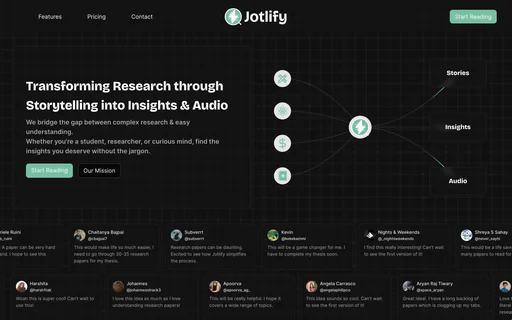
Jotlify

Jotlify simplifies complex research into engaging stories and insights.

5
0 views
0 saved
979

Reader

0.00 USD monthly

Free for those who love to read. Read unlimited papers, listen up to 5 papers per month, upload up to 5 papers per month, ask AI up to 50 questions per month.

View Pricing

Researcher

10.00 USD yearly

For those who love to research. Everything in Reader, listen unlimited papers, upload up to 100 papers per month, ask AI up to 500 questions per month, save notes from paper summaries, priority email and chat support.

View Pricing

Researcher Pro

16.00 USD yearly

For those who do it for a living. Everything in Researcher, upload unlimited papers, ask AI unlimited questions, publish research papers, reach Jotlify's audience.

View Pricing

For the latest pricing, please visit this link: https://jotlify.com/pricing

Prices are subject to change. Please visit the official website for the most up-to-date pricing information.

Pros

  • AI-Powered Simplification: Jotlify uses AI to transform complex research papers into digestible stories and insights, making academic content accessible.
  • Audio Summaries for On-the-Go Learning: Users can listen to research papers in a podcast-style format, allowing for learning during commutes or breaks.
  • Advanced Search and Merge Features: The tool allows users to select multiple papers and merge them into a cohesive synthesis, providing a comprehensive view of topics.
Documind

ChatPDF.so | The #1 Chat with PDF tool, ask any pdf

5
1,793 views
393 saved
925

What is Documind?

Documind is a tool designed for document management and processing.

Pros

  • Interactive Learning: Users can engage with textbooks and novels for interactive learning, asking questions and receiving answers in natural language.
  • Multilingual Support: The tool supports more than 95 languages, allowing users to engage in PDF-based conversations in various languages.
  • Time-Saving: The tool helps busy professionals save time by quickly answering questions and summarizing documents.
  • Flexible Plans: Offers multiple subscription plans to cater to different needs, from students to enterprise users.
  • Data Security: Hosted in the EU, ensuring compliance with GDPR and providing strong data protection measures.

Cons

  • Limited Free Tier: The free tier has limited functionality and number of chats, which may not be sufficient for all users.
  • Potential Learning Curve: New users may face a learning curve to fully utilize all features of the tool effectively.
Talkingpdf Io Chat With Any Pdf

TalkingPDF.io | Chat with any PDF

4
371 views
94 saved
623

What is TalkingPDF Io Chat With Any PDF?

TalkingPDF Io Chat With Any PDF is an innovative AI-powered platform designed to revolutionize how users interact with PDF documents. This tool allows individuals to upload any PDF file and engage in a conversational manner to extract information, insights, and answers directly from the document. By leveraging advanced artificial intelligence, TalkingPDF eliminates the need for tedious manual searching, enabling users to receive accurate, contextual answers in seconds. With a user-friendly interface and strong emphasis on data security, TalkingPDF caters to a diverse range of professionals, students, and researchers seeking efficient document analysis.

Pros

  • Instant PDF Understanding: Users can upload any PDF and start chatting immediately, allowing for quick access to document context.
  • Natural Conversations: The AI allows users to ask questions in plain English and provides accurate, contextual answers.
  • Lightning Fast Responses: The tool delivers answers in seconds, significantly reducing the time spent on document reading.
  • Secure & Private: User documents are encrypted, ensuring privacy and data security.
  • Smart Search Across Multiple PDFs: The platform allows users to search for specific information across multiple PDFs with intelligent semantic search.
  • Free Plan Available: A free plan is provided that allows users to upload PDFs and ask questions, making it accessible.

What are the main features of TalkingPDF Io Chat With Any PDF?

  • AI-Powered Document Analysis: Quickly understand the context of your PDFs with advanced AI technology.
  • Instant Answers: Get accurate responses to your questions in seconds, reducing the time spent on manual document review.
  • Semantic Search: Utilize intelligent search capabilities to find specific information across multiple PDFs effortlessly.
  • Multi-PDF Interaction: Chat with multiple documents simultaneously for comprehensive research and comparison.
  • Data Security: Enjoy peace of mind with encrypted documents and a commitment to user privacy.