

Workflow




What is Workflow?
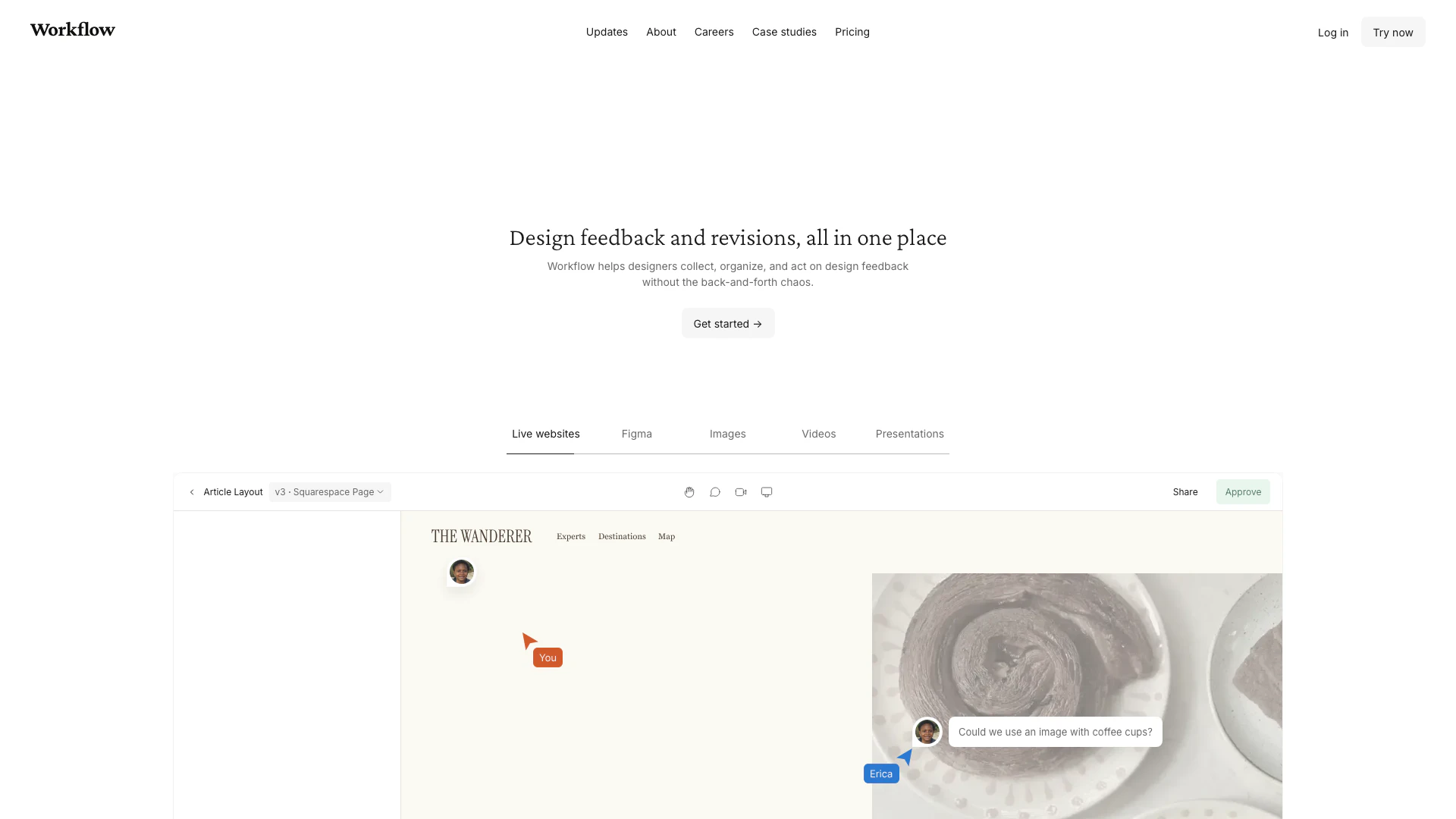
Workflow is a powerful design feedback[1] tool that allows designers to share their work with clients and team members seamlessly. It supports a variety of formats including websites, Figma images, videos, and PDFs, enabling effective collaboration[2] and feedback collection without the chaos of traditional communication methods. By using Workflow, designers can streamline their revision processes, gather actionable feedback, and ensure that all comments and revisions are organized in one place, enhancing overall productivity.
How to use Workflow?
- Sign up for a free account on the Workflow website.
- Upload your designs, which can include websites, images, videos, or PDFs.
- Share the generated link with your clients or team members, allowing them to view and comment on your designs directly.
- Review the feedback received, and make necessary revisions based on the comments.
- Publish the updated version and repeat the process as needed.
What are the main features of Workflow?
- Design Feedback Collection: Easily gather feedback on various design formats including websites, Figma images, and PDFs.
- Version Control[3]: Keep track of all past comments and design versions, ensuring that nothing gets lost in communication.
- Zero Signup[4] for Reviewers: Clients can leave feedback without needing to create an account, simplifying the review process.
- Video Walkthroughs[5]: Introduce your work with built-in video capabilities, making it easier for clients to understand your designs.
- Guided Tours: New users can benefit from guided tours that help them navigate the platform effortlessly.
Who is Workflow for?
Workflow is designed for creative professionals including graphic designers, web designers, and teams who require efficient collaboration on design projects. It is particularly beneficial for those who frequently share visual content and seek structured feedback from clients and colleagues. The platform caters to individuals and teams looking to streamline their design processes and improve communication regarding revisions and approvals.
What are the use cases of Workflow?
- Client Design Reviews: Share design drafts with clients for feedback and approval, ensuring a smooth communication process.
- Team Collaboration: Facilitate discussions among team members about design changes and gather insights to improve the final product.
- Project Presentations: Use the platform to present design concepts to stakeholders, incorporating real-time feedback to enhance the design process.
Product Images

Workflow Pros and Cons
Pros
- Efficient Feedback Collection: Workflow allows designers to collect and organize feedback seamlessly, minimizing back-and-forth communication.
- User-Friendly Interface: The tool features a guided tour that helps users understand how to leave feedback without prior training.
- Zero Signup Requirement: Reviewers can leave feedback without creating an account, making the process quick and easy.
Cons
No cons data detected for this tool
Workflow Pricing
Standard Plan
Perfect for solo designers and small agencies. Unlimited uploads, unlimited comment-only users & reviewers, record video feedback, Kanban board view, client portals.
For the latest pricing, please visit this link: https://www.workflow.design/
Prices are subject to change. Please visit the official website for the most up-to-date pricing information.
Analytics of Workflow
Workflow Website Traffic Analysis
Visits Over Time
Traffic Sources
Nov 2025 - Jan 2026 Worldwide Desktop Only
- Direct: 47.50%
- Search: 37.03%
- Referrals: 8.14%
- Social: 5.80%
- Paid Referrals: 1.07%
- Mail: 0.11%
Top Keywords
| Keyword | Volume | CPC | Estimated Value |
|---|---|---|---|
| workflow | 87.49K | $3.82 | $380.00 |
| workflow design app | 210 | $0.00 | $210.00 |
| workflowdesign app | 180 | $0.00 | $160.00 |
| workflow.design pricing | 160 | $0.00 | $150.00 |
| website feedback workflow? | 150 | $0.00 | $140.00 |
Workflow Reviews
Absolutely loving this program!
The essential features are very self discoverable and that's why there's no learning curve.
I’m loving the platform. I’ve already completed a few projects and my clients also love it!
For more reviews, visit this link: https://www.workflow.design/#testimonials



Workflow Social Listening
Full Walkthrough: Workflow for...
Matt will be back on stage at ...
My 17 Minute AI Workflow To St...
🟠 *Claude Code Week for absol...
NEW Copilot Workflows Agent Wi...
Learn how to use the new Copil...
Unlock to view 38 social media results.