Mykeep


What is MyKeep?
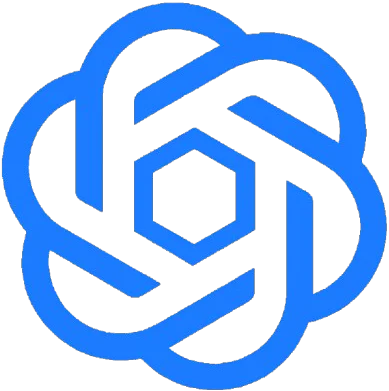
MyKeep is a private visual second-brain web application designed to help users save, organize, and retrieve a variety of content including links, screenshots, images, videos, notes, to-dos, and ideas. It offers a serene dashboard that eliminates the chaos of scattered information, allowing users to focus on what matters. With features like smart search, cross-platform access, and one-click capture, MyKeep serves as an efficient tool for personal and professional organization, making it ideal for anyone looking to streamline their digital life.
How to use MyKeep?
- Capture Content: Use the MyKeep browser extension, mobile app, or desktop application to save links, notes, images, videos, and to-dos with a single action, such as pasting a link or uploading a screenshot.
- Organize Your Vault: Although MyKeep allows for organization through workspaces and tags, you can choose to keep it simple without forcing structure from the start.
- Search and Retrieve: Utilize the smart search feature to find saved items quickly by typing in keywords or phrases that you remember, allowing MyKeep to pull relevant content back into view.
What are the main features of MyKeep?
- Visual Dashboard: MyKeep provides a calm, organized grid where all your saved content is displayed visually, making it easy to navigate.
- Cross-Platform Access: Save and access your content seamlessly across devices including mobile, desktop, and browsers like Chrome, Edge, and Firefox.
- One-Click Capture: Quickly save content from anywhere without lengthy setup processes—just a simple action is all it takes.
- AI-Powered Search: The in-app assistant uses AI to help you find saved items quickly, understanding your search intent rather than just keywords.
- Workspaces and Tags: Organize your saved items into different workspaces or tag them for easy retrieval without clutter.
- Integration with Other Tools: MyKeep works with various applications and AI tools, allowing you to save directly from platforms like Telegram, Discord, and Slack.
- Privacy Focused: Your saved items are kept in a private vault, minimizing distractions from feeds and social noise.
Who is MyKeep for?
MyKeep is tailored for individuals who need a reliable method to organize and retrieve their saved content without the distractions of social feeds. This includes professionals such as designers, researchers, and freelancers who require a centralized location for client work and project materials, as well as everyday users looking to manage personal tasks and ideas. Its intuitive design and cross-platform accessibility make it suitable for anyone seeking to enhance their productivity and maintain a clutter-free digital space.
What are the use cases of MyKeep?
- Personal Organization: Use MyKeep to manage personal tasks, ideas, and reminders in one place, such as grocery lists, travel packing lists, or project notes.
- Professional Workflow: Designers, researchers, and professionals can store client work, reference materials, and important documents all in one accessible vault, enhancing productivity.
- Content Curation: Bloggers, writers, and content creators can save links, quotes, and inspiration from various sources to curate ideas for future projects.
Mykeep Pros and Cons
Pros
- Versatile Content Capture: MyKeep allows users to capture various types of content including links, screenshots, notes, and videos all in one place, making it a versatile tool for personal organization.
- Easy Saving Process: The app features a simple one-action saving process, allowing users to save content quickly without complex setup or forms, enhancing usability.
- Cross-Platform Integration: MyKeep integrates seamlessly with popular browsers and devices, allowing users to save content from Chrome, Edge, Firefox, and mobile devices, ensuring accessibility.
Cons
- Requires Internet Connection: The app requires an internet connection for syncing across devices, which may limit usability in offline scenarios.
- Limited Free Features: Some advanced features, such as AI integration, are only available on paid plans, which may restrict access for users on free plans.
Mykeep Pricing
Plus
For hobbyists who want a calm place to save links, notes, and inspiration. Includes unlimited saves, favorites folders, bring your own AI keys (BYOK), every platform and real-time capture, plan mode (@Plan), and 500 OCR searches per month.
Max
For people who save things seriously and want AI to keep it all findable. Includes everything in Plus, AI auto-tags and scene search, MCP, Telegram, Discord, and Slack, and onboarding help from Vinay.
Ultra Lifetime
Pay once. Keep Max forever: your vault, your rules, no renewals. Includes everything in Max Yearly, lifetime access, and private DM support.
For the latest pricing, please visit this link: https://www.mykeep.space/?pricing=1#pricing
Prices are subject to change. Please visit the official website for the most up-to-date pricing information.