

Twitter-color Created with Sketch. Amazon-color Created with Sketch. Facebook-color Created with Sketch. github [#142] Created with Sketch. meta_fill Pinterest-color Created with Sketch. ProductHunt-color Created with Sketch. Spotify-color Created with Sketch. Threads Logo Streamline Icon: https://streamlinehq.com Yelp-color Created with Sketch. Youtube-color Created with Sketch.
TopAIToolsTopAITools
  • Free Tools
  • Category
  • Leaderboard
  • Submit
EN
TopAIToolsTopAITools
TopAI

TopAITools

TopAITools, The Best Top AI Tools

AI Glossary|English简体中文繁體中文한국어日本語PortuguêsEspañolDeutschFrançaisTiếng Việt|Map

© 2026 TopAITools. All rights reserved.

About

  • Privacy Policy
  • Terms of use

Contact Us

business@topaitoolsreview.com
Home
Ai Meeting Assistant
Caption
Last updated: March 18, 2026
Caption logo

Caption

Get deal
5.0|0 Comments|0 Saved
Introduction:
Instant captions and voice input for seamless communication.
Launch Date:
September 10, 1996
Monthly Visits:
--
Inputs:
Audio
Outputs:
Text
Supported Languages:
ZHJAKOESFRDEPTARHI
AI Models:
AI-powered transcriptionReal-time translation
Website
Free Trial
💼Work🎨Creativity
Ai Meeting Assistant15Ai Productivity Tools220AI Meeting Management Tools39
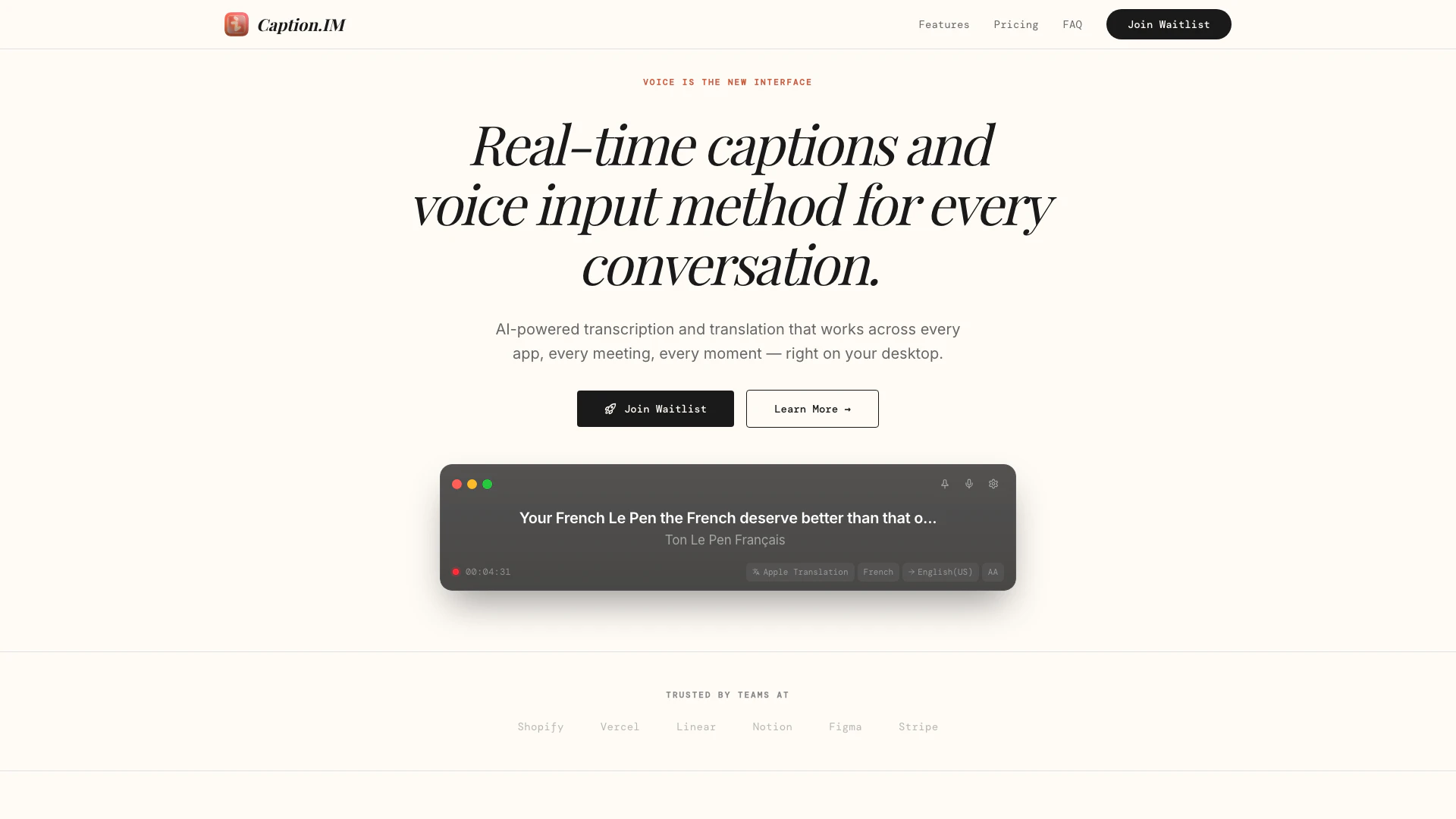
Caption website screenshot showing Instant captions and voice input for sea... interface and features
Use tool
Update this tool
Ecommerce Prompt Generator logo

Ecommerce Prompt Generator

2Mn+ readymade ChatGPT prompt ideas built by prompt engineers, using insights from eCommerce experts - that really work!

Toucan logo

Toucan

Unlock the power of multiple AI models in one sleek app. Apollo’s Multi-Model AI Chat Engine gives you instant access to ChatGPT, Claude, Gemini, and more — all…

Education Copilot logo

Education Copilot

Generate AI lesson plans, PowerPoints, and more with Copilot! Use Copilot to breeze through your unit planning and material creation!

Pixelhunter logo

Pixelhunter

🧠 AI-powered image resizer for social media

Solidgrids logo

Solidgrids

Configure it once and automate your images forever without intervention—no need to review. Photos are ready to publish. Adjust backgrounds, lighting, banners, and more to fit your company branding.

Caption Overview

What is Caption?

Caption is an innovative tool designed to provide instant and accurate captions and voice input for desktop users. It seamlessly integrates with any application, making it ideal for meetings, calls, videos, and more. By leveraging AI-powered transcription and translation, Caption ensures that users can communicate effectively across various platforms, enhancing accessibility and understanding in real-time.


How to use Caption?

To use Caption, follow these simple steps: 1. Grant Permissions: Open Caption on your desktop and allow it to capture audio from any application, such as meetings, calls, or podcasts. 2. See Captions: As audio is captured, real-time captions will appear on your screen with over 98% accuracy, ensuring every word is captured and nuanced meanings are preserved. 3. Translate: If needed, instantly translate the captions into over 50 languages to facilitate communication across different cultures.


What are the main features of Caption?

Caption offers a range of powerful features designed for seamless communication: - Real-Time Captions: Provides accurate captions with 98%+ accuracy from any audio source on your device. - Instant Translation: Translates captions into 50+ languages in real-time, breaking language barriers during international interactions. - Privacy First: Processes all audio locally on your device, ensuring that no data is sent to the cloud, maintaining user privacy. - System Audio Capture: Captures audio from any application running on your device without the need for additional setup. - Export Transcripts: Allows users to save captions in TXT, SRT, or VTT formats for later reference. - Speaker Detection: Automatically identifies and labels different speakers for clarity. - Global Hotkeys: Enables users to start and stop captions quickly using keyboard shortcuts.


Who is Caption for?

Caption is designed for a diverse range of users, including professionals who participate in meetings, educators conducting lectures, and anyone who consumes multimedia content. It is particularly beneficial for individuals who require real-time accessibility features, such as those who are deaf or hard of hearing, as well as multilingual teams needing translation support during conversations.


What are the use cases of Caption?

Caption can be applied in various scenarios, including: 1. Business Meetings: Enhance communication in corporate meetings by providing real-time captions and translations for participants from different linguistic backgrounds. 2. Educational Lectures: Facilitate learning in classrooms or online courses by offering captions for lectures, making content accessible to all students. 3. Podcasts and Webinars: Improve audience engagement by providing accurate captions for recorded or live audio content, ensuring that all listeners can follow along.

Caption Pros and Cons

Pros

  • Real-Time Captions: Provides real-time captions with over 98% accuracy for any audio source, enhancing accessibility in meetings, calls, and videos.
  • Instant Translation: Supports real-time translation into over 50 languages, facilitating communication across different languages during international meetings.
  • Privacy Focused: Processes audio locally on the device, ensuring that no audio data is sent to the cloud, thus maintaining user privacy.

Cons

No cons data detected for this tool

Caption Pricing

Free

Contact Us

Perfect for casual use and trying out Caption.IM.

Promo

EUR9

For professionals who need unlimited captions and translation.

Enterprise

Contact Us

For organizations that need advanced security and compliance.

For the latest pricing, please visit this link: https://caption.im/#pricing

Prices are subject to change. Please visit the official website for the most up-to-date pricing information.


Caption Compare

Tool NameIntroductionPricing
Type
RatingLaunch DateLearn more
Quillbot Paraphraser logo
Quillbot Paraph...
Paraphrasing Tool (Ad-Free and No Sign-up Required) - QuillBot AI
Free
💼Work🎨Creativity
December 31, 1984
Get deal
Autodraw logo
Autodraw
AutoDraw
Free
🎨Creativity
January 2, 1998
Get deal
Waas logo
Waas
Whisper as a Service (GUI and API with queuing for OpenAI Whisper) - schibsted/WAAS
Free
💼Work🎨Creativity
October 8, 2007
Get deal

Info current as of post date. Offers and availability may vary by location and are subject to change.

Caption Q&A

Caption.IM captures system audio directly from your device's audio output. It works with any application — Zoom, Google Meet, YouTube, podcasts, and more. No browser extension or special setup required.

For more FAQs, please visit this link: https://caption.im/#faq

Caption Launch embeds

Use website badges to drive support from your community for your TopAITools Review. They're easy to embed on your homepage or footer.

FEATURED ONTopaitoolsreview.com

Caption Alternatives

AI Repurpose screenshot

AI Repurpose

OpusClip turns long videos into high-quality viral clips for you to share on TikTok, YouTube Shorts, and Reels to increase social media reach.

Website
FreeWriting & EditingAI Content RepurposingAI Text GeneratorAI Social Media Tools
  • Writing & Editing
  • AI Content Repurposing
  • AI Text Generator
  • AI Social Media Tools
Use tool
4.9M
Direct60.14%
Search34.01%
Referrals3.64%
Chatspot screenshot

Chatspot

Boost Productivity in HubSpot with Breeze Copilot | HubSpot

Website
Free
💼Work🎨Creativity
Operations & ManagementAI CRM ToolsAi Productivity Tools
  • Operations & Management
  • AI CRM Tools
  • Ai Productivity Tools
Use tool
33.1M
Direct71.33%
Search20.60%
Referrals6.40%
Free Trial
Otterai screenshot

Otterai

Otter AI enhances productivity with real-time transcription and automated insights.

Website
Free
💼Work🎨Creativity
Productivity & OfficeAI Meeting Management ToolsAI Meeting Insights ToolsAI Meeting Optimization Tools
  • Productivity & Office
  • AI Meeting Management Tools
  • AI Meeting Insights Tools
  • AI Meeting Optimization Tools
Use tool
7.2M
Direct70.53%
Search24.52%
Referrals3.89%

Caption Tags

Real-Time CaptionsVoice InputInstant TranslationAudio CapturePrivacy FocusedCross-Platform

Also used for

Ai Meeting Assistant15Ai Productivity Tools220AI Meeting Management Tools39AI Identity Protection5AI Security Tools2AI Keyboard Tools6AI Productivity Tools310AI Information Management Tools157AI Spreadsheet Tools27AI Spreadsheet Automation Tools29AI File Management Tools22AI Document Processing Tools88AI Business Planning Tools58AI Pitch Deck Generators37AI Branding Tools6
Caption logo
CaptionFreemium
Get deal

Caption Comments (0)

Your rating

?
0/2000

No comments yet

Be the first to share your thoughts!

Caption Prompts (0)

Prompts And Results

Add your own prompts and outputs to help others understand how to use this AI.

🚀0
🚀0