
Last updated:
Gmass

Gmass

Get deal
5.00 Comments0 Saved
Introduction:
Reply to emails efficiently with GMass.
Launch Date:
Monthly Visits:
609.1K
Inputs:
TextAPI
Outputs:
Text
Supported Languages:
EN
AI Models:
ChatGPT
Gmass Overview

What is GMass?

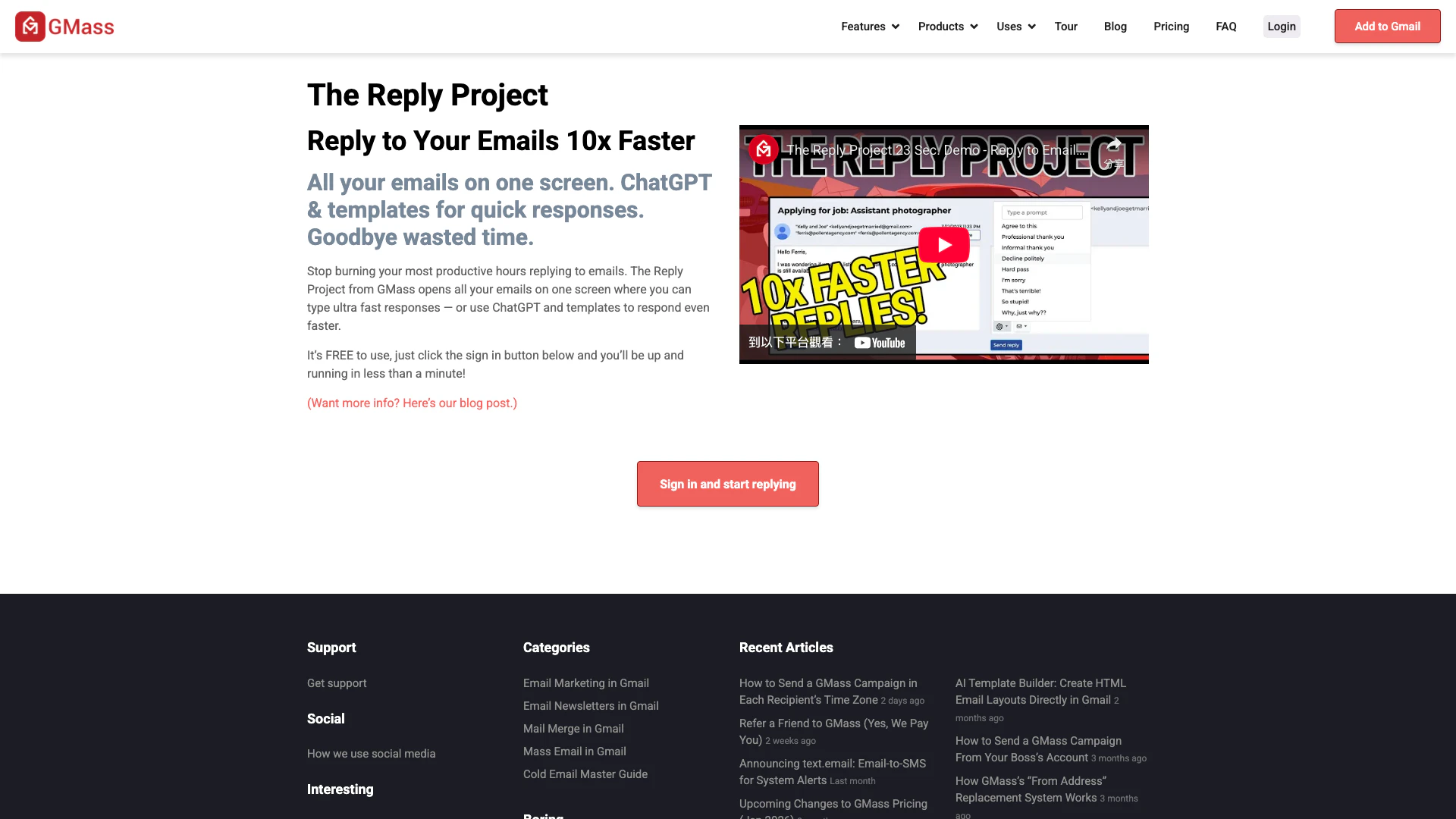
GMass is an innovative email management tool designed to help users reply to emails 10 times faster. It centralizes all your emails on a single screen, allowing for quick responses either by typing or utilizing AI-powered features like ChatGPT and customizable templates. GMass enhances productivity by minimizing the time spent on email replies, making it an essential tool for busy professionals and teams looking to streamline their communication.


How to use GMass?

  1. Sign up for GMass by visiting the website and clicking the sign-in button.
  2. Connect your Gmail account to GMass to access your emails.
  3. Once logged in, you will see all your emails displayed on one screen.
  4. Use the built-in ChatGPT feature or templates to craft quick responses.
  5. Send your replies directly from the GMass interface.

What are the main features of GMass?

  • Break Gmail's Limits: Send larger volumes of emails than Gmail typically allows.
  • Mail Merge with Google Sheets: Automatically send personalized emails using data from Google Sheets.
  • Campaign Analytics: Access sharable reports detailing opens, clicks, replies, and other engagement metrics.
  • Personalization: Use mail merges and conditional logic to tailor emails at scale.
  • Automatic Follow-up Emails: Set up automated follow-ups to enhance response rates.
  • Email Polling: Integrate quick surveys into your email campaigns.
  • Reply Management: Efficiently manage and respond to email replies without clutter.

Who is GMass for?

GMass is designed for professionals, marketers, sales teams, and anyone who needs to manage a high volume of email communication efficiently. It is particularly beneficial for those engaged in outreach campaigns, customer service, or team communications, allowing them to save time and improve their email response rates.


What are the use cases of GMass?

  1. Cold Email Outreach: Drive sales by efficiently reaching potential clients.
  2. Membership Outreach: Keep members informed about important updates and events.
  3. Recruitment: Streamline communication for accepting and rejecting candidates.
  4. Press Releases: Manage media outreach effectively.
  5. Event Invitations: Send invitations for weddings or other significant events.

Product Images

GMass feature demonstration for breaking Gmail's limits
GMass integration with Google Sheets for mail merge
GMass campaign analytics overview
1 / 3

Gmass Pros and Cons

Pros

  • Break Gmail's Sending Limits: Utilizes proprietary technology to send emails beyond Gmail's standard limits, enhancing email outreach capabilities.
  • Mail Merge with Google Sheets: Seamlessly integrates with Google Sheets to read merge fields and automate email sending to new rows, improving efficiency.
  • Automatic Follow-up Emails: Boosts response rates with automated follow-up sequences, ensuring no opportunity is missed.
  • Campaign Analytics: Provides sharable reports on opens, clicks, and replies, allowing users to analyze campaign performance effectively.

Cons

No cons data detected for this tool

Gmass Pricing

Standard

$20/year

Works inside Gmail. Send unlimited emails! Unlimited contacts, Unlimited campaigns, Mail merge personalization, Free email address verification, Custom tracking links w/SSL, Spam Solver, Sequences and follow-ups, API access (+Zapier), A/B testing, Triggered Emails, Inbox Rotation (MultiSend), High-priority support, Email support, Hundreds of other features.

Premium

$29/year

Works inside Gmail. Send unlimited emails! Unlimited contacts, Unlimited campaigns, Mail merge personalization, Free email address verification, Custom tracking links w/SSL, Spam Solver, Sequences and follow-ups, API access (+Zapier), A/B testing, Triggered Emails, Inbox Rotation (MultiSend), High-priority support, Email support, Hundreds of other features.

Professional

$49/year

Works inside Gmail. Send unlimited emails! Unlimited contacts, Unlimited campaigns, Mail merge personalization, Free email address verification, Custom tracking links w/SSL, Spam Solver, Sequences and follow-ups, API access (+Zapier), A/B testing, Triggered Emails, Inbox Rotation (MultiSend), High-priority support, Email support, Hundreds of other features.

For the latest pricing, please visit this link: https://www.gmass.co/reply

Prices are subject to change. Please visit the official website for the most up-to-date pricing information.


Analytics of Gmass

Loading...

Gmass Compare

Tool NameIntroductionPricing
Type
RatingLaunch DateLearn more
AI-Based Cloud Cost Reduction Platform | Profisea Labs
Free
May 1, 2020
Get deal
Lunit develops AI solutions that detect early-stage cancer and optimize cancer treatment for saving lives through technology.
Free
August 10, 2015
Get deal
Paraphrasing Tool (Ad-Free and No Sign-up Required) - QuillBot AI
Free
December 31, 1984
Get deal

Info current as of post date. Offers and availability may vary by location and are subject to change.

Gmass Q&A

You need a Gmail or G Suite account and the Chrome browser.

GMass is lightweight and unobtrusive. After you install GMass, you will notice four extra buttons within your Gmail interface. Three of these buttons are small square buttons to the right of the search field: the 'Build Email List' button, the 'Google Sheets Connect' button and the 'Follow-up Campaigns' button. When composing an email, you'll notice the main GMass button along with a settings box, next to the regular Gmail Send button. Lastly, you'll see some new Gmail Labels on the left where we store reports, like open and click reports.

Most mass email campaigns are sent as new messages, and therefore new conversations, with each recipient. The ability to send a mass email and have each individual email sent as a reply to the last conversation with each recipient creates a more familiar experience for the recipient than a new message would, because the email campaign is threaded within the conversation. If there is a recipient in your list with whom you have not had a prior conversation, then a new message will be sent. [Details on this feature.](https://www.gmass.co/blog/send-email-campaign-as-reply-to-recent-conversation/)

This option is useful if you want to test GMass’s functionality but don’t want to actually send anyone emails. For example, if you want to ensure personalization is working, this option comes in handy. You can also use the 'Send Test Email' button to test personalization. [Details on this feature.](https://www.gmass.co/blog/no-more-fear-preview-your-emails-as-drafts-then-send-them-with-one-click/)

Auto follow-ups are the best thing to happen to email marketers since well...email marketing. Auto follow-ups allow you to send follow-up emails automatically to recipients of your email campaign that have not replied. The auto follow-up sends as part of the same conversation as the original message, making it appear like you're manually hitting Reply on the original sent email to ping the person you're targeting, but in reality, this is all happening automatically. If someone doesn't respond to your first email, an auto follow-up is the best way to get them to reply. [Details on this feature.](https://www.gmass.co/blog/new-feature-automatic-follow-up-emails-until-you-get-a-reply/)

Maybe. It's up to you. Some users use GMass alongside their primary email marketing system, using GMass for lower-volume campaigns and their main system for bigger campaigns. GMass can handle campaigns of up to a few hundred thousand recipients using the SMTP connection feature. GMass is not designed to send a campaign to millions of addresses. One way GMass supplements your actual email marketing system is by making it easy to follow up with everyone that replied to a campaign sent through a traditional ESP. Assuming the replies go to your Gmail account, use GMass to search for the replies, then use the Build Email List feature.

Click Compose in Gmail. Enter a few email addresses in the To field. Put in a Subject and Message, and hit the GMass button (instead of the normal Gmail Send button).

Yes. You compose your email just as you would any other email message in Gmail. Any feature of an email that Gmail supports you can assume that GMass also supports.

For more FAQs, please visit this link: https://www.gmass.co/faq

Gmass Launch embeds

Use website badges to drive support from your community for your TopAITools Review. They're easy to embed on your homepage or footer.

Gmass Alternatives

Notion screenshot

Notion is an AI-powered workspace that automates tasks and enhances team collaboration.

  • Productivity & Office
  • AI Productivity Tools
  • AI Information Management Tools
  • AI Task Management Tools
Use tool
159.0M
Direct81.12%
Search11.13%
Referrals7.29%
Zoho screenshot

Transform your spreadsheets with Zoho Sheet's dynamic features.

  • Productivity & Office
  • AI Spreadsheet Tools
  • AI Spreadsheet Automation Tools
  • Productivity Maximization Tools
Direct74.71%
Search20.24%
Referrals4.33%
Jotform screenshot

Automate customer service with Jotform AI Agents.

  • Productivity & Office
  • Productivity Maximization Tools
  • Form Building Tools
  • Content Management Tools
Direct63.07%
Search17.40%
Referrals17.35%

Gmass Tags

Also used for

Sources (6)

Gmass
GmassFree