Assist




What is Assist?
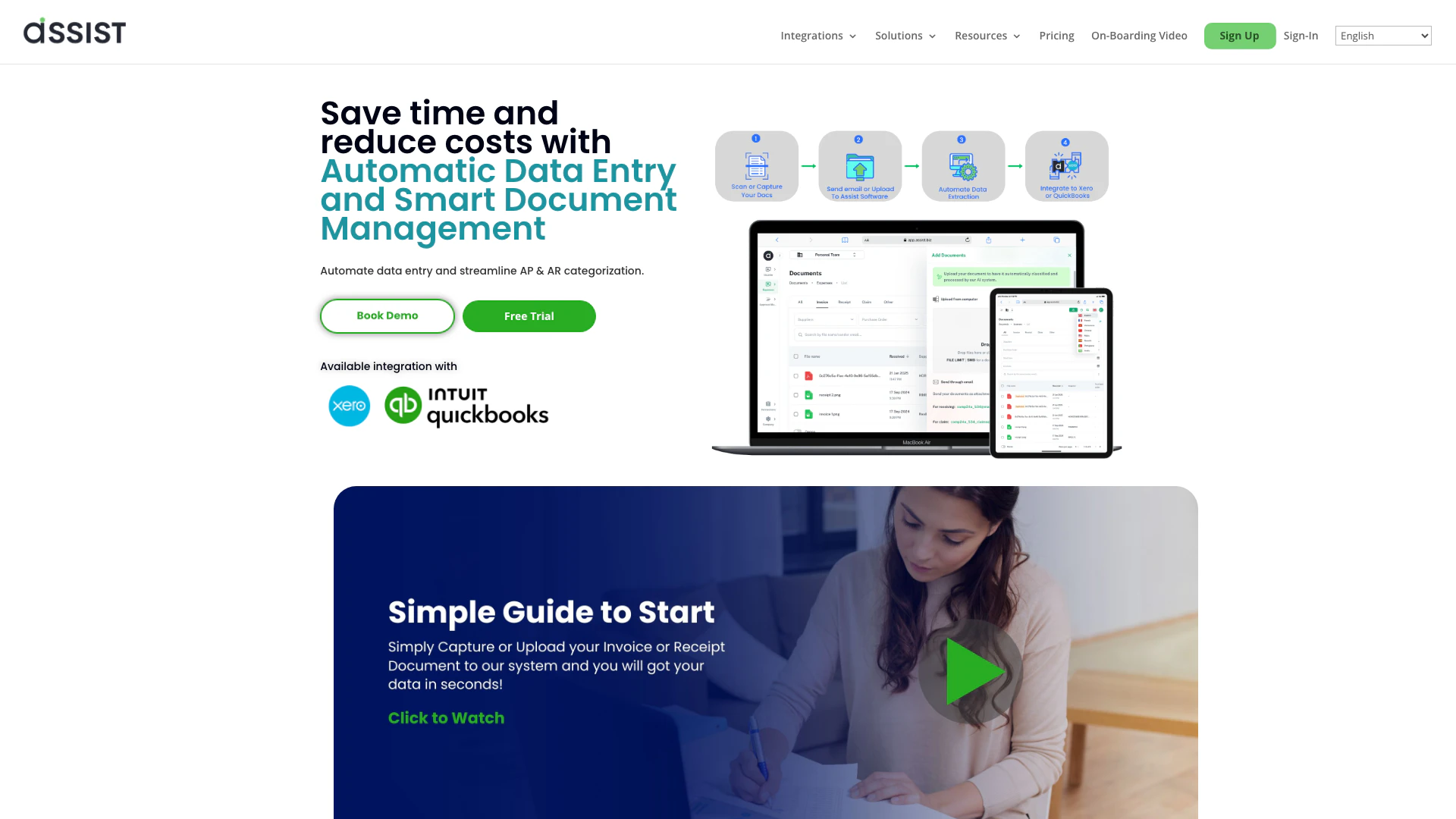
Assist is a powerful document management software designed to automate data entry, streamline accounts payable (AP) and accounts receivable (AR) categorization, and simplify the management of financial documents such as invoices and receipts. By leveraging advanced Optical Character Recognition (OCR) technology, Assist allows businesses to capture data effortlessly from various document types, reducing manual data entry and minimizing errors. The core value of Assist lies in its ability to save time and cut costs for businesses, making document handling more efficient and less labor-intensive.
How to use Assist?
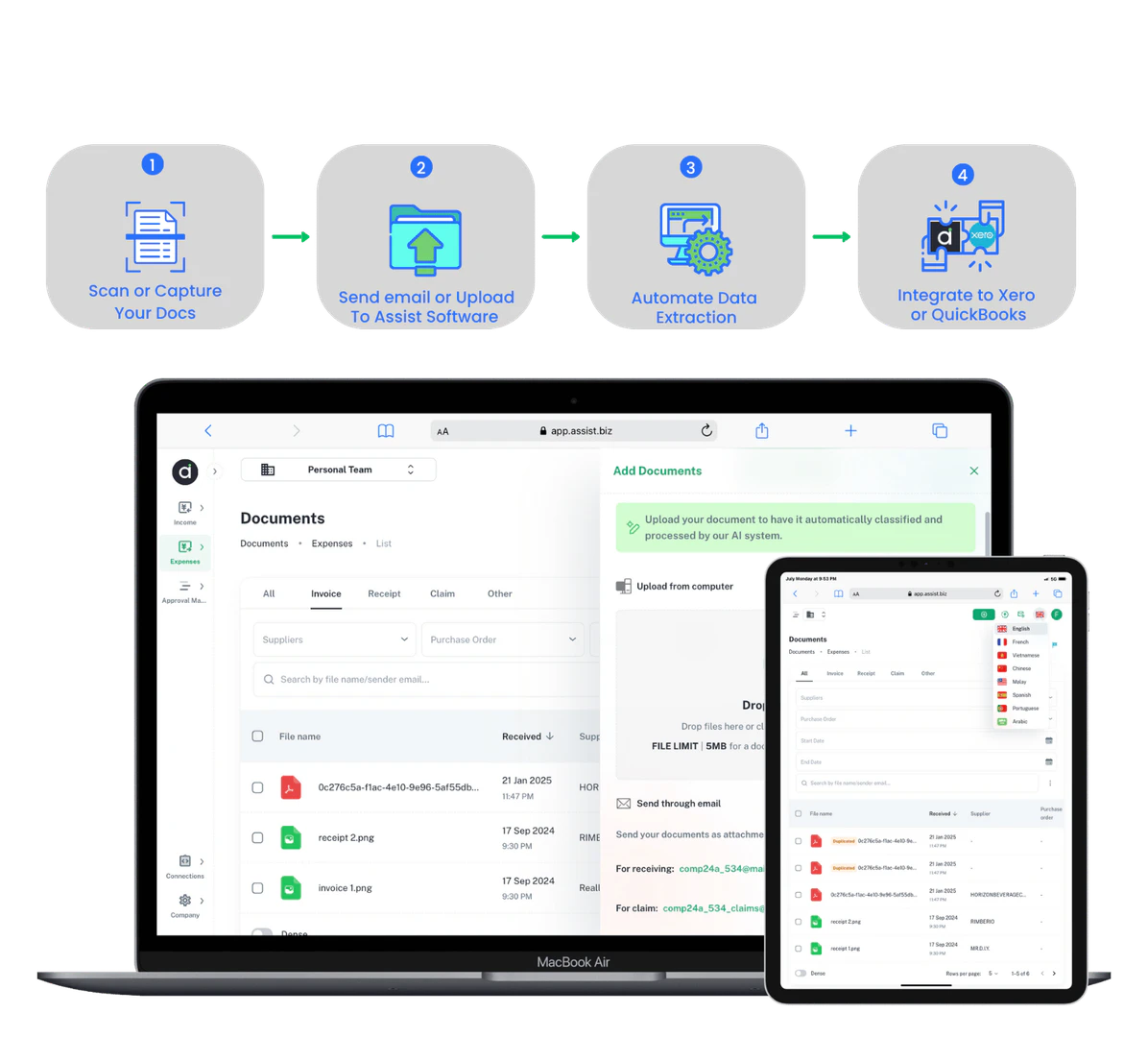
- Capture or Scan Documents: Use your smartphone or scanner to snap a photo or scan your receipts and invoices.
- Upload or Send Documents: Upload the scanned documents to the Assist platform or send them via email to the designated Assist address.
- Manage Documents: Once uploaded, Assist will automatically extract the relevant data from your documents, allowing you to manage and categorize them efficiently.
What are the main features of Assist?
- Automatic Data Entry: Effortlessly capture data from receipts and invoices without manual input.
- E-invoice Compliance: Ensure your invoices meet local compliance standards for seamless processing.
- Document Classification: Automatically categorize documents for better organization.
- Integration with Popular Accounting Software: Connect seamlessly with Xero and QuickBooks for streamlined financial management.
- Multi-language Support: Operate in various languages to cater to diverse user needs.
Who is Assist for?
Assist is ideal for small to medium-sized businesses, accountants, and bookkeepers who need to manage large volumes of financial documents efficiently. It is particularly beneficial for those looking to automate their data entry processes and streamline their accounts payable and receivable tasks. Additionally, business owners seeking to reduce operational costs and improve accuracy in financial reporting will find Assist to be an invaluable tool.
What are the use cases of Assist?
- Automating Invoice Processing: Businesses can use Assist to automatically extract and categorize invoice data, reducing manual entry time.
- Streamlining Expense Management: Capture and manage receipts efficiently, allowing for easier tracking of business expenses.
- Enhancing Financial Reporting: Utilize Assist's data extraction capabilities to generate accurate financial reports quickly, improving decision-making processes.
Product Images




Assist Pros and Cons
Pros
- Automated Data Entry: Assist automates data entry processes, significantly reducing manual input time and minimizing errors.
- Integration with Popular Platforms: The tool seamlessly integrates with Xero and QuickBooks, enhancing its usability for businesses already using these platforms.
- Cost-Effective Solutions: Assist offers competitive pricing, claiming to be 60% lower than competitors while providing superior features.
Cons
No cons data detected for this tool
Assist Pricing
Free
30 Pages Good for light users Document Classification Automatic extraction of document details E-invoice Approval Matrix SmartLearn AI Export to CSV Multi-language support Integration with Xero Integration with QuickBooks Email support
Standard
50 Pages per month Document classification Automatic extraction of document details Export to CSV E-invoice Approval Matrix SmartLearn AI Multi-language support Integration with Xero Integration with QuickBooks Email support Add members
Premium
250 Pages per month Best for regular or heavy users Document classification Automatic extraction of document details E-invoice Approval Matrix SmartLearn AI Export to CSV Multi-language support Integration with Xero Integration with QuickBooks Email support Add members
Enterprise
Talk to us to plan out your automation journey Everything in Premium plan Custom Integration Services Enhanced Security Features Scalability Options Customizable Reporting and Analytics SLA (Service Level Agreements) Training and Onboarding Regulatory Compliance Assistance Advanced AI/ML Customizations
For the latest pricing, please visit this link: https://www.assist.biz/pricing/
Prices are subject to change. Please visit the official website for the most up-to-date pricing information.
Analytics of Assist
Assist Website Traffic Analysis
Visits Over Time
Traffic Sources
Nov 2025 - Jan 2026 Worldwide Desktop Only
- Search: 66.19%
- Direct: 20.23%
- Referrals: 7.36%
- Social: 5.13%
- Paid Referrals: 1.02%
- Mail: 0.06%
Top Keywords
| Keyword | Volume | CPC | Estimated Value |
|---|---|---|---|
| invoice generator | 168.22K | $5.52 | $50.00 |
| receipt generator | 9.05K | $3.07 | $20.00 |
| myinvois | 2.40K | $0.43 | $20.00 |
| myinvois portal | 1.84K | $0.49 | $20.00 |
| billing address vs delivery address different e-invoice specific terms | 50 | $0.00 | $50.00 |
Assist Reviews
ASSIST is a very reliable platform to help companies manage invoice/receipts/claims as it allow fuss free uploading of documents without manual typing on the system. Thus this helps companies to efficiently (by saving time) carry out their tasks with high accuracy.
ASSIST’s Optical Character Recognition is excellent! It not only handles invoices and receipts but also seamlessly supports bank statements, making document management easier and more efficient.
Overall, my experience with ASSIST has been fantastic. My main suggestions are to enhance user guidance with more detailed tutorials or onboarding resources to make it easier for new users. Expanding language options and adding more customization features would also greatly improve the user experience.
For more reviews, visit this link: https://www.assist.biz#reviews