Aipresentations


What is Aipresentations?
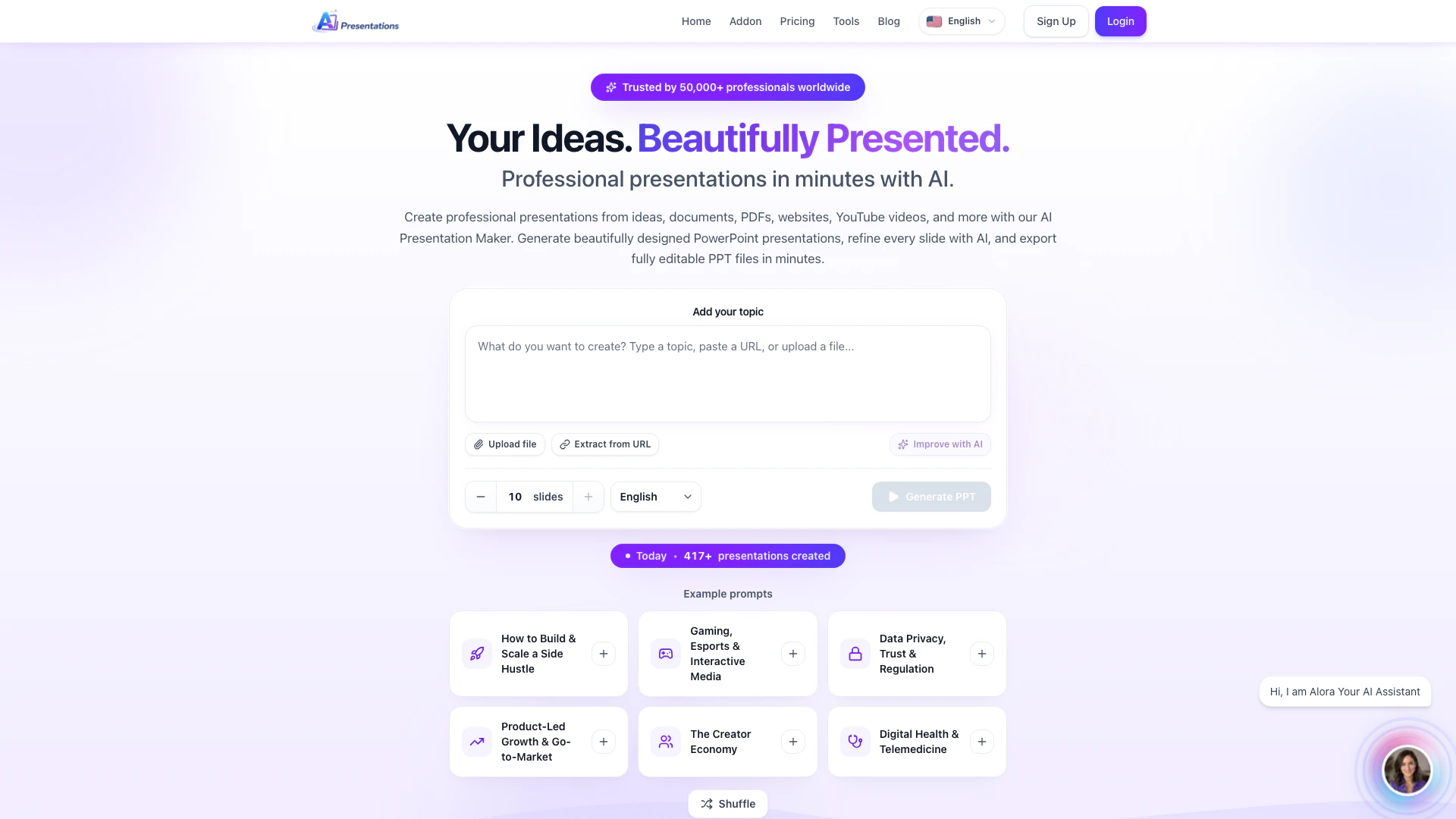
Aipresentations is an innovative AI-powered tool designed to create professional PowerPoint and Google Slides presentations in a matter of minutes. By utilizing advanced artificial intelligence, Aipresentations can transform various types of content—including text, PDFs, and URLs—into visually appealing and structured slide decks. This tool is ideal for users looking to save time and effort while producing high-quality presentations that are ready to present.
How to use Aipresentations?
- Choose Your Input: Begin by typing a topic, uploading files, or pasting content or URLs into the designated input box on the Aipresentations platform.
- Generate Your Slides: Click on the 'Generate PPT' button. The AI Presentation Maker will analyze your input and create an outline of your presentation. You can choose to edit the outline or proceed to create the slides directly.
- Export or Customize: Once the slides are generated, you can review them. If needed, you can modify specific slides using AI tools within the editor. Finally, hit the 'Export PPTX' button to download your presentation in PowerPoint format.
What are the main features of Aipresentations?
- AI-Powered Slide Generation: Automatically creates complete presentations from a single prompt or topic.
- Browser-Based Interface: Works seamlessly on any operating system, including Windows, macOS, and Linux.
- Real-Time Editing: Allows users to edit titles, bullets, and slide structures in real time.
- Diverse Input Options: Supports content generation from text, PDFs, URLs, and more.
- Built-in Image Search: Easily add visuals to your slides from a built-in image search feature.
- Export Flexibility: Export presentations as PPTX or PDF files with proper formatting.
Who is Aipresentations for?
Aipresentations is tailored for a diverse audience, including business professionals, educators, and students. It is particularly beneficial for those who need to create polished presentations quickly without extensive design experience. Whether you're preparing for a corporate meeting, an academic lecture, or a startup pitch, Aipresentations provides the tools necessary to develop compelling presentations efficiently.
What are the use cases of Aipresentations?
- Business Presentations: Quickly create professional pitch decks and reports for meetings or conferences.
- Educational Use: Teachers and students can generate presentations for lectures, projects, or class assignments.
- Content Summarization: Convert articles, blog posts, or YouTube videos into concise, structured presentations for easier understanding and sharing.
Aipresentations Pros and Cons
Pros
- Personalized Presentations: Create personalized presentations tailored to your audience and goals.
- Instant Slide Editing: Edit any slide instantly with AI, eliminating the need to start over.
- Multiple Content Sources: Generate presentations from various sources including prompts, PDFs, websites, and YouTube videos.
- PowerPoint Export with Formatting: Export fully editable PowerPoint files while preserving formatting.
- Easy Customization: Customize themes, colors, fonts, and layouts easily within the app.
- Integrated Visuals Search: Find and add relevant visuals without leaving the editor.
- Seamless Workspace: Create, edit, and present from one seamless workspace.
- Premium Templates: Real AI-generated slides across premium templates.
Cons
- Internet Dependency: Requires an internet connection to access the tool.
- Web-Based Access Only: Limited to web-based access; no desktop application available.
- Learning Curve for AI Features: Users may need to familiarize themselves with AI features for optimal use.
- Browser Compatibility Issues: May have compatibility issues with certain browsers.
- Paid Features: Some advanced features may require a paid subscription.
Aipresentations Pricing
Freemium Plan
Freemium plan allows users to create presentations and export to PowerPoint with generous limits.
Pro Plan
Pro plan offers unlimited presentations and advanced AI features.
Plus Plan
Plus plan provides unlimited presentations and advanced AI features with a yearly subscription.
For the latest pricing, please visit this link: https://www.aipresentations.app/pricing
Prices are subject to change. Please visit the official website for the most up-to-date pricing information.