
Best 36 Web Based Workflow Development Tools Tools in 2026
Angular, Builder, Glideapps, Pipedream, Medo, Creaoai, Weweb, Browser Use, Blink, Codedesign Ai are the best paid / free Web Based Workflow Development Tools tools.
Web Based Workflow Development Tools are innovative solutions designed to streamline and automate business processes through online platforms. These tools empower organizations to create, manage, and optimize workflows without the need for extensive coding knowledge. By integrating artificial intelligence, natural language processing, and machine learning, these tools can analyze user behavior, predict bottlenecks, and suggest improvements, enhancing overall efficiency. They cater to a diverse range of users, from small businesses to large enterprises, enabling teams to collaborate effectively, reduce manual tasks, and improve productivity.

What is Angular?
Angular is a powerful web development framework designed for building modern, scalable applications. Developed and maintained by Google, Angular provides developers with the tools and resources needed to create dynamic web applications with a focus on performance and productivity. It utilizes a component-based architecture, which allows for modular development and efficient state management, making it a popular choice among developers for creating complex applications.

Builder enables rapid web and mobile experience creation with AI-driven tools.
Enterprise
For organizations needing more scale, control, and support. Custom user seats, Custom Agent Credits, Everything in Pro, plus Connect with GitHub Enterprise, GitLab Enterprise, Azure DevOps, Custom spaces, Faster machines, Custom roles & permissions, Remote workspaces, Custom MCP servers, Component mapping, Privacy mode, SSO, Uptime and Premium Support SLAs, Assigned Customer Success Manager.
Pro
For teams building and iterating on projects. Up to 20 users, 500 monthly Agent Credits, each additional user includes 500 monthly Agent Credits, $25/mo per 500 additional credits, Everything in Free, plus Built-in MCP Servers, Pay-as-you-go for more usage, 30-day Activity History, Password-protected previews, Standard Support.
For the latest pricing, please visit this link: https://www.builder.io/pricing
Prices are subject to change. Please visit the official website for the most up-to-date pricing information.

Business
Turn your spreadsheets into tools. Unlimited apps, 30 users included, 5,000 updates, up to 100k rows.
Enterprise
Deploy powerful software at scale. Unlimited apps, custom users, custom updates, custom rows.
For the latest pricing, please visit this link: https://www.glideapps.com/pricing
Prices are subject to change. Please visit the official website for the most up-to-date pricing information.

Pipedream enables seamless automation across APIs with powerful tools for developers.
Free
For individuals getting started with workflow automation. Includes: Up to 100 credits/mo, 1M AI tokens, 3 active workflows, 3 connected accounts, Unlimited workflow testing, Pipedream Connect in development.
Basic
For individuals with growing needs. Includes: 2,000 credits/mo, 20M AI tokens, No usage limit (2k credits included), 10 active workflows, 5 connected accounts.
Advanced
Popular plan for teams running production workflows. Includes: 2,000 credits/mo, 50M AI tokens, Control flow operators, Unlimited workflows, Unlimited connected accounts, Premium apps, GitHub Sync.
Connect
For developers building integrations. Includes: 10,000 credits/mo, Pipedream Connect in production, Auth for 100 external users, $2 per additional user.
Business
For companies building production integrations and automations at scale. Custom pricing that scales with your business. Includes: Volume pricing, Custom invoicing, Priority integration development, Dedicated support in Slack, Support for HIPAA workloads, Uptime and availability SLAs.
For the latest pricing, please visit this link: https://pipedream.com/pricing
Prices are subject to change. Please visit the official website for the most up-to-date pricing information.

What is Medo?
Medo is an innovative no-code platform designed to enable users to build production-ready full-stack applications and websites quickly and efficiently. By automating the processes involved in frontend, backend, and database management, Medo significantly reduces development time and costs, making it an ideal solution for businesses and developers looking to streamline their app development processes without requiring extensive coding knowledge.

Pro
Deep customisation and production-grade control for serious builds. Everything in Free, plus: Advanced Code Agent for complex builds, Customized API & MCP integrations, Source code & database visibility, Early access to advanced features.
For the latest pricing, please visit this link: https://production.creao.ai/pricing
Prices are subject to change. Please visit the official website for the most up-to-date pricing information.

Free
Perfect for personal projects. Maximum one developer seat. Includes 1 million AI tokens, visual drag & drop editor, API & data integration, import coded components, build responsive web-apps, free hosting plan included (up to 500 app sessions), and chat support.
Essential
For individual developers. Maximum one developer seat. Includes everything in Free, plus add Launch or Scale hosting, export code & self-host, sync with GitHub, and daily editor auto-backup.
Pro
For growing needs. Unlimited seats, price per seat. Includes everything in Essential, plus add seats & collaborate, hourly editor auto-backups, and unlimited manual backups.
Partner
For agencies & freelancers. Unlimited seats, price per seat. Includes everything in Pro, plus free hosting plan included (up to 1,000 monthly sessions), staging on WeWeb subdomain, join workspaces for free, transfer projects to customer, featured in partner directory, and 20% referral commission.
Launch
Perfect for getting started. Maximum one developer seat. Custom domain, no WeWeb branding, unlimited app sessions, max 10GB bandwidth, and embedding enabled.
Grow
Perfect for growing apps. Maximum one developer seat. Custom domain, no WeWeb branding, unlimited app sessions, max 200GB bandwidth, and embedding enabled.
Scale
For production apps. Maximum one developer seat. Custom domain, no WeWeb branding, unlimited app sessions, max 400GB bandwidth, embedding enabled, staging & versioning, 10 production app backups, and cached collections.
For the latest pricing, please visit this link: https://www.weweb.io/pricing
Prices are subject to change. Please visit the official website for the most up-to-date pricing information.

Enterprise
Need more? Contact us for custom features, tailored integrations, and more. Custom cloud deployment, dedicated browser pool and on-prem, tailored integrations, custom agent governance rules, dedicated engineer at all times, BAA, zero data retention.
Business
Popular for small teams and medium-volume needs. $500/month, billed $4800 annually. $6000 in yearly credits, up to 250 concurrent sessions, $5/GB proxy data (50% off), $0.03/hour browser sessions (50% off), 4 hour session timeout, up to 5 team members, advanced stealth mode, bring your own proxy, priority support, prompt optimization call, early access to new capabilities.
Scaleup
For growing teams and high-volume needs. $2500/month, billed $24000 annually. Everything from Business, $30000 in yearly credits, up to 500 concurrent sessions, $4/GB proxy data (60% off), $0.03/hour browser sessions (50% off), 4 hour session timeout, unlimited team members, private Slack channel, dedicated SLAs, tailored data retention terms, dedicated onboarding engineer, custom skills creation.
For the latest pricing, please visit this link: https://browser-use.com/pricing
Prices are subject to change. Please visit the official website for the most up-to-date pricing information.

Max
For power users. 800 credits / month. Everything in Pro, plus: Early access to beta features, Credit rollovers, Premium support.
Pro
For active development. 200 credits / month. Everything in Starter, plus: In-app code editing, Advanced AI models, Priority support, Project collaborators.
Starter
For hobby projects. 100 credits / month. Everything in Free, plus: Private projects, Custom domains, Download code, Remove Blink badge.
For the latest pricing, please visit this link: https://blink.new/pricing
Prices are subject to change. Please visit the official website for the most up-to-date pricing information.

Create Stunning AI-Powered Websites Effortlessly with CodeDesign – Advanced Tools for Beautiful, Functional Web Design
Free Plan
Build up to three projects or websites using the free plan and host them under our subdomain.
Lifetime Deal
Buy Lifetime Deal for $198, originally $397. Host on us or on WordPress or export to code.
Annual Plan
Go Annual for 200 sites + 1 Free Domain + AI Website Chatbot Credits.
For the latest pricing, please visit this link: https://codedesign.ai/pricing
Prices are subject to change. Please visit the official website for the most up-to-date pricing information.

What is Youartai?
Youartai is an innovative AI-powered[1] platform designed to streamline the creative process by allowing users to build workflows through simple conversational prompts. By leveraging over 20 advanced AI models, Youartai enables users to generate high-quality content without the need for coding or complex setups. The core value of Youartai lies in its ability to transform ideas into fully realized workflows, making it accessible for both marketing professionals and individuals working on personal projects.

For the latest pricing, please visit this link: https://progressier.com/pricing
Prices are subject to change. Please visit the official website for the most up-to-date pricing information.

What is Momen?
Momen is a no-code[1] platform designed for non-technical founders to build production-ready web applications[2] rapidly. It allows users to launch applications quickly, scale them to handle millions of users, and integrate native AI workflows[3] without requiring any coding skills. Momen simplifies the process of app development by providing a user-friendly interface and a variety of tools that enable entrepreneurs to focus on their ideas rather than the technical complexities of app development.

Free
Perfect for building and exploring your app ideas without any upfront cost. Features include full visual builder, 1 API, 1 Actionflow, 1 AI agent, 1-day server logs, publishing on Momen.app domain, Momen branding, 5 requests per second at peak, 20 MB database storage, 200 MB object storage, 200 MB outbound data transfer/month, 1,000 automated Actionflow runs/month, and 100,000 AI points/month.
Basic
Perfect for your branded app with essential growth tools. Everything in Free, plus unlimited API, unlimited Actionflow, unlimited AI agent & Bring Your Own Model, 1 collaborator, 7-day server logs, custom domain, white labelling, and SEO.
Pro
Perfect for your growing app with advanced controls, ready for revenue. Everything in Basic, plus payment integration, single sign-on (SSO), multiple clients, 10 collaborators, and 30-day server logs.
Enterprise
Looking for more? Let’s talk Enterprise. For large-scale apps or unique needs, we offer fully customizable Enterprise plans. Get dedicated support, custom resource limits, multiple project support, and more.
For the latest pricing, please visit this link: https://momen.app/pricing
Prices are subject to change. Please visit the official website for the most up-to-date pricing information.
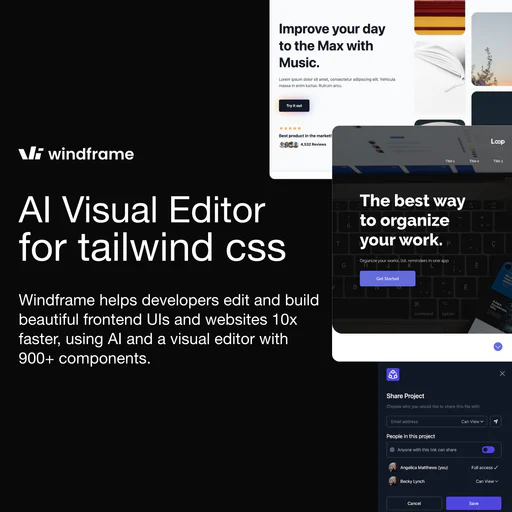
Build stunning websites effortlessly with Windframe's AI-powered tools.
Freelancer
Best for individuals who want to get the full access to Windframe, all its templates and features.
Freelancer Quarterly Plan
Best for individuals who want to get the full access to Windframe, all its templates and features.
Freelancer Annually
Best for individuals who want to get the full access to Windframe, all its templates and features.
Lifetime Freelancer
Best for individuals who want to get lifetime and full access to Windframe, all its templates and future updates. This plan is limited to only 25 licenses.
For the latest pricing, please visit this link: https://windframe.dev/pricing
Prices are subject to change. Please visit the official website for the most up-to-date pricing information.

What is Rowy?
Rowy is an innovative, open-source[1] CMS[2] designed for Firestore[3] that offers a low-code[4] platform for managing Firebase[5] and Google Cloud services. It enables users to handle Firebase Authentication, create instant admin panels, and build cloud functions seamlessly. Rowy combines the simplicity of a no-code interface with the extensibility of coding, allowing users to manage their data in a spreadsheet-like UI while still providing the ability to write custom backend logic. This unique blend makes Rowy a powerful tool for developers and non-developers alike, simplifying the management of backend processes.

Enterprise
Unlimited workflow editing, Custom FloTime, No time limit per workflow run, H100 NVL (94GB VRAM), Custom/hr for extra FloTime, Custom free API Credits, Upload your own LoRAs, Custom private storage, Persistent storage, Custom Queue, Custom # team members, Unlimited private workflows, Custom team Pages.
Explorer
Unlimited workflow editing, 3.5 hrs/month of FloTime, No time limit per workflow run, H100 NVL (94GB VRAM), $7/hr for extra FloTime, $5 free API Credits on signup, Upload your own LoRAs, 20GB of private storage, Persistent storage, 99 items in Queue, 5 team members max, Unlimited private workflows, 1 team Page.
Pathfinder
Unlimited workflow editing, 10 hrs/month of FloTime, No time limit per workflow run, H100 NVL (94GB VRAM), $7/hr for extra FloTime, $10 free API Credits on signup, Upload your own LoRAs, 100GB of private storage, Persistent storage, 99 items in Queue, 10 team members max, Unlimited private workflows, 3 team Pages.
Trailblazer
Unlimited workflow editing, 22 hrs/month of FloTime, No time limit per workflow run, H100 NVL (94GB VRAM), $7/hr for extra FloTime, $15 free API Credits on signup, Upload your own LoRAs, 200GB of private storage, Persistent storage, 99 items in Queue, 10 team members max, Unlimited private workflows, 10 team Pages.
For the latest pricing, please visit this link: https://www.floyo.ai/pricing
Prices are subject to change. Please visit the official website for the most up-to-date pricing information.

Hobby
2 users and 5k traces per month included. Unlimited prompts, 20 evaluations / month included, 30 days retention period, Community support via Github.
Pro
3 users and 10k traces per month included, pay as you go thereafter. Unlimited evaluations, 10k traces / month included then $5 for every 10k, In-app support, 90 days retention period.
Business
Unlimited seats and 1M traces included per month. Everything from Pro, Unlimited seats, 1M traces / month included then $5 for every 10k, Role-based Access Control, SOC2 reports, Private Slack Channel, 365 days retention period.
Enterprise
Personalised service and enterprise security for large teams. Custom pricing, Everything from Business, Volume pricing, Audit logs, Custom retention periods, Bring Your Own Cloud, Dedicated Support, Self-hosted deployment options, Security reviews, Custom SLA, Custom terms & DPA.
For the latest pricing, please visit this link: https://agenta.ai/pricing
Prices are subject to change. Please visit the official website for the most up-to-date pricing information.

Free to Start
Start for free, with optional upgrades and flexible payment options.
For the latest pricing, please visit this link: https://pinme.eth.limo/
Prices are subject to change. Please visit the official website for the most up-to-date pricing information.

Sketchflow.ai accelerates app development from ideas to code without coding.
What is Sketchflow.ai?
Sketchflow.ai is an innovative AI web app generator designed to help users transform their product ideas into fully functional applications quickly and efficiently. With its no-code approach, Sketchflow.ai empowers users to create designs, run real-time simulations, and export native code—all from a single prompt. This tool is perfect for entrepreneurs, product managers, and anyone looking to bring their ideas to life without the need for extensive programming knowledge.







