

Videocompressai





What is Videocompressai?
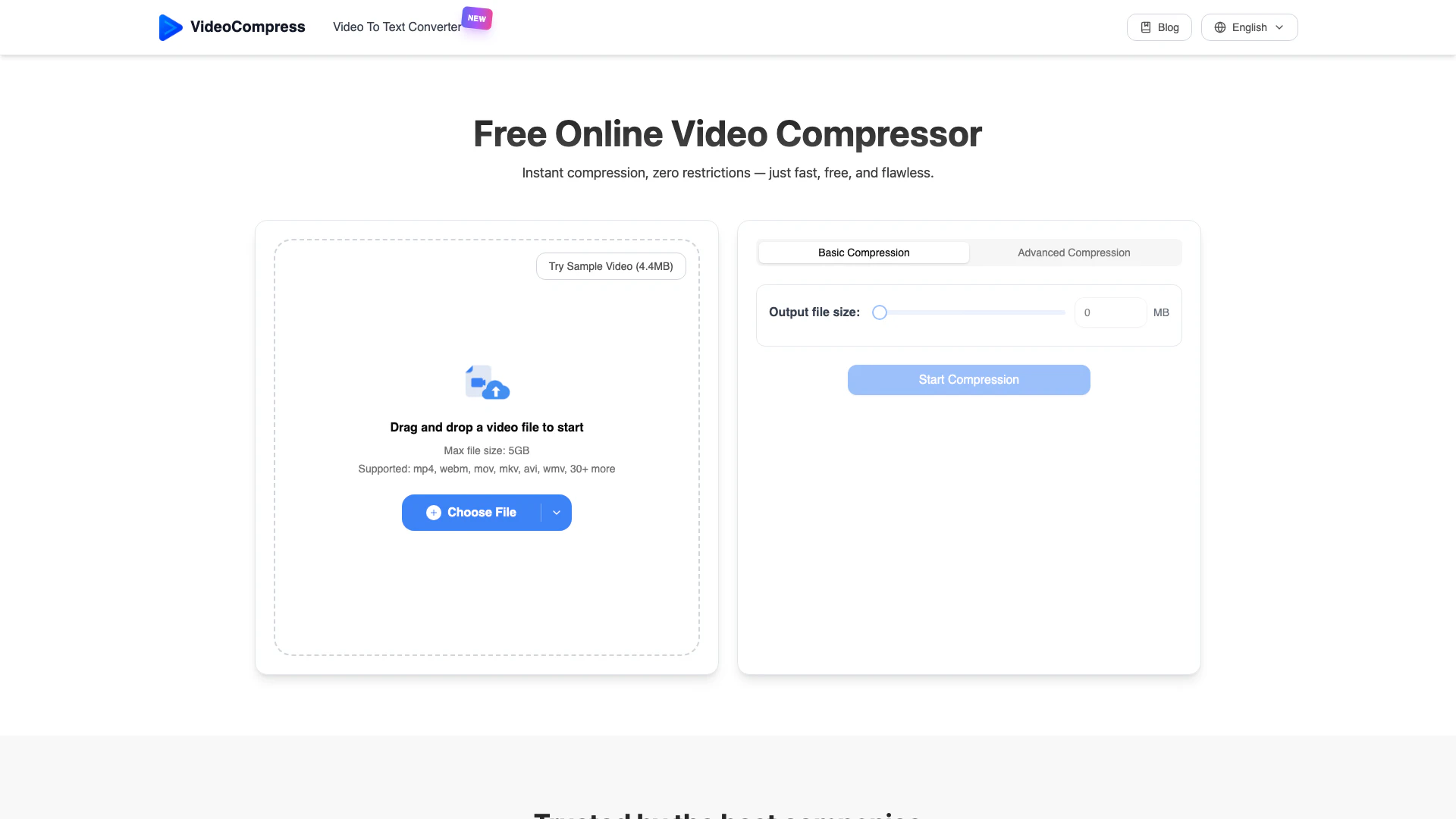
Videocompressai is a fast, free, and easy-to-use online video compressor that allows users to reduce the file size of their videos without sacrificing quality. It supports a wide range of formats, including MP4, MOV, and AVI, and is designed to work seamlessly without any watermarks or usage limits. Utilizing advanced H.265/HEVC encoding technology, Videocompressai can achieve significant file size reductions—up to 80%—while maintaining visual integrity. This tool is perfect for anyone looking to optimize video files for storage, sharing, or online use.
How to use Videocompressai?
To use Videocompressai, follow these three simple steps: 1. Upload Your Video: Drag and drop your video file into the Videocompressai interface or click to select it from your device. The tool supports various formats, including MP4, MOV, and AVI. 2. Select Compression Mode: Choose your desired compression settings. You can either compress your video to a specific file size or select advanced settings for a balance between quality and size. 3. Download Compressed Video: After the compression process is complete, download your optimized video file, which retains excellent quality while being significantly smaller in size.
What are the main features of Videocompressai?
Videocompressai offers a variety of powerful features, including: - Advanced Compression Algorithm: Utilizes H.265/HEVC technology for significant size reduction while maintaining quality. - Secure Encryption: Ensures privacy and security of video files during upload, processing, and storage. - Format Conversion: Supports multiple video formats, allowing easy conversion between MP4, AVI, MOV, and more. - Quality Presets: Offers preset options for different compression needs, including web sharing and high-definition preservation. - Real-time Preview: Allows users to see compression effects in real-time, ensuring the output meets expectations. - Cloud Processing: Operates entirely in the cloud, enabling fast compression without using local resources.
Who is Videocompressai for?
Videocompressai is designed for a diverse range of users, including content creators, marketers, educators, and anyone who regularly works with video files. It is ideal for professionals needing to optimize videos for social media, websites, or email sharing. Additionally, it caters to individuals looking for a straightforward, no-cost solution for compressing their videos without any restrictions or watermarks.
What are the use cases of Videocompressai?
Videocompressai can be used in various scenarios, such as: 1. Social Media Sharing: Quickly compress videos for platforms like Instagram and Facebook, ensuring faster uploads and better engagement. 2. Storage Optimization: Reduce the file sizes of large video archives, saving storage space while maintaining quality. 3. Email Attachments: Compress videos to meet email size limits, making it easier to share content without issues.
Product Images



Videocompressai Pros and Cons
Pros
- Fast and Efficient Compression: Utilizes advanced H.265/HEVC encoding technology to compress videos quickly while maintaining high visual quality.
- No Watermarks or Usage Limits: Completely free to use without any watermarks or restrictions on the number of videos compressed.
- Supports Multiple Formats: Compatible with a wide range of video formats including MP4, MOV, AVI, and more, allowing versatile usage.
- Real-time Preview Feature: Offers real-time comparison of compression effects, ensuring users can verify quality before finalizing.
Cons
No cons data detected for this tool
Videocompressai Pricing
Free Plan
Fast, free, and easy-to-use video compressor with no watermark and no usage limits. You can upload and compress videos up to 5GB in size.
For the latest pricing, please visit this link: https://videocompress.ai/
Prices are subject to change. Please visit the official website for the most up-to-date pricing information.
Analytics of Videocompressai
Videocompressai Website Traffic Analysis
Visits Over Time
Traffic Sources
Nov 2025 - Dec 2025 Worldwide Desktop Only
- Search: 52.63%
- Direct: 45.80%
- Referrals: 1.05%
- Social: 0.33%
- Paid Referrals: 0.09%
- Mail: 0.01%
Top Keywords
| Keyword | Volume | CPC | Estimated Value |
|---|---|---|---|
| 在线 免费 视频压缩 | 0 | $0.00 | $400.00 |
| 视频压缩 | 25.67K | $0.00 | $2430.00 |
| comprimir vídeo | 7.99K | $0.15 | $360.00 |
| 视频压缩在线 | 1.18K | $0.00 | $970.00 |
| 视频在线压缩 | 850 | $0.00 | $640.00 |
Videocompressai Reviews
VideoCompress has revolutionized our video processing workflow. We can now compress 4K videos to manageable sizes without losing quality. Our team productivity has increased by 60%! - Alex Rivera, CTO at InnovateTech
As a marketing team, we deal with tons of video content daily. VideoCompress helps us reduce file sizes for social media while maintaining crystal clear quality. Seeing a 50% faster upload time! - Samantha Lee, Marketing Director at NextGen Solutions
As a startup, storage costs were killing us. VideoCompress reduced our video storage needs by 80% without compromising quality. Our development and marketing teams love it! - Raj Patel, Founder & CEO at StartUp Grid
For more reviews, visit this link: https://videocompress.ai/#what-our-users-say




Videocompressai Social Listening
VideoExpress AI Review - Pros...
See VideoExpress in action her...
VideoExpress AI 2.0 Review - B...
I spent money on VideoExpress ...
VideoExpress AI 2026 Tutorial ...
👉Get an Extra 10% OFF on Vide...
Unlock to view 25 social media results.