Stylo





What is Stylo?
Stylo is the #1 AI Assistant designed specifically for Zendesk, aimed at enhancing customer support interactions. This innovative tool leverages artificial intelligence to streamline communication between support agents and customers, ensuring every interaction is efficient and effective. With Stylo, businesses can automate responses, maintain brand voice consistency, and ultimately improve customer satisfaction. Its purpose-built suite of applications allows organizations to integrate AI seamlessly into their existing workflows, making it an essential tool for modern customer service teams.
How to use Stylo?
- Install Stylo: Begin by adding Stylo to your Zendesk account through the [Zendesk Marketplace](https://www.zendesk.com/marketplace/apps/support/849231/stylo-assist--chatgpt/).
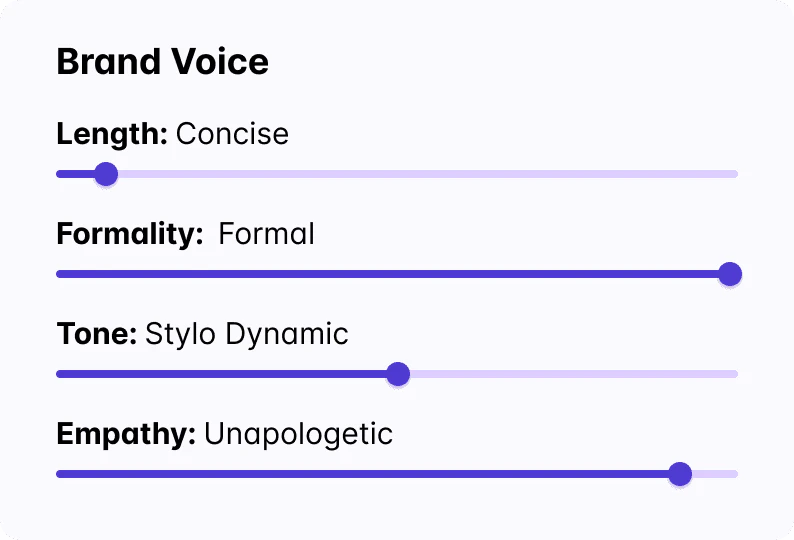
- Configure Settings: Access the Stylo control panel to customize settings such as brand voice, tone, and empathy levels to match your company's communication style.
- Integrate with Other Tools: Utilize Stylo’s integrations with platforms like Shopify to enhance the contextual understanding of customer inquiries.
- Start Interacting: Use Stylo to draft responses, summarize calls, and analyze sentiment, ensuring your team can handle customer queries efficiently.
What are the main features of Stylo?
- AI-Powered Responses: Automatically draft replies that align with your brand voice, ensuring consistency and quality in customer interactions.
- Voice AI and Sentiment Scoring: Analyze customer calls and tickets for sentiment, helping agents prioritize responses effectively.
- Knowledgebase Management: Use Stylo Scribe to create, translate, and enhance articles in your Help Center, making information easily accessible.
- Integration Capabilities: Connect with various platforms like Shopify to enrich customer interactions with relevant data.
Who is Stylo for?
Stylo is designed for customer support teams and organizations that utilize Zendesk for managing customer interactions. It is particularly beneficial for businesses looking to enhance their support efficiency, improve response times, and maintain a consistent brand voice in communications. Companies across various sectors, including retail, technology, and service industries, can leverage Stylo to optimize their customer service operations.
What are the use cases of Stylo?
- Automating Customer Responses: Use Stylo to generate quick replies to frequently asked questions, reducing the workload on support agents.
- Sentiment Analysis: Implement Stylo's sentiment scoring to gauge customer emotions during interactions, enabling more personalized responses.
- Knowledgebase Enhancement: Regularly utilize Stylo Scribe to update and improve Help Center articles based on user feedback and interaction data.
Product Images


Stylo Pros and Cons
Pros
- Brand Voice Control: Stylo allows users to draft responses that perfectly match their brand voice with adjustable settings for length, formality, tone, and empathy.
- Integration Capabilities: The tool offers a library of integrations, including Shopify, to enhance the context and effectiveness of responses.
- Affordable Pricing: Stylo starts at $15 per agent per month, making it reasonably priced for teams looking to improve their support capabilities.
Cons
No cons data detected for this tool
Stylo Pricing
Standard Plan
Starts at $15/agent per month.
For the latest pricing, please visit this link: https://www.askstylo.com/pricing
Prices are subject to change. Please visit the official website for the most up-to-date pricing information.
Analytics of Stylo
Stylo Website Traffic Analysis
Visits Over Time
Traffic Sources
Oct 2025 - Dec 2025 Worldwide Desktop Only
- Direct: 47.09%
- Search: 31.29%
- Referrals: 11.53%
- Social: 8.48%
- Paid Referrals: 1.17%
- Mail: 0.14%
Top Keywords
| Keyword | Volume | CPC | Estimated Value |
|---|---|---|---|
| zendesk one touch tickets | 0 | $0.00 | $20.00 |
| stylo | 23.57K | $0.16 | $60.00 |
| stylot | 370 | $0.00 | $0.00 |
| do bullet points trigger ai | 360 | $0.00 | $0.00 |
| stylo ai | 210 | $0.00 | $90.00 |