Synced So





What is Synced So?
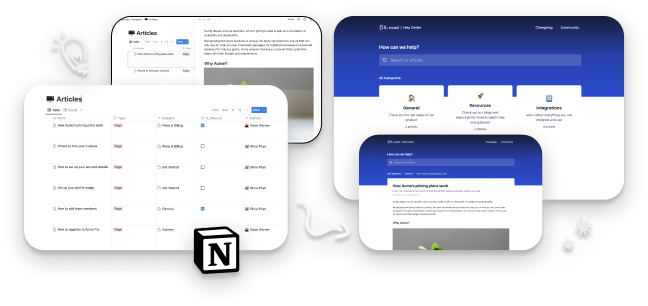
Synced So is an innovative tool designed to transform your Notion documents into a fully functional and embeddable help center site. It allows users to leverage their existing Notion content to create a sleek, modern help center that can be integrated into websites or applications. By using Synced So, teams can streamline their knowledge management processes, enhance user support, and improve accessibility to essential information without the need for additional tools or learning curves.
How to use Synced So?
- Create Content in Notion: Start by writing and managing your help documentation directly within Notion, utilizing its familiar interface.
- Sign Up for Synced So: Visit the Synced So website and create an account to access the tool's features.
- Transform Content: Use Synced So to automatically generate your help center site and in-app widget from your Notion documents.
- Embed the Help Center: Integrate the generated help center into your application or website by following the provided embedding instructions.
- Customize Your Help Center: Tailor the design and branding of your help center to match your company’s style, including logos and UI elements.
What are the main features of Synced So?
- Seamless Integration with Notion: Easily manage your help documents in Notion without needing to learn a new tool.
- Auto-Generated Help Center: Automatically create a help center site and in-app widget from your existing Notion content.
- Custom Domain Hosting: Host your help center on your own domain or a subdomain for better branding and SEO benefits.
- SEO Optimization: Built-in SEO features to enhance your search engine rankings and visibility.
- Customizable UI/UX: Adjust the look and feel of your help center to align with your brand identity.
- In-App User Guidance: Provide contextual help directly within your application to assist users when they need it.
Who is Synced So for?
Synced So is ideal for businesses, startups, and organizations that already utilize Notion for documentation and knowledge management. It is particularly beneficial for teams looking to enhance their customer support services by providing an easily accessible help center. Additionally, product managers, content creators, and technical writers will find Synced So useful for streamlining their workflows and improving user engagement through effective knowledge sharing.
What are the use cases of Synced So?
- Creating a Customer Support Help Center: Businesses can transform their Notion documentation into a help center that provides customers with quick access to FAQs and guides.
- In-App Help Integration: Companies can embed a help center widget within their applications to offer users immediate assistance and guidance based on their context.
- Knowledge Management for Teams: Organizations can use Synced So to maintain an internal knowledge base, ensuring that employees have easy access to important resources and documentation.
Synced So Pros and Cons
Pros
- Easy Integration with Notion: Synced.so allows users to create help documentation directly within Notion, eliminating the need to learn a new tool.
- SEO Optimization: The platform automatically takes care of SEO issues, enhancing Google search rankings for the Help Center.
- Custom Domain Hosting: Users have the flexibility to host their Help Center on their own domain or subdomain, which is beneficial for branding and SEO.
- User-Friendly Interface: Offers a modern and clean UI, improving user experience when navigating the Help Center.
Cons
No cons data detected for this tool
Analytics of Synced So
Synced So Website Traffic Analysis
Visits Over Time
Traffic Sources
Oct 2025 - Dec 2025 Worldwide Desktop Only
- Search: 41.50%
- Direct: 37.67%
- Referrals: 13.85%
- Social: 3.91%
- Paid Referrals: 2.02%
- Mail: 0.19%
Top Keywords
| Keyword | Volume | CPC | Estimated Value |
|---|---|---|---|
| synced | 6.56K | $5.47 | $0.00 |
| syncs so | 330 | $0.00 | $0.00 |
| can you search words on notion | 190 | $0.00 | $0.00 |
| so sync | 170 | $0.00 | $0.00 |
| https://sync.so pricing | 150 | $0.00 | $0.00 |