Pinvari




What is PinVari?
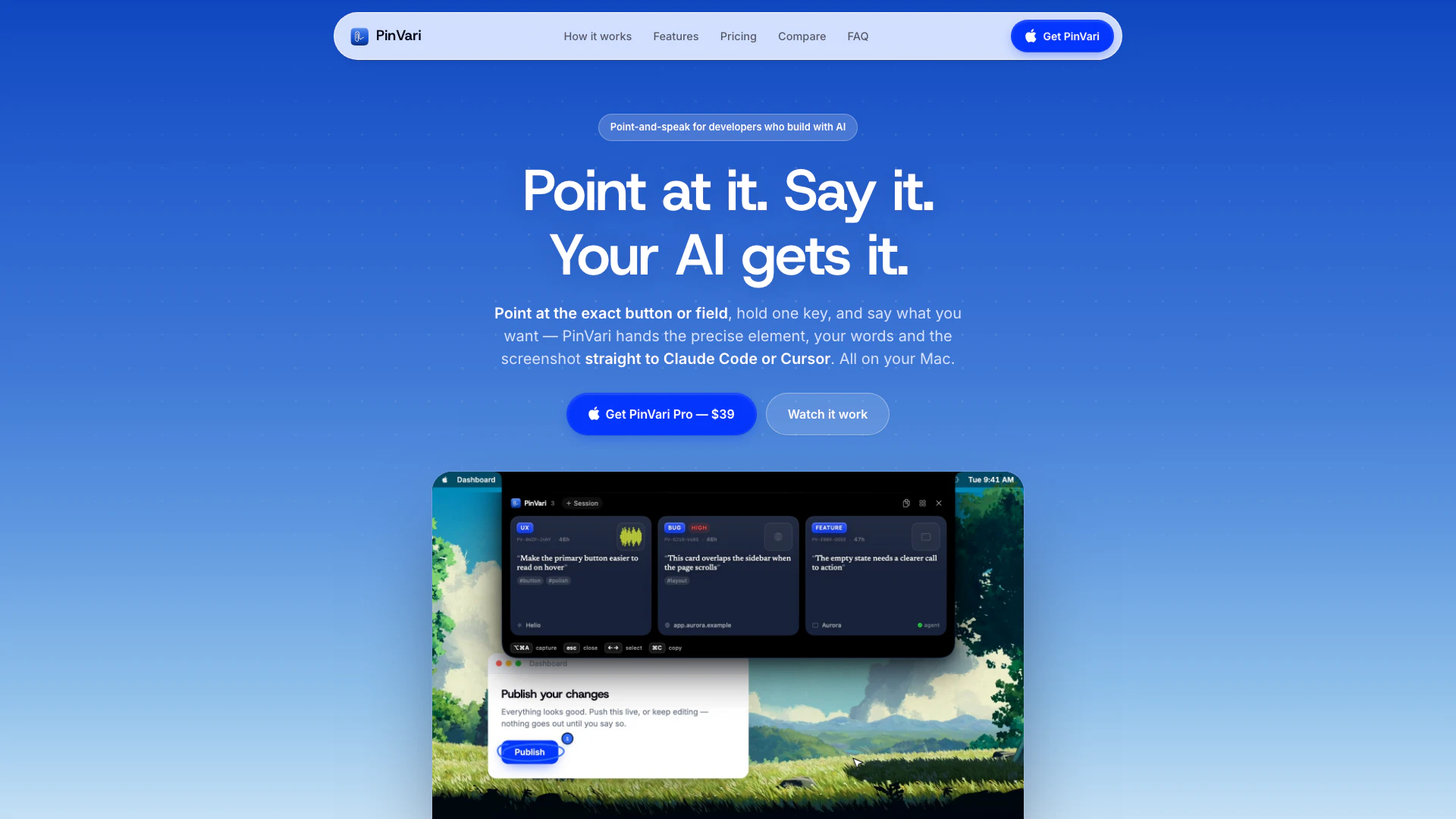
PinVari is an innovative tool designed for Mac users that enhances productivity by allowing users to capture UI elements effortlessly through voice commands. Instead of manually typing out requests for changes, users can simply point at a specific button or field, hold a key, and speak their instructions. This functionality not only streamlines the communication process between users and their AI tools, such as Claude Code and Cursor, but also ensures that the exact elements are captured along with screenshots. PinVari is available for a one-time fee of $39, with no ongoing subscriptions, making it an affordable and practical solution for developers and designers alike.
How to use PinVari?
- Install PinVari: Open your terminal on your Mac and paste the command `$ curl -fsSL https://pinvari.com/install.sh | sh` to install PinVari quickly and easily.
- Activate Your License: Once installed, activate your license by following the on-screen instructions. You only need to do this once, and you can start using the tool immediately.
- Point and Speak: When you want to capture an element, point at the specific button or field on your screen, hold the designated key, and speak your request. PinVari will capture the exact element, your spoken words, and a screenshot, sending it directly to your AI tool like Claude Code or Cursor.
What are the main features of PinVari?
- Point-and-Speak Functionality: Easily point at any button or field and dictate what you want changed, capturing precise elements without typing.
- Integration with AI Tools: Seamlessly connects with AI tools such as Claude Code, Cursor, and Codex, allowing for efficient hand-off of captured elements.
- On-Device Transcription: All voice commands are processed on your Mac, ensuring privacy and security without needing cloud services.
- Workflow Recording: Record your entire workflow, allowing your AI agent to follow a step-by-step trail of named elements rather than pixel coordinates.
- User-Friendly Installation: Set up PinVari with a simple command in your terminal, requiring no complex configurations or API keys.
- Permanent Ownership: A one-time payment grants you lifetime access to the tool without any subscriptions.
Who is PinVari for?
PinVari is designed primarily for developers, UI/UX designers, and software testers who frequently interact with AI tools to enhance their workflow. It is particularly beneficial for those who work on Mac systems and need a more efficient way to communicate changes to their projects. Whether you are a solo developer looking to streamline your coding process or part of a larger team that requires precise communication about UI elements, PinVari offers a practical solution. Its ease of use makes it accessible to both technical and non-technical users, enabling anyone who needs to capture and communicate visual changes quickly.
What are the use cases of PinVari?
- Web Development: Use PinVari to quickly communicate changes needed on web pages to your development team or AI, streamlining the design process.
- User Interface Design: Designers can use PinVari to specify exact UI elements for modification, ensuring clear communication with developers.
- Software Testing: Testers can point to elements and describe issues verbally, allowing for precise bug reporting and documentation without the need for extensive typing.
Pinvari Pros and Cons
Pros
- Intuitive Element Capture: PinVari allows users to capture elements on their Mac by simply pointing and speaking, making it intuitive and fast.
- On-Device Voice Transcription: The tool transcribes voice commands directly on the Mac without uploading data to the cloud, ensuring privacy and security.
- Seamless AI Integration: PinVari integrates seamlessly with AI agents like Claude Code and Cursor, allowing for efficient workflow management.
- Cost-Effective Pricing: The one-time payment model of $39 makes it cost-effective compared to subscription-based tools.
- Workflow Recording Feature: Users can record workflows step-by-step, providing a clear trail for AI agents to follow, enhancing productivity.
Cons
- Mac-Only Availability: PinVari is only available on Mac, limiting its accessibility for users on other operating systems.
- Learning Curve for New Users: Users may need some familiarity with voice commands and the specific AI integrations to maximize the tool's potential.
- Limited Advanced Features: The tool may not support advanced features available in more comprehensive AI tools, which could limit some users.
Pinvari Pricing
PinVari Lite
The essentials, from the Mac App Store. Point, speak, screenshot, hand off. - Point, speak & screenshot capture - Dashboard + one-paste agent hand-off - Multi-monitor · several circles per breath - Fully sandboxed · App Store updates - On-device transcription, no keys
PinVari Pro
The full product — every capture resolves to the exact named element. For the builder who ships alone. - The exact named element, every capture - Workflow recording · dictation · rewrite hotkey - Live MCP: Claude Code, Cursor & any client - Teams: $29/seat once · free updates
PinVari Max
Everything in Pro, plus the companion that answers out loud, guides you, and does things when you ask. - Spoken answers about anything on screen - Live open-mic sessions & on-screen guides - Clicks, types, fills forms — with your say-so - Runs projects with the Claude on your Mac - Cancel any time — captures stay on-device
For the latest pricing, please visit this link: https://pinvari.com/#pricing
Prices are subject to change. Please visit the official website for the most up-to-date pricing information.