Best 26 AI Image Segmentation Tools in 2026

Remove Bg, Roboflow, Ai Webcam Effects For Video Meetings, Labelme, AI Image Segmentation, Trexlabel, Algodocs, AI Face Swap Video, Unlimited Bg Ai Background Removal Tool, Face Crop Jet are the best paid / free AI Image Segmentation tools.

AI image segmentation is a powerful tool that enables precise identification and classification of objects within digital images. By dividing images into meaningful segments, it enhances accuracy in tasks such as medical imaging, autonomous driving, and product design. This technology provides a deeper understanding of visual data, allowing businesses to make informed decisions and optimize performance. Its efficiency and adaptability make it a valuable asset across industries, transforming how visual information is processed and utilized.

Remove Bg

Remove image backgrounds automatically in 5 seconds with just one click. Don't spend hours manually picking pixels. Upload your photo now & see the magic.

4
1,824 views
76 saved
67.0M

What is Remove Bg?

Remove Bg is an advanced AI-powered tool designed to automatically remove backgrounds from images in just 5 seconds with a single click. This innovative tool eliminates the need for manual pixel picking, allowing users to effortlessly isolate subjects from their backgrounds. With its user-friendly interface, Remove Bg is ideal for anyone needing quick and professional-quality background removal, making it a must-have for e-commerce, marketing, photography, and graphic design.

Pros

  • High-Quality Background Removal: remove.bg offers stunning quality in background removal with incredible accuracy, making it suitable for various applications like e-commerce and professional headshots.
  • Automated Efficiency: The tool allows bulk editing, processing up to 500 images per minute, which boosts efficiency for users needing to handle large volumes of images.
  • User-Friendly Interface: The platform provides an easy-to-use interface where users can upload images or paste URLs seamlessly.
  • Integration with Popular Tools: remove.bg integrates with tools like Figma, Photoshop, and Zapier, allowing users to embed background removal directly into their workflows.

What are the main features of Remove Bg?

  • Automatic Background Removal: Effortlessly remove backgrounds from images in seconds.
  • AI Background Generator: Create custom backdrops without needing to write prompts.
  • Bulk Editing: Process up to 500 images per minute for enhanced productivity.
  • Integrations: Seamlessly integrate with tools like Figma, Photoshop, and Zapier.
  • Mobile App: Erase backgrounds on the go with the Remove Bg mobile application.
Roboflow

Roboflow provides comprehensive tools for developing and deploying computer vision models.

5
0 views
0 saved
1.3M

Public

0.00 USD free

Best for Open Source and Exploration. Free. No credit card required. Includes data labeling suite with AI features, model training, workflow builder, cloud hosted deployment, and edge device sandbox.

Core

79.00 USD monthly

Best for Small Projects with Private Data. $79 per month, billed annually or $99 per month, billed monthly. Includes all features in Public, plus private data & models, training analytics, model evaluation, preprocessing & augmentations, and concurrent model training.

Enterprise

0.00 USD monthly

Best for Production Deployments. Custom pricing. Includes all features in Core, plus edge deployment with commercial inference model license, priority access to faster cloud GPUs, RBAC with annotation review, workflow versioning, model monitoring, and filtering model evaluation by tag.

For the latest pricing, please visit this link: https://roboflow.com/

Prices are subject to change. Please visit the official website for the most up-to-date pricing information.

What is Roboflow?

Roboflow is a comprehensive platform designed for developers and enterprises to build and deploy computer vision models efficiently. It provides a suite of tools that cover the entire lifecycle of computer vision projects, from automated image annotation to high-performance deployment solutions. With Roboflow, users can easily manage their data, train models, and deploy them across various environments, making it an essential tool for anyone looking to leverage visual intelligence in their applications.

Pros

  • Comprehensive Computer Vision Tools: Roboflow provides a complete suite of tools for building and deploying computer vision models, including annotation, training, and deployment solutions.
  • High-Performance Deployment Options: The platform allows for high-performance deployment of models across various environments, including edge devices and cloud infrastructure.
  • Low-Code Workflow Creation: Roboflow features a low-code interface that simplifies the creation of workflows and pipelines, making it accessible for developers of all skill levels.

What are the main features of Roboflow?

  • Automated Annotation Tools: Speed up the data labeling process with AI-assisted features.
  • Model Training Infrastructure: Access hosted training environments with GPU support for efficient model training.
  • Flexible Deployment Options: Deploy models on devices, at the edge, or via API with ease.
  • Low-Code Workflows: Build complex pipelines and applications using a user-friendly, low-code interface.
  • Access to Open Source Datasets: Utilize a library of open-source datasets and pre-trained models to kickstart projects.
Ai Webcam Effects For Video Meetings

Webcam Effects Chrome Plugin - Replace, blur the webcam background, record single source or whole tab in browser for any browser based video streaming.

5
1,939 views
209 saved
29.9K

What is Ai Webcam Effects For Video Meetings?

Ai Webcam Effects For Video Meetings is a Chrome plugin designed to enhance video conferencing experiences by allowing users to replace or blur their webcam backgrounds, record single sources or entire tabs in their browser, and utilize various visual effects. This tool leverages advanced AI technology to provide real-time features that improve the clarity and professionalism of video calls, making it an essential tool for anyone looking to enhance their online presence during virtual meetings.

Pros

  • Universal Platform Support: The tool supports Windows, Mac, and Linux, ensuring accessibility for a wide range of users.
  • Quick and Easy Installation: The installation and configuration process is quick, taking only seconds to complete.
  • Privacy Features: The tool filters out inappropriate elements and messy backgrounds, enhancing user privacy during video calls.
  • Customization Options: Users can optimize their video frame layout and use virtual backgrounds, adding creativity to their video calls.

What are the main features of Ai Webcam Effects For Video Meetings?

  • Virtual Backgrounds: Replace your background with solid colors, personalized images, or dynamic videos in real-time.
  • Background Blur: Automatically blur your webcam background to maintain focus on you during calls.
  • Smart Zoom: Real-time auto-framing ensures you are always in focus, enhancing your professional appearance.
  • Custom Layouts: Optimize your video layout for better viewer engagement and presentation effectiveness.
  • Emoji and Giphy Integration: Add fun and expressive visuals to your video calls to boost engagement.
Labelme

Create high-quality vision datasets effortlessly.

5
0 views
0 saved
27.7K

Starter

49.00 USD one-time

Annotate images. No Python required. Includes 1 year of updates, image annotation app v5.11.3, one-click AI annotation (SAM2), describe & annotate with text (SAM3), Windows, Mac & Linux — no Python needed, 1 year of updates + annotation guides.

View Pricing

Pro

79.00 USD one-time

Build AI training datasets, fast. Includes everything in Starter, plus 1 year of upgrades + all new Pro features, dataset creation toolkit (10+ tools for labeling, automation & export), ready-to-train exports (YOLO, VOC & more), step-by-step guides (dataset creation + model training), priority email support (48h response). Best for power users.

View Pricing

Pro (Lifetime)

249.00 USD one-time

Pro tools. Lifetime updates. Free updates forever. Everything in Pro, plus lifetime free upgrades (including all future major versions). You save $79/yr from year 4 onward.

View Pricing

For the latest pricing, please visit this link: https://labelme.io/pricing

Prices are subject to change. Please visit the official website for the most up-to-date pricing information.

What is LabelMe?

LabelMe is a powerful and trusted tool for creating high-quality vision datasets, widely recognized as the industry standard among over 15,000 builders. This offline image annotation[1] application allows users to efficiently annotate images using various shapes such as polygons[2], bounding boxes[3], and segmentation[4]. With a one-time purchase model and no subscription fees, LabelMe offers an accessible solution for developers and researchers looking to build training datasets privately and quickly, without the need for cloud uploads.

Pros

  • High-Quality Dataset Creation: Labelme is designed for creating high-quality vision datasets, making it ideal for AI training.
  • Offline Functionality: The tool operates offline, ensuring data privacy and allowing users to work without cloud uploads.
  • AI-Assisted Annotation: Labelme offers AI-assisted features for real-time feedback and auto-annotation, enhancing efficiency.
  • Multi-Language Support: Supports 14 languages, making it accessible to a diverse user base.

What are the main features of LabelMe?

  • Offline Annotation: LabelMe operates completely offline, ensuring data privacy and security.
  • Versatile Annotation Tools: Users can annotate images with various shapes including polygons, rectangles, and circles.
  • AI-Assisted Annotation: The tool provides real-time feedback and auto-annotation features using AI models, enhancing efficiency.
  • Rich Attributes: Users can add detailed flags and texts to their annotations for better dataset management.
  • Automation Toolkit: Command-line tools facilitate batch processing and integration with existing workflows.
AI Image Segmentation

Segment Anything | Meta AI

5
437 views
351 saved
19.5K

What is AI Image Segmentation?

AI Image Segmentation is a segmentation system developed by Meta AI that can identify and isolate any object in an image with a single click. It uses a promptable design with zero-shot generalization, allowing it to work with unfamiliar objects without additional training.

Pros

  • Promptable Segmentation: SAM allows users to segment any object in an image with a single click, utilizing various input prompts without the need for additional training.
  • Zero-shot Generalization: The model can generalize to unfamiliar objects and images, which enhances its flexibility and usability in diverse scenarios.
  • Efficient Design: The model is designed to be efficient, with a quick inference time, enabling it to run in a web browser in just a few milliseconds per prompt.
  • Integration Capabilities: SAM's design enables flexible integration with other systems, allowing for various applications in different environments.

Cons

  • No Mask Labeling: The model only predicts object masks and does not generate labels, which may limit its usability for certain applications.
  • Limited Video Support: Currently, SAM only supports images and individual frames from videos, restricting its application in video processing.
Trexlabel

T-Rex Label is an intuitive online data annotation tool for efficient dataset creation.

4
0 views
0 saved
12.6K

What is T-Rex Label[1]?

T-Rex Label is an online data annotation[2] tool designed to facilitate efficient and rapid construction of complex scene datasets. It supports various visual models including Grounding DINO[3], DINO-X[4], and T-Rex, and is compatible with COCO and YOLO dataset annotation formats. This tool offers a range of annotation functionalities such as 2D bounding boxes and segmentation, making it an essential asset for users in various industries needing high-quality annotated data.

Pros

  • Easy to Use with Zero Configuration: T-Rex Label is designed for quick setup and use, requiring no fine-tuning or additional training, which significantly reduces time costs.
  • Cross-Image Batch Annotation: With a single selection, T-Rex Label can automatically recognize similar objects and apply the prompt across multiple images, enhancing efficiency.
  • Browser-Based Tool: As a web-based annotation tool, T-Rex Label eliminates the need for installation and deployment, allowing teams to get started quickly and reducing maintenance costs.

What are the main features of T-Rex Label?

  • Zero-shot Object Detection: T-Rex Label can detect objects without the need for additional training or fine-tuning, allowing for quick and efficient data labeling.
  • Batch Annotation: Users can select a target object, and T-Rex Label will automatically identify similar objects across images, enabling batch annotation in a single prompt.
  • Browser-Based Tool: Being a web-based annotation tool, T-Rex Label eliminates the need for installation or deployment, reducing maintenance costs and making it easy for teams to get started.
  • Support for Multiple Formats: T-Rex Label is compatible with popular dataset formats like COCO and YOLO, ensuring seamless integration into existing AI workflows.
Algodocs

AlgoDocs - Intelligent Document Processing - AI-Powered Document Data Extraction - AlgoDocs

4
2,025 views
383 saved
12.3K

What is AlgoDocs?

AlgoDocs is an advanced Intelligent Document Processing tool that leverages AI technology to automate document data extraction. This innovative platform is designed to streamline business processes by minimizing manual data entry and enhancing accuracy in data extraction. By utilizing its AI-powered capabilities, AlgoDocs enables organizations to efficiently capture and manage data from various document types, thereby improving operational efficiency and reducing errors.

Pros

  • High Accuracy of Data Extraction: AlgoDocs offers an AI Handwriting Recognizer with an average accuracy of 97% for extracting handwritten text, which enhances the reliability of data extraction.
  • Template-Free Extraction: The platform allows data extraction without the need for templates or labeling, making it user-friendly for various document types.
  • Automated Data Processing: AlgoDocs automates the importing, extraction, and exporting of data, significantly reducing manual data entry tasks.
  • Wide Range of Document Support: The tool is capable of extracting data from various documents including invoices, bank statements, HR forms, and more, making it versatile for different business needs.

What are the main features of AlgoDocs?

  • AI-powered document data extraction without the need for templates or labeling.
  • Automatic extraction of key-value pairs and tables from various document types.
  • High accuracy handwriting recognition to convert handwritten text into machine-printed text.
  • Seamless integration for importing documents from multiple applications.
  • Rule-based extraction for simple data cases.
  • Enhanced data transformation capabilities for structured output.
  • Instant notifications for data discrepancies and exceptions.
  • Flexible exporting options to various formats and systems.
AI Face Swap Video

FaceMagic app allows uses to make ai face swap videos in just a sec with one selfie, making deepfake tech accessible for everyone.

4
318 views
70 saved
11.2K

What is AI Face Swap Video?

AI Face Swap Video is an innovative application that allows users to create AI-generated face swap videos effortlessly using just a selfie. This tool leverages advanced deepfake technology to make face swapping accessible to everyone, enabling users to transform their videos with astonishing results. Whether you want to star in your favorite movie scenes or create funny content for social media, AI Face Swap Video provides a user-friendly platform for engaging and entertaining video creation.

Pros

  • Fast Face Swap Creation: With advanced AI technology, face swaps can be created in just a few seconds using only a selfie.
  • Multiple Face Swapping: The tool allows swapping multiple faces at a time, enhancing its functionality.
  • Astonishing Results: The use of advanced face recognition technology and Deep Neural Network processing delivers impressive face swap results.
  • In-App Resources: Users can upload their own videos, photos, or GIFs for custom face swaps, providing a high volume of in-app resources.

What are the main features of AI Face Swap Video?

  • One-Click Face Swapping: Easily create face swap videos with just one selfie.
  • Custom Uploads: Upload your own videos, photos, or GIFs for personalized face swaps.
  • Multiple Face Swaps: Swap multiple faces in a single video for more fun.
  • Fast Processing: Generate astonishing face swap videos in just seconds.
  • High-Quality Results: Utilizes advanced AI and deep neural networks for impressive face recognition and processing.
Unlimited Bg Ai Background Removal Tool

UnlimitedBG

5
1,466 views
79 saved
3.0K

Pros

  • No Signup Required: Users can access the tool without needing to provide an email address or personal information, making it easy to start using immediately.
  • Unlimited Free Downloads: The tool allows unlimited high-resolution image downloads for free, which is beneficial for both personal and commercial use.
  • Batch Processing Feature: UnlimitedBG supports free batch processing of multiple images, making it efficient for users who need to remove backgrounds from many images at once.
  • High-Resolution Output: There are no limitations on maximum output resolution or file size, allowing for high-quality results suitable for large format projects.
Face Crop Jet

Detect and Crop Faces from Photos for ID Cards-Face Crop Software

4
1,022 views
80 saved
2.0K

Standard Edition

55.00 USD one-time

The standard edition for Windows and macOS costs $55. All charges are one-time payments and licenses are valid for lifetime.

View Pricing

Service Edition

200.00 USD one-time

The Service Edition for Windows Server costs $200. All charges are one-time payments and licenses are valid for lifetime.

View Pricing

For the latest pricing, please visit this link: https://www.facecropjet.com/order

Prices are subject to change. Please visit the official website for the most up-to-date pricing information.
What is Face Crop Jet?

Face Crop Jet is an innovative software tool designed to detect and crop faces from photographs, specifically tailored for creating ID card-ready images. Utilizing advanced AI algorithms, this tool automates the face detection process, allowing users to produce high-quality profile pictures without the need for manual cropping. Ideal for organizations and institutions that require consistent and professional ID photos, Face Crop Jet stands out in the realm of face cropping software by offering an intuitive interface and a fully automated workflow.

Pros

  • Intelligent Face Detection: The software uses advanced AI algorithms for face detection and cropping.
  • Fully Automatic Operation: No manual selection is required, and the software can monitor folders for automatic cropping.
  • Batch Processing Capability: Face Crop Jet can process multiple images simultaneously, making it efficient for bulk tasks.
  • User-Friendly Interface: The interface is designed to be intuitive and easy to use, reducing complexity for users.
  • Privacy Protection: All processing occurs locally on the user's machine, ensuring that images are not uploaded anywhere.
  • Cost-Effective Licensing: The software offers a one-time payment model with licenses valid for a lifetime, providing good value.

Cons

  • Limited Trial Version: The trial version adds a watermark to processed images, which may not be ideal for evaluation.
  • Platform Compatibility: The software is only available for Windows and macOS, which may limit accessibility for some users.
  • Lack of Customer Support Information: There is insufficient information regarding customer support and documentation on the website.

What are the main features of Face Crop Jet?

  • Intelligent face detection and cropping using advanced AI algorithms.
  • Fully automatic cropping with zero configuration required.
  • Batch processing capability for handling multiple images at once.
  • Customizable crop settings, including face/shoulder options.
  • Robot mode for directory monitoring, allowing automatic cropping of newly added images.
  • Compatibility with various image formats and sizes.
  • Privacy guaranteed, as all processing occurs locally on your machine.
Fixitai

fiXit

4
1,493 views
17 saved
2.0K

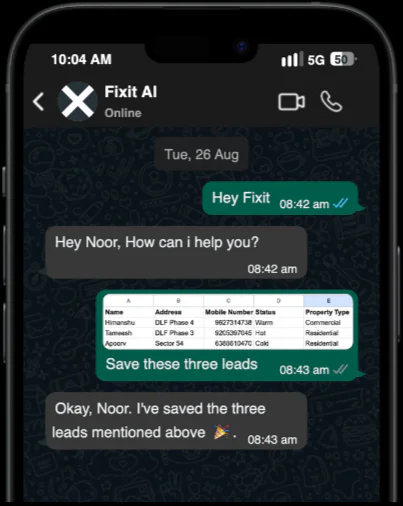
What is Fixitai?

Fixitai is an innovative AI-powered sales assistant designed specifically for the real estate industry. This tool operates natively within WhatsApp, allowing users to capture, qualify, and nurture leads automatically. By integrating seamlessly into existing workflows, Fixitai acts like a dedicated AI employee that tirelessly works to ensure no lead is missed, helping real estate professionals close deals faster and more efficiently.

Pros

  • Instant Onboarding: Users can onboard in under 2 minutes without needing any training.
  • Multichannel Integration: Fixit captures leads from various sources and organizes them into a clean pipeline.
  • Affordable Pricing: Fixit offers a transparent pricing model starting at $19.99/month, making it accessible for both small and large teams.
  • Real-time Insights: Provides live data to assist users in making informed decisions.

What are the main features of Fixitai?

  • AI-powered lead capture and qualification.
  • Seamless integration with WhatsApp for real-time communication.
  • Automated follow-ups and reminders to ensure no lead is missed.
  • Customizable workflows to fit specific team needs.
  • Comprehensive data security with enterprise-grade encryption.
  • User-friendly interface requiring no additional software downloads.
Wasteaid

WasteAID by Ecorithms | AI Waste Auditing Software

4
379 views
363 saved
809

What is WasteAID?

WasteAID is an AI-powered waste auditing software developed by Ecorithms that automates the process of waste compliance monitoring and contamination detection. It is designed to help waste management companies enhance their operational efficiency by providing real-time insights into waste collection activities. By leveraging advanced AI technology, WasteAID detects violations directly from the waste collection trucks, ensuring that companies can maintain compliance with local regulations such as California's SB 1383. The software not only aids in tracking contamination but also boosts recycling rates and revenue through targeted educational outreach.

Pros

  • Automated Detection: WasteAID offers automated detection of contamination in all waste streams, enhancing the compliance process.
  • Tailored Compliance Solutions: The service provides tailored compliance solutions, ensuring efficient tracking for compliance and outreach.
  • Cost Recovery Features: The platform includes features to capture missed contamination expenses, which can help recover costs.

What are the main features of WasteAID?

  • AI Detection: Automatically detects waste violations and contamination during pickups with image documentation.
  • Compliance Tracking: Monitors compliance with local regulations, specifically tailored for California's SB 1383.
  • CRM Integration: Tracks accounts and services, identifying repeat contaminators for targeted education.
  • Outreach Tools: Provides auto-targeted notices and impact tracking to facilitate customer education.
  • Automated Reporting: Generates comprehensive reports in PDF/CSV format for record-keeping and analysis.
Platepose

Generate stunning food images effortlessly with AI.

4
0 views
0 saved
459

Standard

11.00 USD one-time

Generate AI Food Pictures - 1 Dish - 24+ Food Pictures per Dish - 3 Palette Styles - 512px x 512px resolution - Upload 50 variations per dish - Full Ownership of Images

View Pricing

Best Value

46.00 USD one-time

Multi Dishes Generate Your Menu - 5 Dishes - 200+ Food Pictures per Dish - 5 Palette Styles - 512px x 512px resolution - Upload 50 variations per dish - Full Ownership of Images

View Pricing

Enterprise

0.00 USD free

For brands and ghost kitchens - Unlimited generations - Priority support - Custom AI prompts - Custom workflows - Custom applications

View Pricing

For the latest pricing, please visit this link: https://platepose.com/#pricing

Prices are subject to change. Please visit the official website for the most up-to-date pricing information.

What is PlatePose?

PlatePose is an innovative AI-powered[1] tool designed to revolutionize food photography[2]. It serves as your personal AI food stylist, enabling users to create professional-quality food images effortlessly. By simply uploading 10-20 source images of your dish, PlatePose utilizes advanced artificial intelligence to generate over 50 unique food photos tailored for various uses such as delivery listings, marketing campaigns, and social media profiles. With features like multiple palette styles[4] and full ownership of the generated images, PlatePose offers a cost-effective solution for individuals and businesses looking to enhance their visual content.

Pros

  • AI-Generated Food Images: PlatePose uses AI to create over 50 unique food images from just 10-20 source pictures, saving time and effort in food photography.
  • Cost-Effective Solution: By utilizing AI for food photography, users can save significant costs compared to hiring professional photographers.
  • Full Ownership of Images: Users retain full ownership of all generated images, allowing for unrestricted use in marketing and social media.

What are the main features of PlatePose?

  • AI-Generated Food Images: Create over 50 unique images for each dish using AI technology.
  • Multiple Palette Styles: Choose from various palette styles to match your branding or aesthetic preferences.
  • Ownership of Images: Full ownership rights to all images generated, allowing for unrestricted use.
  • User-Friendly[5] Interface: Simple upload and management process for your food images.
  • Quick Turnaround[6]: Fast image generation[3], typically within 48 hours.
Pixcleaner Remove Background

Conference Speakers Johnny Downs – Chief Computer Vision Engineer, PixAI Labs Presentation topic: “Modern methods of image segmentation using […]

4
2,017 views
481 saved
452

What is Pixcleaner Remove Background?

Pixcleaner Remove Background is an advanced AI tool designed for automating the background removal process in images. Utilizing cutting-edge CleanPix technology, this tool leverages artificial intelligence and computer vision to accurately segment images, allowing users to isolate subjects from their backgrounds effortlessly. It is particularly beneficial for e-commerce, marketing, and design professionals who require high-quality visuals without the distraction of unwanted backgrounds.

What are the main features of Pixcleaner Remove Background?

  • AI-powered background removal for images.
  • User-friendly interface for easy navigation.
  • High accuracy in image segmentation.
  • Quick processing time for efficient workflow.
  • Ability to make manual adjustments for optimal results.
Remove Background Ai

Remove Background AI let's you remove video's and image's background automatically. RemoveBackgroundAI.com uses machine learning/artificial intelligence to remove the background from the content. With an API.

5
1,899 views
487 saved
360

What is Remove Background AI?

Remove Background AI is an innovative tool that utilizes advanced machine learning and artificial intelligence technologies to automatically remove backgrounds from images and videos. This online service, available at RemoveBackgroundAI.com, streamlines the process of background removal, making it accessible and efficient for users who require quick and precise editing solutions. With its user-friendly interface and powerful API, Remove Background AI stands out as a reliable resource for individuals and businesses looking to enhance their visual content.

What are the main features of Remove Background AI?

  • Automatic background removal for both images and videos.
  • Utilizes advanced machine learning and AI technology for high accuracy.
  • User-friendly interface that simplifies the editing process.
  • API access for developers to integrate background removal into their applications.
  • Fast processing times for quick results.
  • Support for multiple file formats, ensuring versatility in use.
AI Background Remover

Remove Background from Images & Download, simpleish.io

4
461 views
120 saved
212

What is AI Background Remover?

AI Background Remover is an innovative online tool designed to automatically remove backgrounds from images in just a few seconds. Utilizing advanced artificial intelligence technology, this tool allows users to upload images and receive clean cutouts with transparent backgrounds or custom backgrounds. It is particularly useful for various applications, including personal projects, e-commerce, photography, and marketing. The simplicity and efficiency of AI Background Remover make it an ideal choice for anyone looking to enhance their images quickly and effortlessly.

Pros

  • Automatic Background Removal: The tool removes backgrounds 100% automatically in just 5 seconds with one click.
  • Free to Use: The service is offered for free, making it accessible for users.
  • Easy Integration: An API is available for easy integration with software workflows.

What are the main features of AI Background Remover?

  • Automatic Background Removal: Instantly removes backgrounds from images in just 5 seconds.
  • High-Quality Cutouts: Produces smooth and clear cutouts with precision.
  • User-Friendly Interface: Simple drag-and-drop functionality for easy image uploads.
  • Transparent Backgrounds: Allows users to download images with transparent backgrounds (PNG format).
  • Custom Backgrounds: Users can add colored backgrounds to their images.
  • API Integration: Offers an API for developers to integrate background removal features into their software workflows.
Rails Guard

Rails Guard - Live AI data masking in Rails console sessions.

5
446 views
58 saved
97

What is Rails Guard?

Rails Guard is an innovative tool designed for live AI data masking in Rails console sessions. This solution enhances security by masking sensitive data in real-time, ensuring that compliance requirements are met without compromising the speed of operations. By integrating seamlessly into Rails applications with just one line of code, Rails Guard allows developers to manage sensitive information effectively while maintaining a smooth user experience.

Pros

  • Easy Integration: Integrate with one line of code, making it easy to set up and use in Rails applications.
  • Real-time AI Data Masking: Masks sensitive data in real-time during Rails Console sessions without disrupting speed.
  • Automated Compliance: Automates compliance with HIPAA, SOC 1/2, PCI, GDPR, and other regulations.
  • Auditability: Records sessions to track who did what, when, and where for any console operation.
  • User Transparency: Maintains the same interface for users, ensuring no impact to existing workflows.
  • Cost Efficiency: Saves time for engineers, potentially recovering one year of investment in the first month.

What are the main features of Rails Guard?

  • Live AI data masking that protects sensitive information in real-time.
  • Passwordless authentication through Google SSO with multi-factor authentication (MFA).
  • Session recording for auditability, allowing tracking of who did what and when.
  • Seamless integration with existing Rails console operations, ensuring no disruption.
  • Automated compliance with regulations such as HIPAA, SOC 1/2, PCI, and GDPR.
  • Just-in-time access grants for temporary console access via Slack.
Paddlex

Paddlex is gearing up for a new season with exciting updates.

5
0 views
0 saved

What is Paddlex?

Paddlex is a specialized platform designed for paddle sports enthusiasts, offering a comprehensive suite of tools and resources to enhance the paddle experience. Although the website is currently under maintenance, it aims to provide users with the latest information on paddle activities, events, and training resources. The core value of Paddlex lies in its commitment to fostering a vibrant community of paddle sport lovers, helping them connect, learn, and grow in their passion for paddling.

Pros

  • User-Friendly Interface: Paddlex is designed to be intuitive, making it accessible for users with varying levels of technical expertise.
  • Versatile Functionality: Paddlex offers a range of features suitable for different applications, enhancing its usability across various projects.
  • Active Community Support: The tool is backed by an active community, providing users with resources and support for troubleshooting and learning.

What are the main features of Paddlex?

  • Comprehensive event calendar for paddle activities.
  • Community engagement through social media updates.
  • Resources for training and skill development in paddle sports.
  • User-friendly interface for easy navigation once the site is live.
AI Inpainting

VisionMorpher | Generative Image Filler

4
95 views
105 saved

What is AI Inpainting?

AI Inpainting is a cutting-edge generative image filler tool developed by VisionMorpher that allows users to creatively edit and transform images using artificial intelligence. This innovative tool enables users to upload images and effortlessly manipulate them by adding, removing, or replacing elements with simple text prompts. By leveraging advanced AI technology, AI Inpainting simplifies the image editing process, making it accessible for both professionals and amateurs alike, while delivering high-quality results in just seconds.


Pros

  • User-Friendly Interface: VisionMorpher provides an intuitive and interactive platform for users to easily upload images and edit them.
  • Quick Image Transformation: Users can transform their images in a matter of seconds using simple text prompts.

Cons

  • Image Size Limitation: Currently, the maximum image size supported is 512x512px, which may limit users needing larger formats.
  • No Refund for Credits: Bought credit packs and used credits cannot be refunded, which may be a concern for users.

What are the main features of AI Inpainting?

  • Generative Image Filler: Quickly add, remove, or replace image elements using AI technology.
  • Intuitive Interface: User-friendly platform that simplifies the image editing process.
  • Text Prompt Functionality: Users can describe changes in natural language for accurate results.
  • Image Upload and Edit: Easily upload images and manipulate them with a few clicks.
  • Image Management: View and delete generated images from your profile page.

What is AI AI Image Segmentation

AI Image Segmentation refers to the application of artificial intelligence techniques to identify and delineate specific objects or regions within images. This process is crucial for various fields such as medical imaging, autonomous driving, and computer vision. By analyzing pixel data and patterns, AI algorithms can reliably classify each pixel in an image, thereby enabling precise recognition of objects, areas, or features. Essentially, AI Image Segmentation automates and enhances the interpretation of visual data, making it invaluable for numerous analytical tasks.

AI Image Segmentation core features

The core features of AI Image Segmentation typically include: - Precise object localization and identification - Pixel-wise classification for accurate segmentation - Support for various image formats - Real-time processing capabilities - Integration with machine learning frameworks - User-friendly interfaces for ease of use - Continuous learning from new datasets to improve accuracy over time

Who is suitable to use AI Image Segmentation

AI Image Segmentation is suitable for a range of users, including researchers in computer vision, medical professionals analyzing imaging data, and developers implementing AI solutions for various industries. For example, clinicians can use segmentation to better understand anatomical structures in medical images, while tech companies might apply it for tasks in autonomous driving or augmented reality. The applicability spans beginners looking to explore image processing techniques to seasoned experts developing advanced applications.

How does AI Image Segmentation work?

AI Image Segmentation works by employing algorithms to analyze images on a pixel-by-pixel basis. The process involves several steps: first, the algorithm is trained on a dataset of labeled images. This training enables it to learn various features and patterns associated with different objects or regions. Then, when a new image is input, the model applies the learned patterns to classify each pixel into specific categories. The result is a segmented image where separate areas are distinctly marked, allowing for easier analysis and interpretation.

Advantages of AI Image Segmentation

The advantages of AI Image Segmentation are numerous. It enhances the accuracy of image analysis by providing detailed and precise object identification. This helps in applications like medical imaging, where accurate delineation of tissues or tumors can influence diagnosis and treatment. Additionally, it improves efficiency by automating tedious manual processes and allows for the analysis of large datasets quickly. However, it requires quality labeled data and computational resources, and its effectiveness can diminish with poor dataset quality.

FAQ about AI Image Segmentation

As of 2026, U-Net remains a strong choice for image segmentation, particularly in the medical field due to its architecture that effectively captures context at multiple scales. However, its relevance may be challenged by newer models that offer advanced capabilities, such as improved handling of complex textures or higher efficiency. It's crucial for users to assess their specific needs and refer to recent advancements in segmentation techniques to determine if U-Net is still the best fit.

When comparing SAM and U-Net for medical images, SAM is noted for its adaptability to various segmentation needs and potential for faster performance in certain contexts. However, U-Net's established track record in medical settings, especially for its precision in delineating anatomical structures, may still give it an edge. The best choice depends on the specific requirements of the imaging task, the complexity of the images being analyzed, and the resources available for implementation.

The cost of using AI segmentation plugins for QGIS can vary significantly depending on the specific plugins and functionalities required. Some tools may be available for free, while others might come with licensing fees based on features or usage rates. It's important for users to review the options provided by plugin developers to get a clear understanding of potential expenses associated with these segmentation tools within QGIS.

Yes, the GeoAI QGIS Plugin for image segmentation is available for free use. It offers users access to powerful segmentation capabilities without the burden of costs, making it an attractive option for both casual users and professionals looking for cost-effective solutions in geographic information systems (GIS). Users can explore its features and utilize the plugin without financial commitment.

AI segmentation can indeed improve the accuracy of knee MRI scans by enhancing the delineation of important structures, such as ligaments and cartilage. This level of precision aids radiologists and orthopedic specialists in making better-informed decisions regarding diagnosis and treatment. The success of AI segmentation, however, largely depends on the quality of the training data and the model's architectural design, which need to be optimally configured for such tasks.

Comparing the Segment Anything Model (SAM) to U-Net reveals distinct advantages for each. SAM is designed for versatility and may perform well across various image types, while U-Net is specifically tailored for precise medical image segmentation. Depending on the intended application, users might prefer SAM for broader use cases, whereas U-Net may excel in scenarios demanding high precision within defined anatomical contexts.

Beginners can effectively use Meta's SAM for image segmentation projects due to its user-friendly interface and the extensive documentation provided. SAM is built to accommodate various skill levels, enabling newcomers to engage in segmentation tasks without needing deep technical expertise. Its accessible features make it an excellent starting point for those looking to dive into the field of AI-driven image segmentation.

The AI segmentation plugin for QGIS operates by integrating machine learning algorithms that analyze spatial data and classify it into segments based on predefined criteria. In medical research, the plugin allows for the effective processing of imaging data, like MRI or CT scans, enabling researchers to extract meaningful insights from complex datasets. This streamlines the analysis phase and enhances overall research outcomes by providing clearer visual distinctions in the data.

Interactivity Studio's AI image segmentation tool features several key attributes that enhance its usability and efficacy. These include: - Real-time segmentation capabilities - User-friendly interface - Support for a variety of image formats - Integration with existing workflows - Customizability for specific tasks - Accessibility to beginners and advanced users alike - Robust support and documentation for troubleshooting

The best approach for 3D segmentation in medical imaging often combines deep learning techniques with established paradigms in image processing. Utilizing 3D convolutional neural networks (CNNs) can provide better spatial understanding of volumetric datasets. Additionally, strategies such as data augmentation, regularization techniques, and careful selection of training datasets play crucial roles in enhancing segmentation accuracy within this challenging domain.



