
Midjourneyvideoai
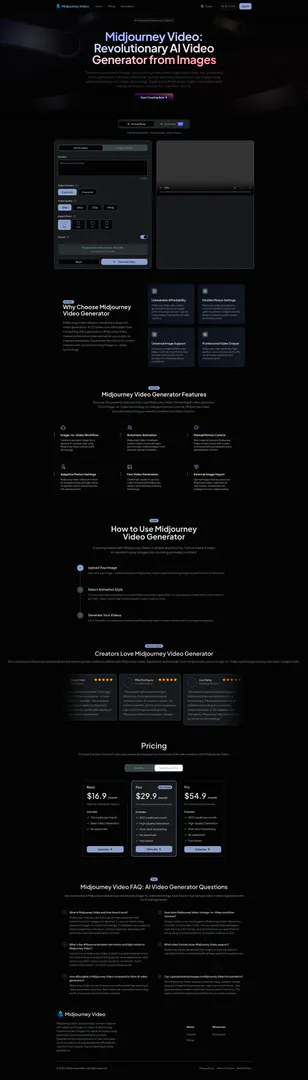




What is Midjourney Video?
Midjourney Video is an innovative AI video generator that transforms static images into stunning 5-second videos using advanced Image-to-Video technology. This revolutionary tool allows users to create professional-quality animated videos quickly and affordably, making it accessible for creators worldwide. With features like automatic and manual animation controls, Midjourney Video stands out as a leading solution in the AI video generation market, offering exceptional value at over 25 times cheaper than traditional video generators.
How to use Midjourney Video?
Using Midjourney Video is simple and intuitive. Follow these steps to create your animated videos: 1. Upload Your Image: Start with any image—create new ones in Midjourney Video or upload existing images as start frames for animation. 2. Select Animation Style: Choose between automatic animation for instant video generation or manual controls with custom motion prompts. Decide on low or high motion based on your creative vision. 3. Generate Your Videos: Click 'Animate' to create your professional Midjourney Video content instantly with stunning visual quality.
What are the main features of Midjourney Video?
Midjourney Video offers a range of powerful features that make it a top choice for AI video generation: - Image-to-Video Workflow: Transform any static image into a dynamic 5-second video using advanced AI technology. - Automatic Animation: The intelligent system creates motion prompts automatically, bringing images to life with natural movement. - Manual Motion Control: Users can direct exactly how their content moves with custom motion prompts and detailed scene controls. - Adaptive Motion Settings: Choose low motion for ambient scenes or high motion for dynamic action sequences with full camera control. - Fast Video Generation: Create high-quality 5-second videos instantly with optimized AI processing technology. - External Image Import: Upload images from any source, mark them as start frames, and animate them with intelligent motion understanding.
Who is Midjourney Video for?
Midjourney Video is designed for a wide range of users including digital artists, content creators, marketers, and businesses looking to enhance their visual storytelling. Its affordability and ease of use make it ideal for individual creators as well as teams seeking to produce high-quality video content without the high costs typically associated with video production. Whether for social media posts, marketing campaigns, or creative projects, Midjourney Video provides the tools necessary for anyone looking to innovate in video content creation.
What are the use cases of Midjourney Video?
Midjourney Video can be utilized in various scenarios, including: 1. Social Media Content Creation: Quickly transform images into engaging videos for platforms like Instagram, TikTok, and Facebook, enhancing user engagement. 2. Marketing Campaigns: Use animated videos to promote products or services, capturing audience attention with professional-quality visuals. 3. Creative Projects: Artists and designers can animate their artwork, bringing static images to life for portfolios or presentations.
Product Images

Midjourneyvideoai Pros and Cons
Pros
- Unbeatable Affordability: Midjourney Video offers video generation at about one image worth of cost per second, making it over 25 times cheaper than existing AI video solutions.
- Flexible Motion Settings: The tool provides options for low motion for ambient scenes and high motion for dynamic sequences, allowing for creative control over video animation.
- Universal Image Support: Users can upload any image to be animated, marking it as a start frame and customizing motion prompts for limitless creative possibilities.
Cons
No cons data detected for this tool
Midjourneyvideoai Pricing
Basic
Ideal for individual creators
Plus
Most Popular, for creators and professionals
Pro
For teams and businesses
For the latest pricing, please visit this link: https://midjourneyvideo.ai/en/#pricing
Prices are subject to change. Please visit the official website for the most up-to-date pricing information.
Analytics of Midjourneyvideoai
Midjourneyvideoai Website Traffic Analysis
Visits Over Time
Traffic Sources
Oct 2025 - Dec 2025 Worldwide Desktop Only
- Search: 41.20%
- Direct: 37.08%
- Referrals: 13.61%
- Social: 4.56%
- Paid Referrals: 1.90%
- Mail: 0.19%
Top Keywords
| Keyword | Volume | CPC | Estimated Value |
|---|---|---|---|
| ai goon video | 0 | $0.00 | $130.00 |
| midjourney video | 6.23K | $2.31 | $0.00 |
| mid journey al | 2.07K | $2.54 | $0.00 |
| midvideo | 1.34K | $0.00 | $20.00 |
| midjourney video generator | 900 | $2.59 | $270.00 |
Midjourneyvideoai Reviews
Midjourney Video is incredible! The Image-to-Video workflow is so intuitive - I create my art and press 'Animate'. The automatic animation feature makes my characters come alive instantly, and the affordability of Midjourney Video is unmatched.
The low and high motion settings in Midjourney Video give me complete creative control. For ambient scenes, low motion is perfect, and for action sequences, high motion brings everything to life. Midjourney Video is a true game-changer.
Being able to upload external images to Midjourney Video and animate them is revolutionary. The automatic and manual animation controls give us complete creative freedom. At 25x cheaper than alternatives, Midjourney Video transformed our entire content strategy.
For more reviews, visit this link: https://midjourneyvideo.ai/#success-stories