Useembers



What is Useembers?
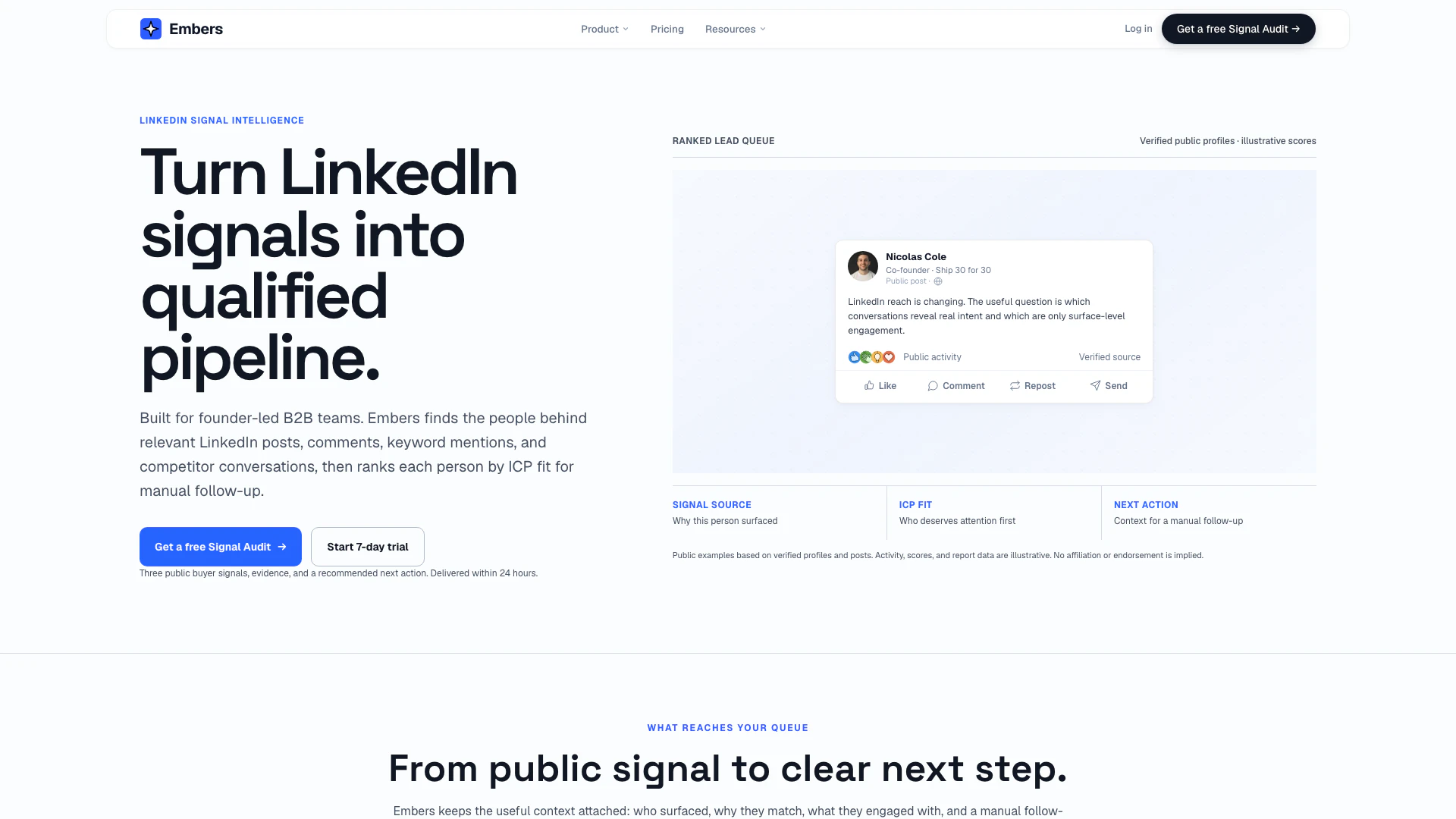
Useembers is an innovative LinkedIn lead generation tool designed to help businesses identify and engage with potential buyers through public LinkedIn activities. By analyzing posts, comments, keywords, and competitor conversations, Useembers provides valuable insights into buyer signals that can lead to qualified leads. The platform enables users to filter these signals against their Ideal Customer Profile (ICP), ensuring they focus on the most relevant prospects and facilitating personalized outreach.
How to use Useembers?
- Create an Account: Sign up for Useembers on their website and choose a plan that suits your needs.
- Paste Your LinkedIn Profile: Input your LinkedIn profile information into the platform to start generating leads.
- Set Up Signal Sources: Choose the types of public LinkedIn activities you want to track, such as posts, comments, and keywords relevant to your industry.
- Review Ranked Leads: Access your Today queue, where Useembers ranks leads based on fit, signal age, and follow-up status, allowing you to prioritize your outreach.
- Engage with Prospects: Use the personalized message drafts provided by Useembers to reach out to potential leads directly through LinkedIn.
What are the main features of Useembers?
- Four Signal Sources: Tracks various public LinkedIn activities including posts, comments, competitor engagement, and keyword mentions.
- Ranked Lead Queue: Provides a prioritized list of leads based on their relevance to your ICP and engagement signals.
- Contextual Insights: Each lead comes with detailed context about their engagement, helping you understand why they are worth contacting.
- Personalized Outreach: Drafts personalized messages based on the lead's activity, making outreach more effective.
- Integration Capabilities: Offers webhook support to connect lead updates and reports to your existing CRM or automation tools.
Who is Useembers for?
Useembers is designed for B2B sales teams, particularly founders and sales professionals looking to enhance their LinkedIn lead generation efforts. It is ideal for those who want to convert public engagement into actionable leads without the need for extensive automation or complicated processes. Whether you are a solo entrepreneur or part of a small sales team, Useembers helps you streamline your outreach by identifying high-intent prospects based on their LinkedIn activities.
What are the use cases of Useembers?
- Identifying Prospects: Useembers helps businesses find qualified leads by tracking relevant activities on LinkedIn, such as comments on industry-related posts or engagement with competitors.
- Enhancing Outreach: Sales professionals can utilize the personalized message drafts generated by Useembers to initiate conversations with potential buyers, increasing the chances of successful engagement.
- Monitoring Competitor Activity: Businesses can keep an eye on their competitors' public engagements to uncover new leads and understand market trends, allowing for strategic positioning.
Useembers Pros and Cons
Pros
- Comprehensive Signal Tracking: Embers tracks multiple sources of LinkedIn activity, including posts, comments, keywords, and competitor engagement, providing a holistic view of potential leads.
- Ranked Lead Queue: The tool organizes leads based on their fit and engagement context, allowing users to prioritize outreach effectively.
- Privacy and Security Focused: Embers does not require LinkedIn passwords or install browser extensions, ensuring user accounts remain secure and private.
Cons
- Limited Automation Features: While Embers provides valuable insights, it lacks automation features for sending messages or managing connections, requiring manual follow-up.
- Dependency on Public Data: The effectiveness of Embers relies on publicly available LinkedIn data, which may limit the depth of insights for private profiles.
- Learning Curve for New Users: Users may face a learning curve in understanding how to effectively utilize the various features and signal sources offered by Embers.
Useembers Pricing
Starter
For one profile. Includes monitoring of 1 LinkedIn profile, 3 competitors, and 10 keywords. Single-user workspace and standard reports.
Team
For three profiles. Includes monitoring of 3 LinkedIn profiles, 5 competitors, and 25 keywords. Contact information, invitations, and white-label reports.
For the latest pricing, please visit this link: https://useembers.com/pricing/
Prices are subject to change. Please visit the official website for the most up-to-date pricing information.