
Statementsheet





What is StatementSheet?
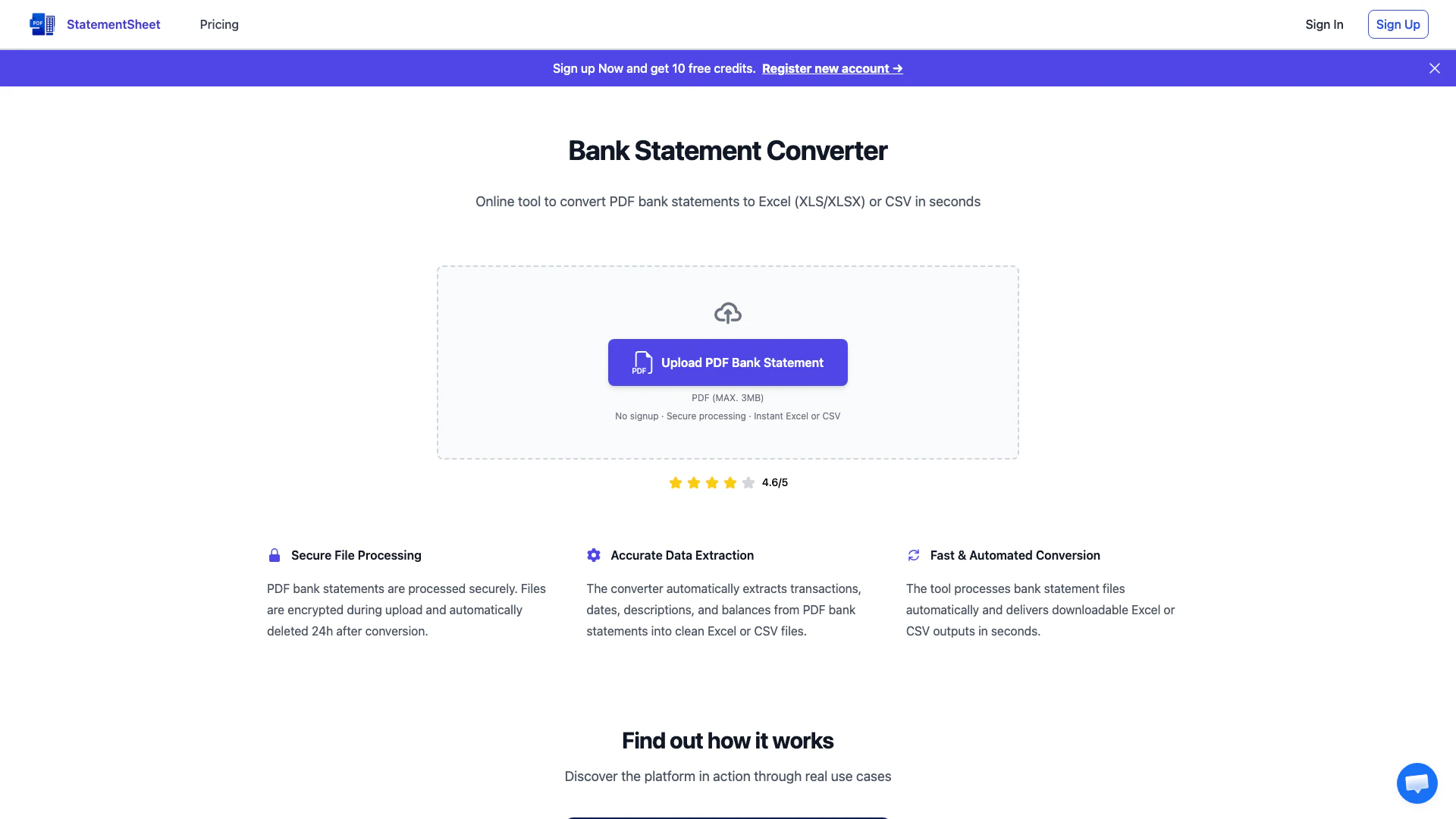
StatementSheet is an innovative online tool designed to convert PDF bank statements into structured formats like Excel (XLS/XLSX) or CSV files quickly and accurately. With its advanced data extraction capabilities, StatementSheet allows users to effortlessly transform their bank statements into usable spreadsheet formats, making financial management and analysis much simpler. The platform ensures secure processing of sensitive financial data, offering a user-friendly interface that requires no software installation or account creation. Users can expect fast, automated conversions that maintain the integrity of their data.
How to use StatementSheet?
- Visit the StatementSheet website and locate the bank statement converter tool.
- Upload your PDF bank statement by either dragging and dropping the file into the designated area or using the upload button.
- Wait as the converter processes the file, extracting all relevant transactions, dates, descriptions, and balances.
- Review the extracted data for accuracy, making adjustments if necessary.
- Download the final converted bank statement in either Excel or CSV format.
What are the main features of StatementSheet?
- Secure File Processing: Ensures that all uploaded PDF bank statements are encrypted and automatically deleted after 24 hours.
- Accurate Data Extraction: Automatically extracts essential data such as transactions, dates, descriptions, and balances into clean Excel or CSV files.
- Fast & Automated Conversion: Processes bank statement files in seconds, providing instant downloadable outputs.
- Support for Multi-page Statements: Can handle multi-page PDF bank statements, consolidating all data into a single structured file.
- No Account Required: Users can convert bank statements without the need to create an account or sign in.
Who is StatementSheet for?
StatementSheet is ideal for individuals, small business owners, accountants, and financial analysts who need to convert PDF bank statements into usable formats for budgeting, accounting, or financial analysis. It caters to users looking for a quick and efficient solution to manage their financial data without the hassle of complex software installations or lengthy sign-up processes. Whether for personal finance tracking or professional accounting purposes, StatementSheet provides a secure and straightforward way to handle bank statement conversions.
What are the use cases of StatementSheet?
- Personal Finance Management: Individuals can convert their bank statements to Excel or CSV for easier tracking of expenses and budgeting.
- Accounting and Bookkeeping: Accountants can quickly convert client bank statements for accurate financial reporting and analysis.
- Data Analysis: Financial analysts can extract data from bank statements for further analysis, trend identification, and reporting.
Product Images
Statementsheet Pros and Cons
Pros
- Accurate Data Extraction: The tool automatically extracts transactions, dates, descriptions, and balances from PDF bank statements into clean Excel or CSV files, ensuring high accuracy.
- Fast Conversion Process: StatementSheet processes bank statement files automatically and delivers downloadable Excel or CSV outputs in seconds, enhancing user efficiency.
- Secure File Processing: Files are encrypted during upload and automatically deleted 24 hours after conversion, ensuring the security of sensitive financial data.
Cons
No cons data detected for this tool
Statementsheet Pricing
Basic
400 pages / month Email Support
Essential
1000 pages / month Email Support
Professional
3000 pages / month Priority Support
Enterprise
Customized for your needs.
For the latest pricing, please visit this link: https://statementsheet.com/en/pricing/
Prices are subject to change. Please visit the official website for the most up-to-date pricing information.
Analytics of Statementsheet
Statementsheet Website Traffic Analysis
Visits Over Time
Traffic Sources
Nov 2025 - Jan 2026 Worldwide Desktop Only
- Social: 33.08%
- Search: 32.82%
- Direct: 26.10%
- Referrals: 6.62%
- Paid Referrals: 1.25%
- Mail: 0.11%
Top Keywords
| Keyword | Volume | CPC | Estimated Value |
|---|---|---|---|
| can i download truist bank statement | 0 | $0.00 | $200.00 |
| does rbc have the annual 1099 data on csv files for the tax preparers? | 0 | $0.00 | $190.00 |
| how to custome extrract transactions from monzo account for taxes | 0 | $0.00 | $150.00 |
| rbc csv export | 0 | $0.00 | $150.00 |
| how to export bank statements as csv bmo | 150 | $0.00 | $140.00 |





