Sora Image To Video Artin - Chrome Extension





What is Sora Image To Video?
Sora Image To Video is a revolutionary browser extension powered by Arting AI that transforms images into engaging videos. This innovative tool allows users to upload a single image and generate a video based on that content, leveraging advanced AI technology to enhance creativity. Sora Image To Video streamlines the video creation process, making it accessible for users of all skill levels, from casual creators to professional content makers.
How to use Sora Image To Video?
- Install the Sora Image To Video extension from the Chrome Web Store.
- Open the extension and upload your original image.
- Input a descriptive prompt that guides the AI in generating the video.
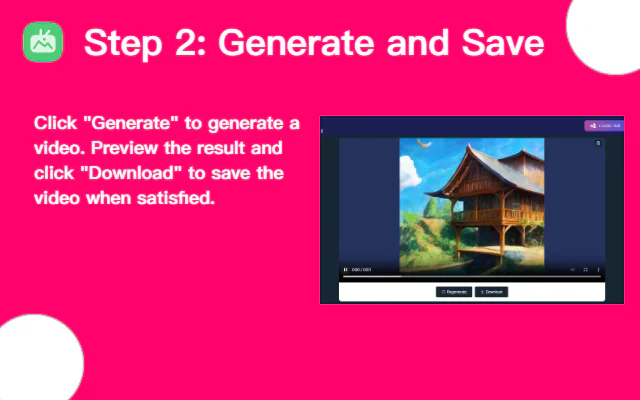
- Click the 'Generate' button to start the video creation process.
- Once the video is generated, review the results and download your newly created video.
What are the main features of Sora Image To Video?
- AI-powered video generation from uploaded images.
- User-friendly interface for easy image uploading and prompt input.
- Fast rendering of videos with high-quality output.
- Ability to generate videos in multiple languages.
- Supports user creativity with customizable prompts for varied results.
Who is Sora Image To Video for?
Sora Image To Video is designed for a wide range of users, including content creators, marketers, educators, and anyone looking to produce engaging video content quickly. It is ideal for individuals who may not have advanced video editing skills but want to leverage AI technology to create visually appealing videos from their images. This tool is also suitable for businesses aiming to enhance their visual storytelling and marketing efforts.
What are the use cases of Sora Image To Video?
- Creating promotional videos for products or services using original images.
- Developing educational content that transforms static images into dynamic video presentations.
- Crafting social media content that captures attention through creative video formats.
- Generating personalized video greetings or messages by converting personal images into videos.
- Enhancing storytelling in blogs or websites by embedding videos created from relevant images.