Replypulse




What is Replypulse?
Replypulse is an innovative AI reply generator specifically designed for enhancing engagement on X/Twitter. This Chrome Extension leverages advanced artificial intelligence to create human-like, engaging replies that help users grow their presence and interaction on the platform. By providing personalized responses tailored to individual conversations, Replypulse allows users to connect more effectively with their audience, leading to increased visibility and follower growth on X/Twitter.
How to use Replypulse?
- Install the Replypulse Chrome Extension from the Chrome Web Store.
- Sign up for an account and start your 7-day free trial.
- Provide context and keywords for the reply you want to generate.
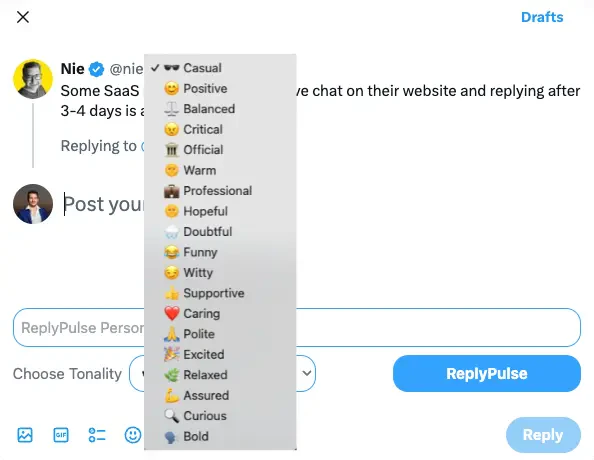
- Choose the desired tonality (formal, friendly, humorous, etc.) for your response.
- Click 'Generate Reply' to create an engaging, personalized response ready for use on X/Twitter.
What are the main features of Replypulse?
- AI-Powered Reply Generation: Quickly generates relevant and engaging replies using AI.
- Personalized Context Input: Users can provide context and keywords to ensure replies are tailored to their conversations.
- Adjustable Tonality: Choose from various tones such as formal, friendly, humorous, or professional to match your communication style.
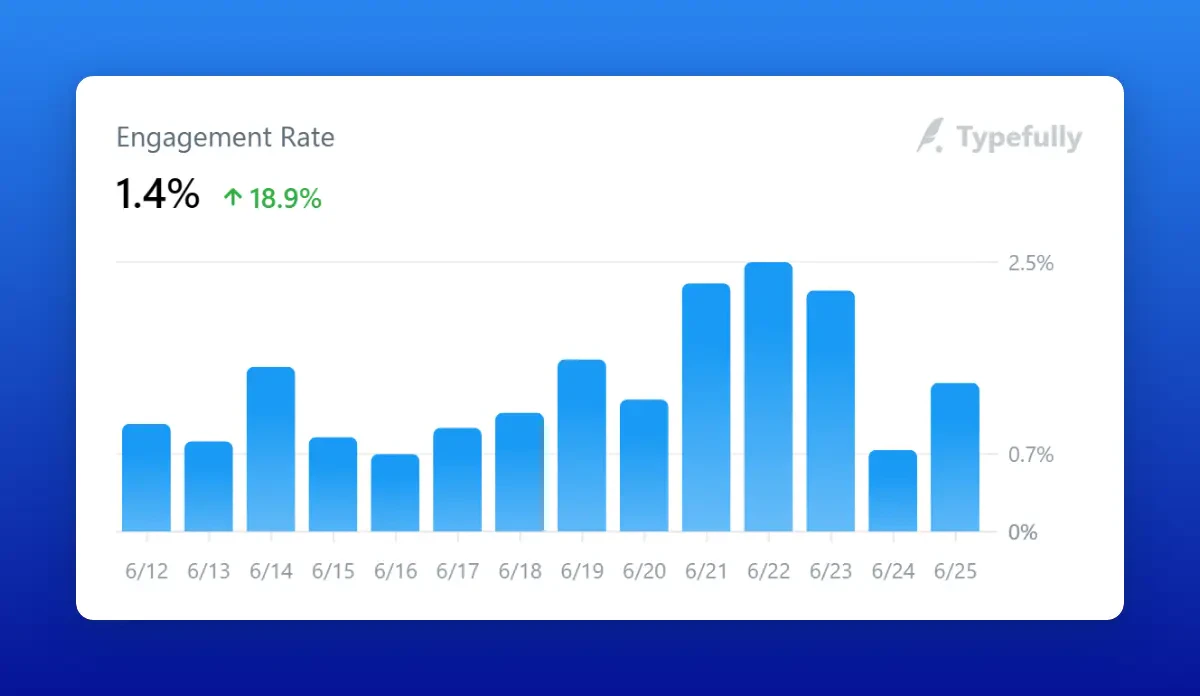
- Engagement Tracking: Monitor improvements in engagement rates, impressions, and follower growth.
- User-Friendly Interface: Easy-to-navigate design for seamless interaction and reply generation.
Who is Replypulse for?
Replypulse is designed for individuals, small businesses, and professionals looking to enhance their presence on X/Twitter. It is particularly beneficial for content creators, marketers, and anyone aiming to improve their engagement and interaction with followers. By utilizing AI-generated replies, users can save time and increase their effectiveness in communication, making it an ideal tool for those wanting to grow their audience and foster meaningful connections.
What are the use cases of Replypulse?
- Content Engagement: Generate replies to tweets that boost interaction and visibility for posts.
- Brand Management: Craft personalized responses to customer inquiries or feedback on X/Twitter, enhancing brand image.
- Community Building: Use tailored replies to foster a sense of community among followers, encouraging discussion and loyalty.
- Marketing Campaigns: Create engaging replies for promotional tweets, increasing the effectiveness of marketing efforts.
- Networking: Respond to industry-related tweets with thoughtful replies, establishing connections with influencers and peers.
Product Images


Replypulse Pros and Cons
Pros
- AI-Powered Engagement: ReplyPulse utilizes AI to generate smart and personalized replies, enhancing user engagement on X/Twitter.
- Adjustable Tonality: Users can choose from various tones such as formal, friendly, or humorous, ensuring replies match the intended mood.
- Free Trial Availability: A 7-day free trial allows users to test the service without any credit card, making it accessible for new users.
Cons
No cons data detected for this tool
Replypulse Pricing
Starter
For individuals and small businesses. Enjoy 2 Months FREE.
Pro
For professionals and growing businesses. Enjoy 2 Months FREE.
Lifetime
Limited Offer. Use your own OpenAI Key. Pay once and use forever.
For the latest pricing, please visit this link: https://replypulse.com/#pricing
Prices are subject to change. Please visit the official website for the most up-to-date pricing information.
Replypulse Reviews
This is literally the only tool you need to grow on X! The responses are so good and the fact that you can provide context before generating a response is a game changer. Highly recommend this for anyone looking to grow their audience.
Kinda fire I'm not going to lie! I found this on twitter used it and was impressed. I cant wait for more features to be added to this product cheers!!!!
ReplyPulse helped me find the inspiration to reply to the tweets I wanted to participate in. It's easy to use and really allows you to create a tailored response based on how you feel and what the person has posted.
For more reviews, visit this link: https://www.replypulse.com/#testimonials