Livetoka





What is LiveToka?
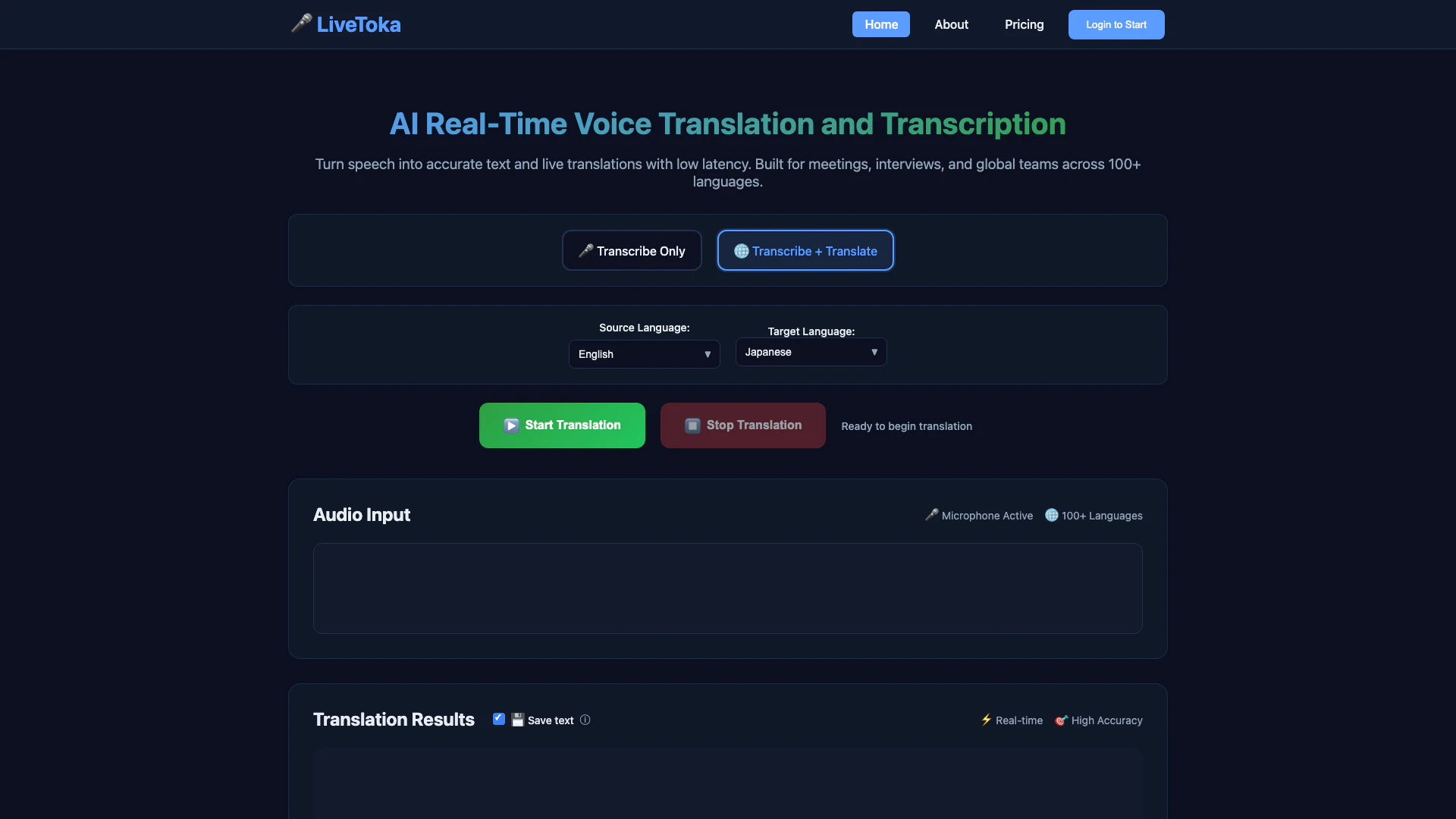
LiveToka is an advanced AI-powered tool designed for real-time voice translation and transcription. It enables users to convert spoken language into accurate text and live translations with minimal latency, making it ideal for meetings, interviews, and support teams. Supporting over 100 languages, LiveToka prioritizes privacy with secure processing, ensuring that user data remains confidential. This tool is designed to enhance communication across diverse linguistic backgrounds, allowing teams to collaborate seamlessly and efficiently.
How to use LiveToka?
- Go to the LiveToka website and click on 'Start Translation'.
- Allow the browser to access your microphone for audio input.
- Select your source and target languages from the dropdown menus.
- Begin speaking into the microphone to see real-time transcription and translation results appear on the screen.
- You can switch between transcription and translation modes anytime during your session.
What are the main features of LiveToka?
- Real-Time Transcription and Translation: Instantly convert spoken language into text and translated output with low latency.
- Multilingual Support: Offers translation and transcription in over 100 languages, covering major language pairs worldwide.
- AI-Powered Accuracy: Utilizes advanced speech recognition and AI translation technologies for high accuracy and contextually relevant translations.
- Meeting Summaries: Automatically generates action items, decisions, and key points for effective follow-ups.
- Exportable Transcripts: Allows users to save and export transcripts in formats like CSV or JSON for further use.
Who is LiveToka for?
LiveToka is designed for a diverse range of users including corporate teams, educational institutions, and support organizations. It is particularly beneficial for businesses conducting international meetings, educators delivering lectures in multilingual classrooms, and customer support teams interacting with clients from different linguistic backgrounds. The tool enhances communication by providing real-time translations and transcriptions, making it suitable for anyone needing to break down language barriers in their professional or educational environments.
What are the use cases of LiveToka?
- Corporate Meetings: Facilitating multilingual discussions in international business meetings to ensure all participants understand and contribute effectively.
- Online Education: Enhancing the learning experience in virtual classrooms by providing real-time captions and translations for students from various linguistic backgrounds.
- Customer Support: Allowing support teams to communicate seamlessly with clients in their preferred languages, improving customer satisfaction and service efficiency.
Product Images



Livetoka Pros and Cons
Pros
- Real-Time Translation and Transcription: LiveToka offers live, low-latency voice translation and transcription, making it ideal for meetings and interviews across 100+ languages.
- High Accuracy Voice Recognition: The tool utilizes advanced speech recognition technology, ensuring industry-leading accuracy for transcriptions and translations.
- Privacy-First Processing: LiveToka prioritizes user privacy, processing data securely without storing voice recordings or personal conversations.
Cons
No cons data detected for this tool
Livetoka Pricing
Starter
Great for individuals. Includes transcription up to 600 min OR translation up to 300 min, all language pairs, real-time translation, translation history, and email support.
Professional
Perfect for businesses. Includes transcription up to 1500 min OR translation up to 750 min, all language pairs, real-time translation, translation history, session data export (CSV, JSON), and priority support.
Business
For growing teams. Includes transcription up to 3000 min OR translation up to 1500 min, all language pairs, real-time translation, translation history, session data export (CSV, JSON), and priority support.
Business Plus
For large organizations. Includes transcription up to 8000 min OR translation up to 4000 min, all language pairs, real-time translation, translation history, session data export (CSV, JSON), and priority support.
Enterprise
For enterprise organizations. Includes custom minute packages, volume discounts, dedicated account manager, custom integrations, SLA guarantees, white-label options, and training & onboarding.
For the latest pricing, please visit this link: https://livetoka.com/pricing.html
Prices are subject to change. Please visit the official website for the most up-to-date pricing information.
Livetoka Reviews
LiveToka gave us bilingual captions for our weekly demos without changing our Zoom flow. The transcript + summary saves an hour after every call.
Latency is low enough that our agents and customers can talk naturally. Exporting CSV/JSON lets us coach with real data.
I switch between transcription and translation in the same lecture. Students love the readable, punctuated transcript and bilingual export.
For more reviews, visit this link: https://livetoka.com/#what-users-say