Translate Dub





What is Translate Dub?
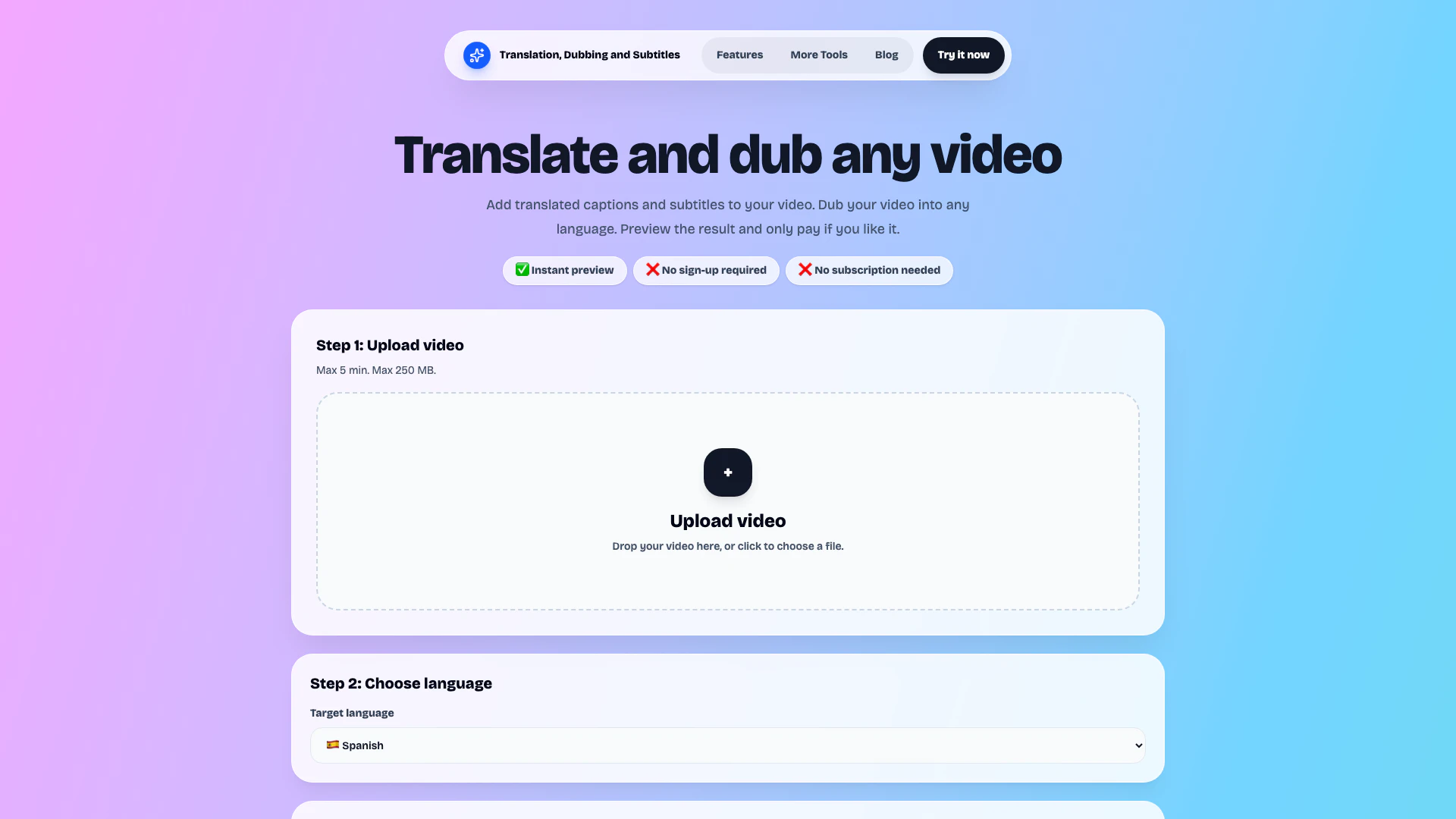
Translate Dub is an innovative AI-powered tool designed to help users translate and dub their videos effortlessly. By allowing users to add translated captions and dubbed voiceovers in various languages, it enhances the accessibility of video content for a global audience. With no signup or subscription required, users can easily upload their videos, select target languages, and generate previews to ensure satisfaction before making a purchase.
How to use Translate Dub?
- Upload your video: Choose a video file up to 5 minutes long and 250 MB in size.
- Select a language: Pick the target language you want to translate your video into.
- Choose your output: Decide whether you want translated captions, dubbed audio, or both.
- Generate a preview: Create a short preview of your translated video to review.
- Download the full video: If satisfied with the preview, proceed to pay and download the completed translated video.
What are the main features of Translate Dub?
- Instant preview of translated videos
- No signup or subscription required
- Flexible output options: translated captions, dubbed audio, or both
- Multiple supported languages for translation and dubbing
- Easy-to-use interface for video localization
- Pay-per-download model for convenience
- Customizable caption styles and dubbed voice options
Who is Translate Dub for?
Translate Dub is ideal for a variety of users including content creators looking to reach international audiences on platforms like TikTok, YouTube, and Instagram; businesses needing to localize product demos and training materials; online educators aiming to make their content accessible to students in different languages; coaches and consultants wanting to expand their reach; and social media teams testing translated video content efficiently without the need for extensive localization resources.
What are the use cases of Translate Dub?
- Translating educational videos for diverse student populations.
- Localizing marketing content and advertisements to engage international customers.
- Creating multilingual tutorials and product demonstrations for global audiences.
Translate Dub Pros and Cons
Pros
- Instant Preview Feature: Users can generate a preview of their translated video before making a purchase, allowing them to assess the quality of the translation and dubbing.
- No Signup Required: The tool allows users to upload videos and generate previews without the need for account creation, simplifying the process.
- Flexible Output Options: Translate Dub offers various output options, including translated captions, dubbed audio, or both, catering to different user needs.
Cons
No cons data detected for this tool
Translate Dub Pricing
Translated captions only
Keep the original audio and add translated captions.
Dubbed voice only
Replace the original audio with dubbed voice.
Dubbed voice + captions
Dub the voice and add translated captions.
For the latest pricing, please visit this link: https://translate-dub.com/#upload
Prices are subject to change. Please visit the official website for the most up-to-date pricing information.