

Intersub





What is InterSub?
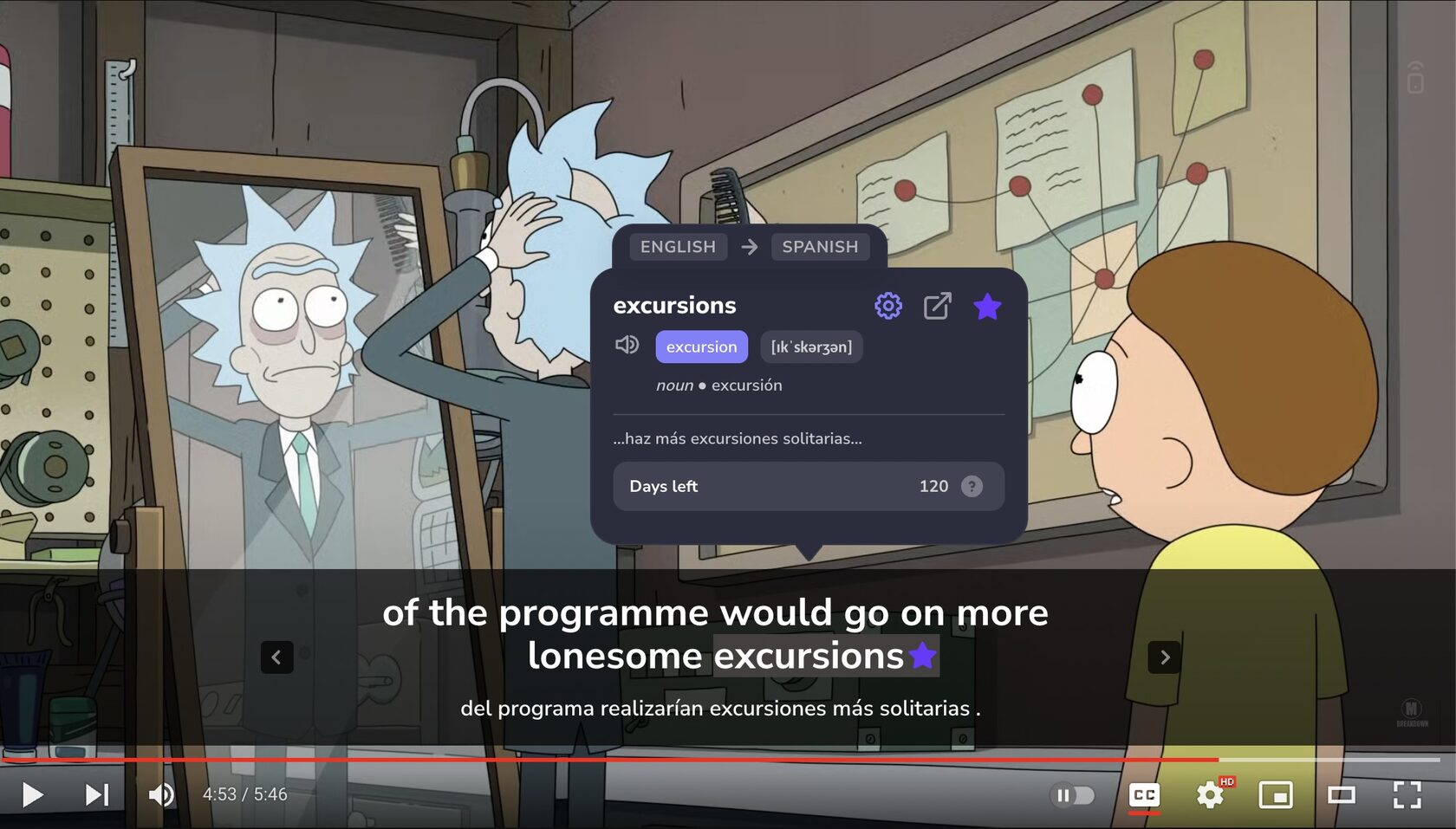
InterSub is an innovative browser extension designed to enhance language learning through interactive dual subtitles and instant word translations. It allows users to watch videos on popular streaming platforms like YouTube, Netflix, and TED with subtitles in both their native and target languages. This tool is perfect for anyone looking to improve their language skills effortlessly while enjoying their favorite content.
How to use InterSub?
- Install the InterSub browser extension from the official website or your browser's extension store. 2. Open a video on supported platforms like YouTube or Netflix. 3. Enable the InterSub extension to activate dual subtitles in your native and target languages. 4. Hover over any word in the subtitles to see an instant translation and definition. 5. Save new words to your personal wordbook for future reference.
What are the main features of InterSub?
- AI-assisted Dual Subtitles: Watch videos with subtitles in both your target language and native language side-by-side.
- Instant Translations: Get immediate translations by hovering over any word in the subtitles.
- Personal Wordbook: Automatically save all translated words to your personal vocabulary list for easy review.
- Multi-Platform Support: Compatible with YouTube, Netflix, Prime Video, TED, Coursera, Udemy, and more.
- Collocation Detection: Advanced AI recognizes phrasal verbs and idioms to enhance understanding.
Who is InterSub for?
InterSub is tailored for language learners of all levels, from beginners to advanced users. It is particularly beneficial for those who enjoy watching videos in their target language, as it provides a seamless way to learn vocabulary and phrases in context. Whether you are a student, a professional looking to improve language skills, or a casual learner, InterSub offers a practical solution to enhance your language acquisition.
What are the use cases of InterSub?
- Watching Movies and TV Shows: Enhance your understanding of dialogue in films and series by using dual subtitles.
- Online Courses: Utilize InterSub while taking courses on platforms like Coursera or Udemy to grasp complex terminology and concepts.
- Language Practice: Regularly watch content in your target language to reinforce learning and improve listening skills.
Product Images




Intersub Pros and Cons
Pros
- Multi-Platform Support: InterSub works on popular platforms like YouTube, Netflix, Prime Video, and more, allowing users to learn languages while watching their favorite shows.
- AI-Assisted Dual Subtitles: The AI-powered feature provides dual subtitles in the user's native and target languages, enhancing comprehension.
- Instant Translations: Users can hover over words in subtitles for instant definitions and context translations, making it easier to learn on the go.
- Personal Wordbook: All translated words are saved in a personal vocabulary list for easy review and reinforcement of learning.
- Free Trial Available: InterSub offers a free trial period for users to experience the benefits before committing to a subscription.
Cons
- Limited Browser Compatibility: Currently, InterSub is only available as a browser extension for Chrome, Edge, and Firefox, which may limit accessibility for some users.
- Requires Internet Connection: InterSub depends on an internet connection to function effectively, limiting offline usage.
Analytics of Intersub
Intersub Website Traffic Analysis
Visits Over Time
Traffic Sources
Oct 2025 - Dec 2025 Worldwide Desktop Only
- Direct: 48.13%
- Search: 40.63%
- Referrals: 6.98%
- Social: 3.32%
- Paid Referrals: 0.75%
- Mail: 0.12%
Top Keywords
| Keyword | Volume | CPC | Estimated Value |
|---|---|---|---|
| chrome extension for youtube subtitles for language learning | 0 | $0.00 | $190.00 |
| dual subtitles | 2.03K | $2.67 | $320.00 |
| intersub | 630 | $0.00 | $430.00 |
| двойные субтитры | 280 | $0.00 | $160.00 |
| double subtitles extension | 220 | $0.00 | $150.00 |




Intersub Social Listening
被字幕組認證的字幕神器 AegiSub / 雙語字幕 + 卡...
► 內容綱要 00:00 開場白 01:03 建立/匯入字幕...
LingoPie Review (Is It Worth I...
CHECK OUT LANGUAGE PROGRAMS ↓↓...
【2025】别再“啃生肉”了!免费开源!这个AI视频翻译神器...
👉最强AI视频翻译神器:https://filmora.g...
Unlock to view 21 social media results.