Heatbot




What is Heatbot?
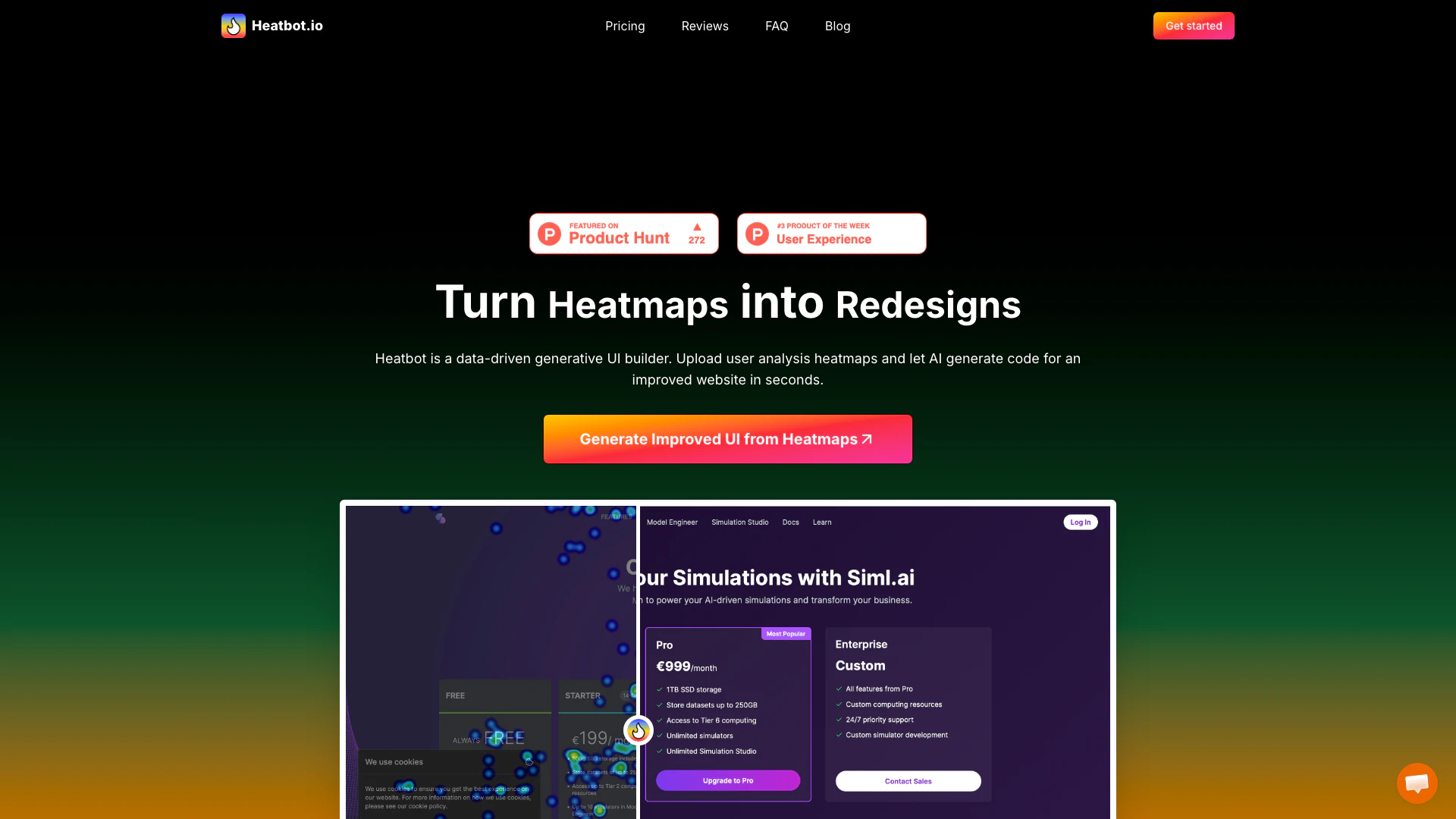
Heatbot is an innovative AI-powered tool designed to transform heatmap data into enhanced website designs. By utilizing user interaction heatmaps, Heatbot intelligently generates code for improved user interfaces in a matter of seconds. This data-driven generative UI builder simplifies the complex process of redesigning websites based on user behavior, enabling businesses to optimize their online presence effectively.
How to use Heatbot?
- Upload website screenshot: Capture a screenshot of the specific UI or the entire website section you wish to enhance.
- Upload heatmap image: Provide an image of the heatmap from your tracking software, ensuring it corresponds to the same area as your website screenshot.
- Set goals for improvement: Choose from a library of predefined goals or create your own to guide the AI in generating the improved UI.
- Generate improved UIs: Let Heatbot analyze the heatmap data and improvement goals to create an optimized HTML/CSS/JavaScript code, along with a detailed improvement report.
What are the main features of Heatbot?
- Data-driven UI generation: Automatically generate improved user interfaces based on heatmap analysis.
- Multiple framework support: Generate code using popular frameworks like Bootstrap, Tailwindcss, and Foundation.
- Customizable improvement goals: Users can select predefined goals or create custom ones to tailor the redesign process.
- Comprehensive reports: Receive detailed improvement reports alongside the generated code.
- User-friendly interface: Simplified steps for uploading screenshots and heatmaps make the process accessible for all users.
Who is Heatbot for?
Heatbot is ideal for UX designers, web developers, marketers, and business stakeholders who seek to enhance their website's performance through data-driven insights. It caters to individuals and teams looking to optimize user experience and conversion rates by leveraging heatmap data effectively. Whether for small projects or larger enterprises, Heatbot provides the tools necessary for improving website designs based on actual user interactions.
What are the use cases of Heatbot?
- E-commerce optimization: Enhance product pages by analyzing user interaction patterns to improve conversion rates.
- Landing page redesign: Utilize heatmap data to refine landing pages for better user engagement and lead generation.
- User experience testing: Implement iterative design changes based on heatmap insights to create a more user-friendly interface.
Product Images


Heatbot Pros and Cons
Pros
- AI-Powered UI Generation: Heatbot utilizes AI to analyze heatmap data and generate improved HTML/CSS/JavaScript code, streamlining the redesign process.
- Integration with Popular Tools: It works seamlessly with various heatmap tools like Hotjar, Mouseflow, and CrazyEgg, enhancing its usability for users already using these platforms.
- Customizable Improvement Goals: Users can set predefined or custom goals for UI improvements, allowing for tailored solutions based on specific needs.
Cons
No cons data detected for this tool
Heatbot Pricing
Heatbot.io Basic Plan
Great for individuals and small projects using Bootstrap. 1 user seat, up to 2 projects, 1350 credits per month included (non-transferable), generate HTML, CSS, and JavaScript, use plain CSS or Bootstrap, select from pre-defined improvement goals.
Heatbot.io Pro Plan
Perfect for power users, teams and small businesses. Includes 3 seats, up to 15 projects, 4350 credits per month included (non-transferable), all features from Basic, use Bootstrap, Tailwindcss, Foundation, and other popular frameworks, pre-defined & custom improvement goals, generate comprehensive improvement report, switch between AI models, priority support.
Enterprise
Businesses that require more power and custom solutions. Unlimited seats, unlimited projects, unlimited generations per day, all features from Pro, custom integration development, 24/7 support, SSO (SAML 2.0).
For the latest pricing, please visit this link: https://heatbot.io/#pricing
Prices are subject to change. Please visit the official website for the most up-to-date pricing information.
Analytics of Heatbot
Heatbot Website Traffic Analysis
Visits Over Time
Traffic Sources
Dec 2025 - Dec 2025 Worldwide Desktop Only
- Direct: 41.92%
- Search: 32.36%
- Referrals: 12.68%
- Social: 10.02%
- Paid Referrals: 1.90%
- Mail: 0.21%
Top Keywords
| Keyword | Volume | CPC | Estimated Value |
|---|---|---|---|
| hotjar heatmap | 1.66K | $5.00 | $0.00 |
| hotjar heatmaps | 990 | $0.00 | $0.00 |
| ai chatbot for heat | 140 | $0.00 | $0.00 |
| ai heatmap website | 140 | $0.00 | $0.00 |
| hotjar figma prototype | 110 | $0.00 | $0.00 |
Heatbot Reviews
Often looked at heatmaps and had a hard time figuring out the best changes to make based on the data patterns. Sounds like you've found a solution to this!
Heatbot is going places!! 😍🔥
Excited to see what Heatbot will achieve soon! 🔥 Automatically improving conversions with heatmap results could be a game-changer. 🚀
For more reviews, visit this link: https://heatbot.io#reviews