

Avclabs


What is AVCLabs?
AVCLabs Video Enhancer[1] AI is a cutting-edge software tool designed to intelligently restore and enhance the quality of videos. Utilizing advanced AI technologies, it effectively improves video clarity, colorizes black and white footage, and upscales video resolutions from SD to HD, 720p to 1080p, and even up to 8K. This powerful tool is perfect for users looking to revitalize old video content, enhance the quality of personal footage, or produce professional-grade video restoration[3]s.
How to use AVCLabs?
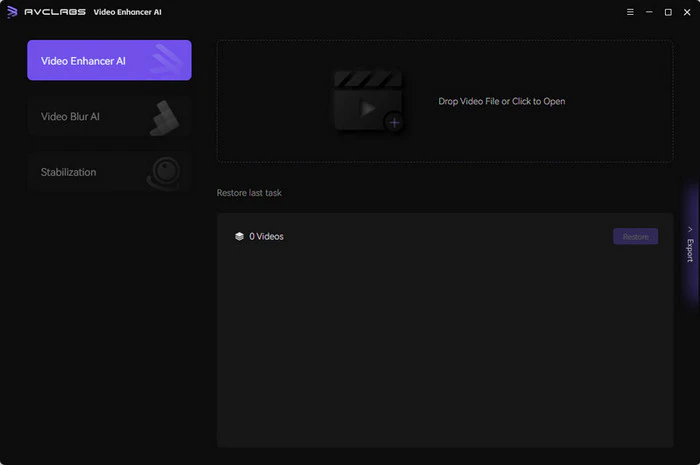
- Add SD, Blurry or Damaged Videos: Click the 'Browse' button to import videos or drag and drop source videos directly into the program.
- Choose the AI Model[2] and Resolution: On the right panel of AVCLabs Video Enhancer AI, select the desired AI Model, Video Resolution, and Video Format.
- Start AI Enhancing Videos: After configuring the parameters, click the 'Export' button to render the video. Once completed, you can access the final video in a better view.
What are the main features of AVCLabs?
- Video Restoration: Restores clarity to blurry, overexposed, or low-resolution videos.
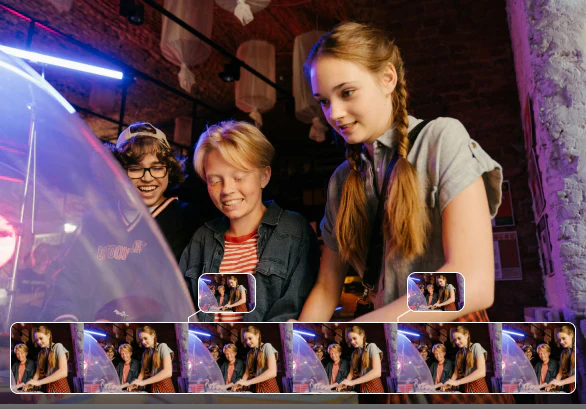
- Upscaling[4]: Upscales video from SD to HD, 720p to 1080p, 1080p to 4K, and even 8K.
- Colorization[5]: Automatically colorizes black-and-white videos using deep learning.
- Frame Interpolation[6]: Increases frame rates for smoother video playback.
- AI Face Enhancement: Improves facial clarity in videos.
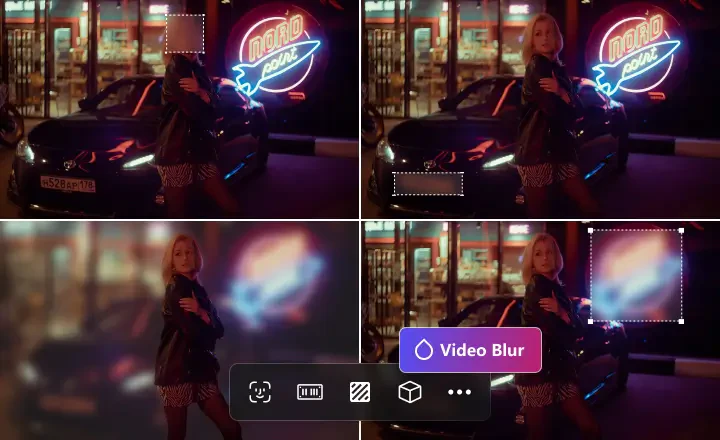
- Video Stabilization: Stabilizes shaky footage for smoother playback.
- Batch Processing: Allows processing of multiple files simultaneously.
Who is AVCLabs for?
AVCLabs Video Enhancer AI is designed for a wide range of users, including video editors, content creators, historians, and anyone looking to enhance their video quality. It is particularly beneficial for those working with old footage, low-resolution videos, or content requiring restoration. Whether for personal use, professional video production, or archival purposes, this tool caters to various needs across different industries.
What are the use cases of AVCLabs?
- Restoring Old Home Videos: Revitalize deteriorated family footage for preservation.
- Enhancing Historical Documentaries: Improve the quality of archival videos for better viewing experiences.
- Upscaling Gaming Footage: Enhance video quality of recorded gameplay for streaming or sharing.
Product Images




Avclabs Pros and Cons
Pros
- Advanced AI Video Enhancement: AVCLabs Video Enhancer AI utilizes advanced AI models such as CNN, RNN, and LSTM to intelligently restore and enhance video quality, making it suitable for various video types.
- High-Resolution Upscaling: The tool can upscale videos from SD to HD, 720p to 1080p, and even 4K or 8K, ensuring high-quality output for modern displays.
- User-Friendly Interface: AVCLabs offers a simple and intuitive interface that allows users of all skill levels to enhance videos without needing extensive technical knowledge.
- Local Processing for Privacy: The software processes videos locally, ensuring user privacy and eliminating concerns about data exposure associated with cloud-based services.
Cons
No cons data detected for this tool
Avclabs Pricing
1-Month Plan
Auto-Renew. Cancel Anytime. 1-License for 1-PC. 5 Days Money Back Guarantee. Free Update & 24/7 Support.
1-Year Plan
Auto-Renew. Cancel Anytime. 1-License for 1-PC. 5 Days Money Back Guarantee. Free Update & 24/7 Support.
Perpetual Plan
One-Time Payment. 1-License for 1-PC. 30 Days Money Back Guarantee. Free Update & 24/7 Support.
For the latest pricing, please visit this link: https://www.avclabs.com/purchase.html
Prices are subject to change. Please visit the official website for the most up-to-date pricing information.
Analytics of Avclabs
Avclabs Website Traffic Analysis
Visits Over Time
Traffic Sources
Nov 2025 - Jan 2026 Worldwide Desktop Only
- Search: 50.77%
- Direct: 36.39%
- Referrals: 8.56%
- Social: 3.24%
- Paid Referrals: 0.91%
- Mail: 0.11%
Top Keywords
| Keyword | Volume | CPC | Estimated Value |
|---|---|---|---|
| ytmp3 | 1.14M | $0.49 | $380.00 |
| avclabs video enhancer ai | 8.55K | $1.47 | $2820.00 |
| avclabs | 3.72K | $1.51 | $1840.00 |
| 4k video converter | 2.68K | $0.38 | $370.00 |
| avclabs photopro ai | 1.58K | $0.00 | $1040.00 |
Avclabs Reviews
This is just a quick email to say how impressed I am with this software. I have been trying various products to restore/enhance my very old camcorder footage which has deteriorated over the years. By far, your software is the best. Well done.
I run a video forensics lab. I have a new case and just completed a side-by-side comparison of your results to those of all my existing tools, and yours was the clearest. I like the ability to set a start-end processing frame range and the overall speed improvements.
Completely impressed with the software. For my line of work, this software helped me enhance my videography. Would definitely recommend this software to anyone interested in making they're videos look pristine.
For more reviews, visit this link: https://www.avclabs.com/video-enhancer-ai.html#reviews




Avclabs Social Listening
4K High Quality Tutorial | AVC...
Free download AVCLabs Video En...
Sharpen & Upscale Videos to 4K...
Check out the latest AI video:...
Using AI to enhance your video...
Check out Video Enhancer AI: h...
Unlock to view 34 social media results.