

Voicemaker



What is Voicemaker?
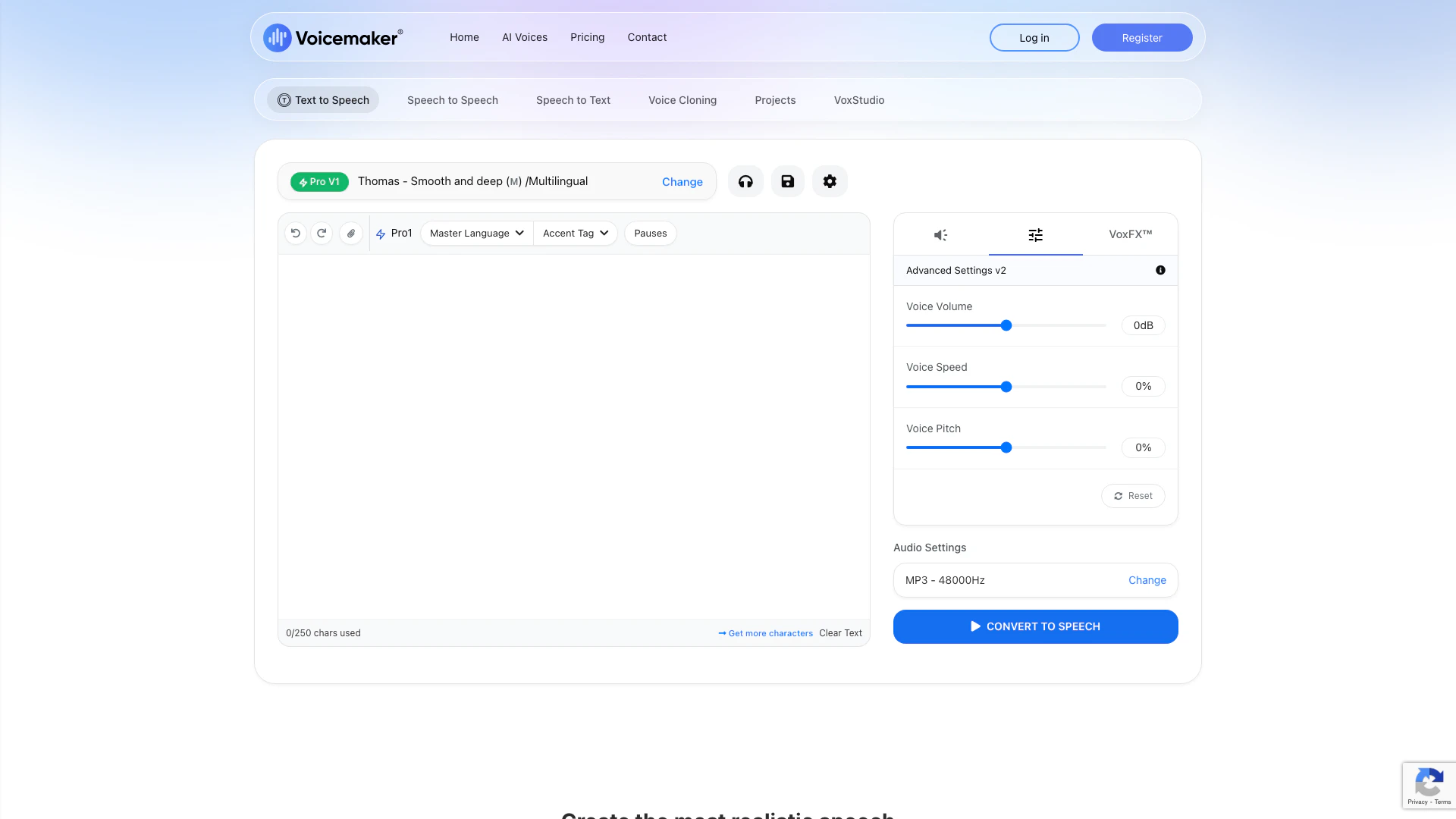
Voicemaker is an advanced text-to-speech (TTS) converter that transforms written text into ultra-realistic speech. It offers over 1,000 AI-generated voices across 130 languages, allowing users to create high-quality audio content for various applications, including YouTube Shorts, videos, and presentations. Voicemaker is designed for versatility, enabling users to download TTS audio files in popular formats like MP3 and WAV, making it an essential tool for content creators, educators, and businesses.
How to use Voicemaker?
- Visit the Voicemaker website and sign up for an account.
- Choose the type of voice you want from the extensive library of AI voices.
- Enter the text you wish to convert into speech in the provided text box.
- Adjust settings such as pitch, speed, and volume according to your preferences.
- Click on the 'Generate Speech' button to create your audio file.
- Download the generated audio in your preferred format (MP3 or WAV) for use in your projects.
What are the main features of Voicemaker?
- Over 1,000 AI voices in 130 languages for diverse applications.
- High-resolution audio quality (48 kHz, 16-bit PCM) for professional use.
- Multiple audio format options including MP3, WAV, OGG, AAC, and OPUS.
- Pronunciation editor to customize voice output for names and complex terms.
- Cloud storage for easy access to projects across devices.
- Speech-to-speech capabilities for transforming existing audio into different voices.
- AI dubbing feature for instant translation and dubbing in multiple languages.
Who is Voicemaker for?
Voicemaker is ideal for a wide range of users, including content creators, educators, marketers, and businesses looking to enhance their audio content. It serves those who require high-quality voiceovers for videos, presentations, e-learning materials, and more. With its extensive library of voices and languages, Voicemaker caters to professionals in various industries, including entertainment, education, and corporate training.
What are the use cases of Voicemaker?
- Creating voiceovers for YouTube videos and social media content.
- Developing engaging e-learning modules and educational resources.
- Producing audio versions of articles and blog posts for accessibility.
- Generating automated customer support responses and IVR systems.
- Dubbing films and videos in multiple languages for a global audience.
Product Images







Voicemaker Pros and Cons
Pros
- Extensive Voice Options: Voicemaker offers over 1,000 AI voices in 130 languages, providing users with a wide variety of choices for text-to-speech conversion.
- High-Quality Audio Output: The tool produces studio-quality audio at 48 kHz, ensuring clarity and professionalism for various applications such as videos and presentations.
- User-Friendly Features: Voicemaker includes features like a pronunciation editor and multi-track project management, making it easy for users to customize their audio.
- User-Friendly Interface: Voicemaker features an intuitive interface that simplifies the process of converting text to speech, making it accessible for users of all skill levels.
Cons
No cons data detected for this tool
Voicemaker Pricing
Free Plan
For individuals who want to try out the most advanced AI audio. Free to use with limited converts, up to 250 characters per convert, 750+ Default Voices, supports only AI1, AI2 & AI3 voices, 120 Languages, and SSML Support.
Starter
For hobbyists creating projects with AI audio. Includes 200,000 Characters per month (~4 hours audio generation), up to 3,000 characters per convert, custom voice cloning, 500+ Pro voices, 1000+ Default Voices, 140 Languages, Speech To Speech, Subtitle (.SRT), and Voicemaker VoxFX™.
Premium
For creators making premium content for global audiences. Includes 500,000 Characters per month (~9 hours audio generation), up to 5,000 characters per convert, Speech To Text, VoxStudio™, Projects, Pronunciation Editor, Cloud Storage (10GB), and File History.
Business
For teams and businesses scaling content production. 1 million Characters per month (~18 hours audio generation), up to 10,000 characters per convert, Enterprise SSO, Cloud Storage (20GB), File Sharing, Team Workspace - 3 Seats Incl., and Broadcasting Rights.
Developer API Platform
For innovators building projects with Voice AI API capabilities. Pay-as-you-go pricing at $20 per 1M characters, customizable voice speed, pitch, volume, pauses, emphasis, and dynamic voice effects.
Audiobook & Podcast Creation
For publishers bringing stories to life with AI narration. Includes 1,000,000 Characters per year (~24 hours audio generation), up to 100,000 characters per convert, 1000+ Default AI Voices, 140 Languages, Cloud Storage (10GB), SSML Support, Personal & Commercial use, Support for YouTube Videos, and Dedicated Support.
For the latest pricing, please visit this link: https://voicemaker.in/pricing
Prices are subject to change. Please visit the official website for the most up-to-date pricing information.
Analytics of Voicemaker
Voicemaker Website Traffic Analysis
Visits Over Time
Traffic Sources
Dec 2025 - Feb 2026 Worldwide Desktop Only
- Search: 56.98%
- Direct: 34.91%
- Referrals: 6.19%
- Social: 1.31%
- Paid Referrals: 0.55%
- Mail: 0.06%
Top Keywords
| Keyword | Volume | CPC | Estimated Value |
|---|---|---|---|
| text to speech | 575.97K | $0.60 | $42250.00 |
| text to voice | 58.04K | $0.32 | $20280.00 |
| text to audio | 37.25K | $0.47 | $11490.00 |
| voicemaker | 10.38K | $0.09 | $21460.00 |
| voice maker | 9.26K | $0.09 | $31280.00 |




Voicemaker Social Listening
How To Convert Text👨💻 Into ...
How To Convert Text👨💻 Into ...
Text To Speech - VoiceMaker
VoiceMaker is an AI-Based Onli...
Free SPEECHELO Alternative ✅ V...
If you are interested in makin...
Unlock to view 16 social media results.