

Twitter-color Created with Sketch. Amazon-color Created with Sketch. Facebook-color Created with Sketch. github [#142] Created with Sketch. meta_fill Pinterest-color Created with Sketch. ProductHunt-color Created with Sketch. Spotify-color Created with Sketch. Threads Logo Streamline Icon: https://streamlinehq.com Yelp-color Created with Sketch. Youtube-color Created with Sketch.
TopAIToolsTopAITools
  • Free Tools
  • Category
  • Leaderboard
  • Deals
  • Submit
EN
TopAIToolsTopAITools
TopAI

TopAITools

TopAITools, The Best Top AI Tools

AI Glossary|English简体中文繁體中文한국어日本語PortuguêsEspañolDeutschFrançaisTiếng Việt|Map

© 2026 TopAITools. All rights reserved.

About

  • Privacy Policy
  • Terms of use

Contact Us

business@topaitoolsreview.com
Home
Mobile Expense Tracking Solutions
Spendlog
Last updated: May 26, 2026
Spendlog logo

Spendlog

Get deal
4.0|0 Comments|0 Saved
Introduction:
SpendLog simplifies expense tracking with AI.
Launch Date:
November 20, 2025
Monthly Visits:
--
Inputs:
ImageTabular
Outputs:
Tabular
Website
Free
🙋‍♂️Personal💼Work
Mobile Expense Tracking Solutions30Smart Receipt Management15Personal Finance Management Tools43
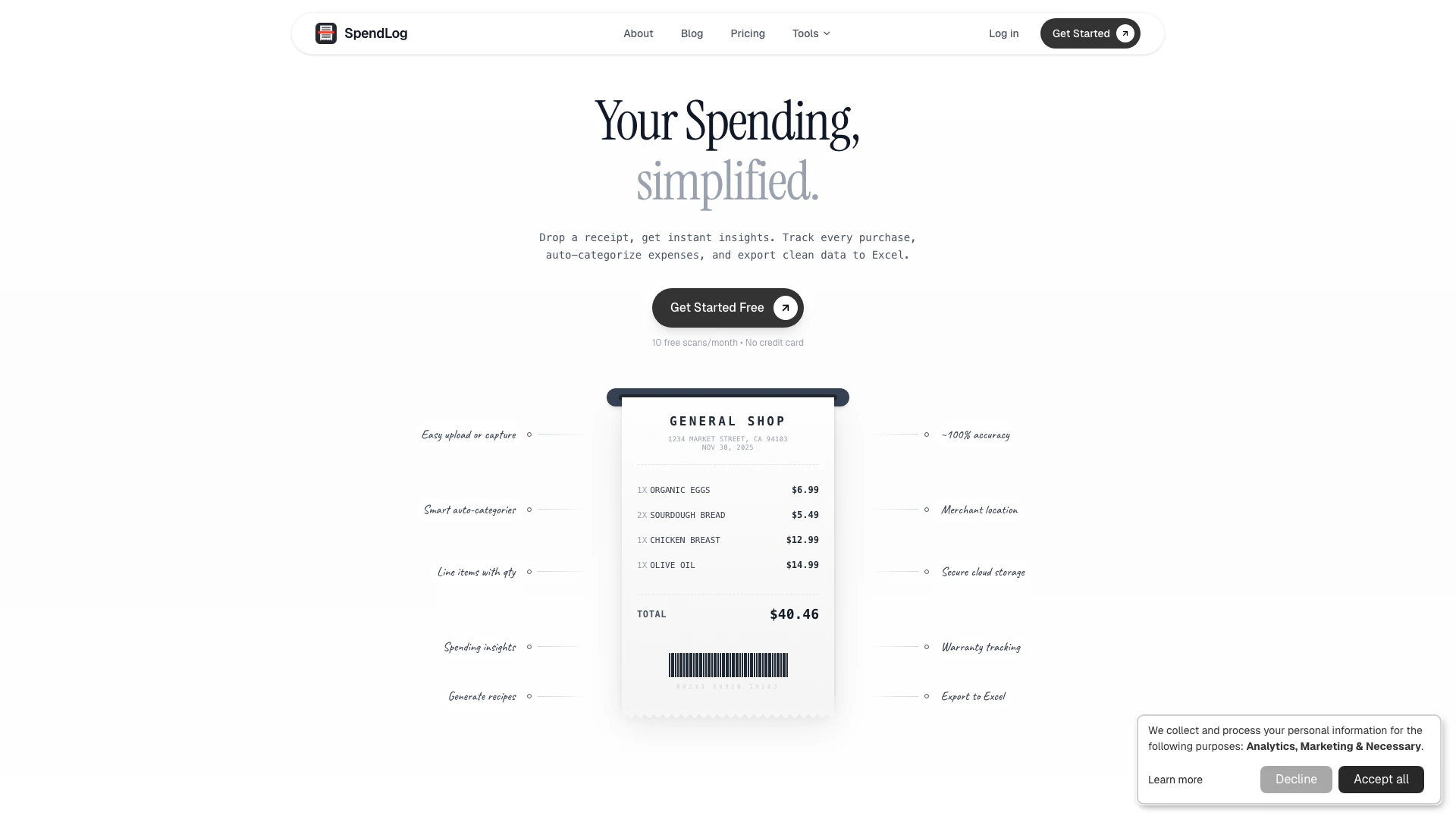
Spendlog website screenshot showing SpendLog simplifies expense tracking wit... interface and features
Use tool
Update this tool
Ait Contacts Extractor For Gmail logo

Ait Contacts Extractor For Gmail

EmailWhiz for Gmail™ - Google Workspace Marketplace

Apple logo

Apple

Apple Creator Studio offers a suite of creative tools for video, music, and design.

Deepseek logo

Deepseek

DeepSeek focuses on pioneering general AI technologies and models.

Box logo

Box

Box AI enhances enterprise productivity with intelligent content management and automation.

Microsoft logo

Microsoft

Easily create and edit high-quality videos with Clipchamp.

Spendlog Overview

What is SpendLog?

SpendLog is a free AI-powered expense tracking application designed to simplify the management of personal finances. This innovative tool automatically categorizes expenses, allowing users to effortlessly keep track of their spending habits. With features like receipt scanning, warranty tracking, and the ability to export data to Excel, SpendLog aims to provide a comprehensive solution for users looking to gain better control over their financial activities.


How to use SpendLog?

To use SpendLog effectively, follow these steps: 1. Download and Install: Visit the SpendLog website and download the application to your device. 2. Create an Account: Sign up for a free account using your email address or social media account. 3. Add Expenses: Start adding your expenses manually or use the receipt scanning feature to capture expenses automatically. 4. Review Categories: Check the auto-categorized expenses to ensure they are accurate, and make adjustments if necessary. 5. Track Warranties: Use the warranty tracking feature to keep tabs on your purchased items. 6. Export Data: When needed, export your expense data to Excel for further analysis or record-keeping.


What are the main features of SpendLog?

SpendLog offers a variety of powerful features designed to enhance your expense tracking experience: - AI Expense Categorization: Automatically categorizes expenses to simplify tracking. - Receipt Scanning: Capture and digitize receipts using your smartphone camera. - Warranty Tracking: Keep track of warranties for your purchased items to avoid missing expiration dates. - Export to Excel: Easily export your financial data to Excel for further analysis or reporting.


Who is SpendLog for?

SpendLog is ideal for individuals who want to gain better control over their finances, including students, professionals, and families. Whether you are looking to track daily expenses, manage budgets, or keep an eye on warranties for your purchases, SpendLog provides the tools necessary for effective financial management.


What are the use cases of SpendLog?

SpendLog can be utilized in various scenarios, including: 1. Personal Budgeting: Users can track their daily expenses to stay within budget limits. 2. Receipt Management: Easily manage and organize receipts for tax purposes or reimbursement claims. 3. Warranty Monitoring: Keep track of product warranties to ensure timely claims if issues arise.

Spendlog Pros and Cons

Pros

  • Automated Expense Categorization: SpendLog automatically categorizes expenses, saving users time and effort in managing their finances.
  • Receipt Scanning Feature: Users can easily scan receipts, making it convenient to keep track of purchases without manual entry.
  • Excel Export Capability: SpendLog allows users to export their expense data to Excel, facilitating easier analysis and record-keeping.

Cons

No cons data detected for this tool

Spendlog Compare

Tool NameIntroductionPricing
Type
RatingLaunch DateLearn more
Rewind Ai logo
Rewind Ai
Rewind
Free
🙋‍♂️Personal💼Work
February 2, 2018
Get deal
Quillbot Paraphraser logo
Quillbot Paraph...
Paraphrasing Tool (Ad-Free and No Sign-up Required) - QuillBot AI
Free
💼Work🎨Creativity
December 31, 1984
Get deal
Pixelhunter logo
Pixelhunter
🧠 AI-powered image resizer for social media
Free
💼Work🎨Creativity
June 8, 2021
Get deal

Info current as of post date. Offers and availability may vary by location and are subject to change.

Spendlog Launch embeds

Use website badges to drive support from your community for your TopAITools Review. They're easy to embed on your homepage or footer.

FEATURED ONTopaitoolsreview.com

Spendlog Alternatives

Ramp screenshot

Ramp

Automate finance tasks with Ramp's AI software.

Website
Free
💼Work
FinanceAI Accounting Automation for SMEsMobile Expense Tracking SolutionsSmart Receipt Management
  • Finance
  • AI Accounting Automation for SMEs
  • Mobile Expense Tracking Solutions
  • Smart Receipt Management
Use tool
5.1M
Direct71.38%
Search23.59%
Referrals3.83%
Brex screenshot

Brex

Brex automates finance tasks with AI agents for efficiency.

Website
Free
💼Work🎨Creativity
FinanceAI Accounting Automation for SMEsIntegrated Payment and Financial ManagementMobile Expense Tracking Solutions
  • Finance
  • AI Accounting Automation for SMEs
  • Integrated Payment and Financial Management
  • Mobile Expense Tracking Solutions
Use tool
919.8K
Direct65.80%
Search25.95%
Referrals5.89%
Visorfinance screenshot

Visorfinance

Automate your finances with AI insights.

Website
Free
💼Work
FinanceFinancial Analysis ToolsIntegrated Payment and Financial ManagementMobile Expense Tracking Solutions
  • Finance
  • Financial Analysis Tools
  • Integrated Payment and Financial Management
  • Mobile Expense Tracking Solutions
Use tool
83.4K
Direct61.89%
Social33.29%
Search2.16%

Spendlog Tags

Expense Trackingreceipt scanningwarranty trackingauto-categorizationExcel export

Also used for

Mobile Expense Tracking Solutions30Smart Receipt Management15Personal Finance Management Tools43E Commerce Ai Solutions4AI Performance Review1AI Professional Development3AI Commit Generator1AI Product Feed Management1AI Restaurant Automation2Ai Drive Thru Tools1AI Trading Journal39AI Trading Analytics63AI Trade Performance Tracking20AI Investment Banking Preparation6Insurtech Solutions2
Spendlog logo
SpendlogFree
Get deal

Spendlog Comments (0)

Your rating

?
0/2000

No comments yet

Be the first to share your thoughts!

Spendlog Prompts (0)

Prompts And Results

Add your own prompts and outputs to help others understand how to use this AI.

🚀0
🚀0