

Last updated:
Speechreader

Speechreader

Get deal
5.00 Comments0 Saved
Introduction:
Convert text to lifelike audio with Speechreader.
Launch Date:
--
Monthly Visits:
35.7K
Inputs:
TextImage
Outputs:
Audio
Supported Languages:
ENDEESFRHI
AI Models:
AI voices
Website
🙋‍♂️Personal💼Work🎨Creativity
Ai Text To Speech84AI Voice Generator88AI Voice Over52
Speechreader Overview

What is Speechreader?

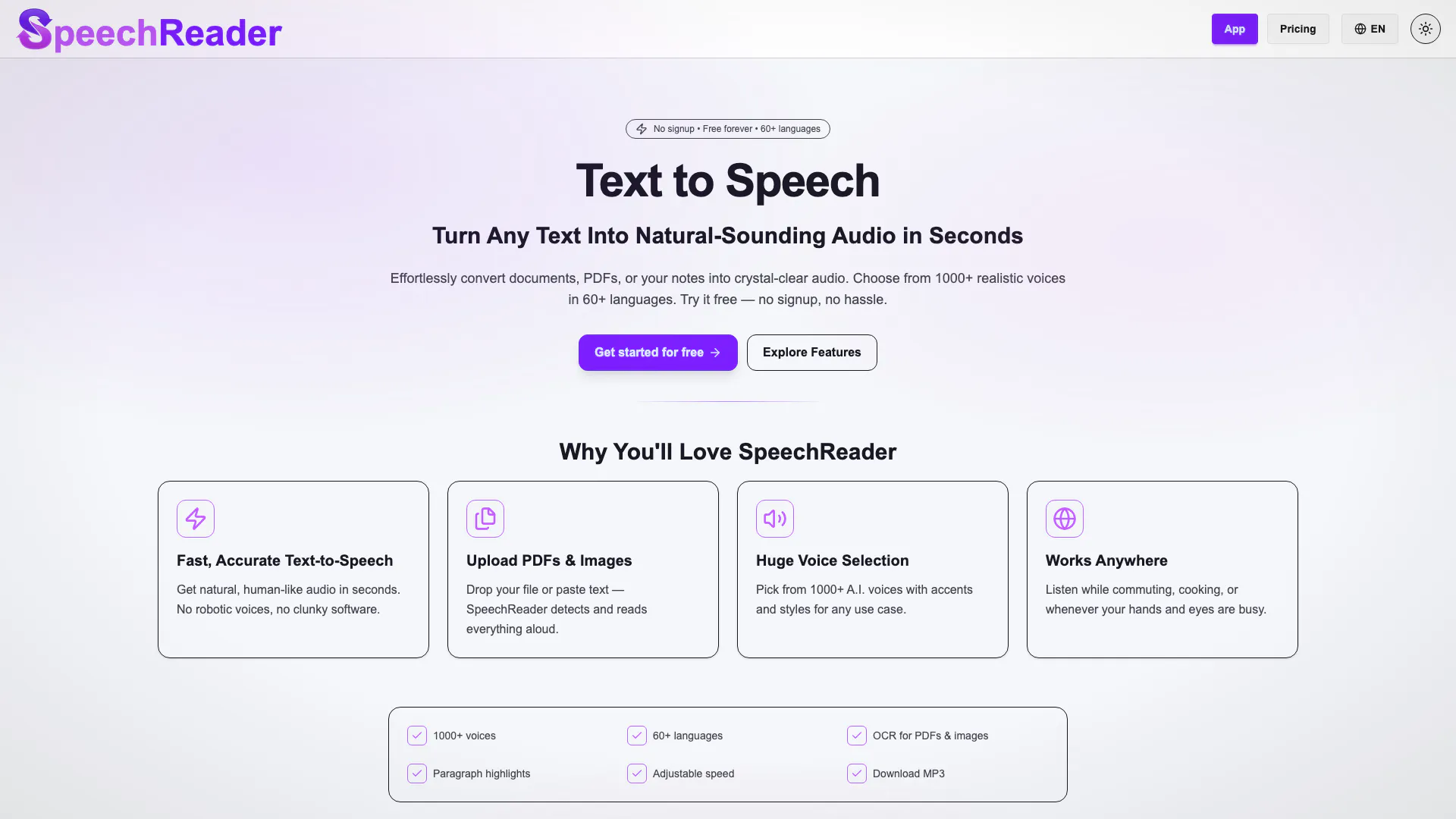
Speechreader is an advanced text-to-speech (TTS) online tool that converts written text into lifelike audio using AI voices. This platform allows users to effortlessly transform documents, PDFs, or any text into natural-sounding audio in over 60 languages. With Speechreader, you can listen to your text being read aloud without the need for any sign-up or payment, making it an accessible solution for various needs, including accessibility, content creation, and personal use.


How to use Speechreader?

  1. Visit the Speechreader website and navigate to the text input area.
  2. Paste your text or upload a document (like PDFs or images) that you want to convert to speech.
  3. Choose from the selection of over 1000 AI voices that best fits your needs.
  4. Click on the 'Listen' button to hear the text read aloud instantly, or download the audio file for offline use.

What are the main features of Speechreader?

  • Fast and accurate text-to-speech conversion, providing natural-sounding audio in seconds.
  • Support for uploading various file types including documents and images.
  • A vast selection of over 1000 realistic AI voices across 60+ languages.
  • Accessibility features for users with visual impairments, allowing text to be read aloud clearly.
  • No signup required for the free plan, making it easy to start using the service.

Who is Speechreader for?

Speechreader is designed for a wide range of users, including students, educators, content creators, and professionals who need high-quality audio for presentations, videos, or learning purposes. It is particularly beneficial for individuals with visual impairments or reading difficulties, as it provides an inclusive solution for accessing written content through audio. Additionally, marketers and podcasters can utilize Speechreader to generate voiceovers and audio content quickly and efficiently.


What are the use cases of Speechreader?

  1. Creating audio versions of written content for e-learning and educational purposes.
  2. Generating AI voiceovers for marketing videos and advertisements.
  3. Converting text into spoken audio for podcasts or tutorials.

Speechreader Pros and Cons

Pros

  • Natural-Sounding Voices: SpeechReader offers lifelike AI voices that provide a natural listening experience, making it suitable for various applications such as presentations and podcasts.
  • Wide Language Support: With support for over 60 languages and 1000+ voice styles, users can easily find a voice that fits their specific needs and preferences.
  • No Signup Required: Users can start using SpeechReader for free without the need for registration, making it accessible and hassle-free.

Cons

No cons data detected for this tool

Speechreader Pricing

Free Demo

Contact Us

1,000 characters/day

Basic

$3/month

100,000 characters/day

Premium

$8/month

500,000 characters/day

For the latest pricing, please visit this link: https://speechreader.io/en/pricing

Prices are subject to change. Please visit the official website for the most up-to-date pricing information.

Analytics of Speechreader

Speechreader Website Traffic Analysis

Visits Over Time

Oct 2025 - Dec 2025 All Traffic
--
AI Tools Rank
35.72K
Monthly Visits
36.48%
Bounce Rate
4.05
Pages Per Visit
0:35
Visit Duration
633.01K
Global Rank
3.68K
Country Rank

Traffic Sources

Oct 2025 - Dec 2025 Worldwide Desktop Only

  • Direct: 46.38%
  • Search: 38.61%
  • Referrals: 13.35%
  • Social: 1.19%
  • Paid Referrals: 0.31%
  • Mail: 0.04%

Top Regions

Oct 2025 - Dec 2025 Desktop Only
RegionPercentage
🇺🇸
United States
30.89%
🇩🇪
Germany
7.76%
🇪🇸
Spain
7.62%
🇬🇧
United Kingdom
6.87%
🇫🇷
France
6.58%
  1. United States: 30.89%
  2. Germany: 7.76%
  3. Spain: 7.62%
  4. United Kingdom: 6.87%
  5. France: 6.58%

Top Keywords

KeywordVolumeCPCEstimated Value
text to speech reader27.39K$0.74$150.00
speechreader2.62K$0.00$1480.00
text to speech reader free2.47K$1.05$150.00
speech reader1.21K$0.97$220.00
speechreader.io740$0.00$540.00

Speechreader Compare

Tool NameIntroductionPricing
Type
RatingLaunch DateLearn more
Explore AI Lawyer for easy, quick, and budget-friendly legal help. Empowering consumers and lawyers with AI-driven solutions for all your legal needs.
Free
February 11, 2023
Get deal
Explore Prompt Vibes to create unique prompts with our ChatGPT Prompt generator. Discover a collection of the best prompts designed for various uses.
Free
February 25, 2023
Get deal
Build, scale, and monitor AI Agents.
Free
September 13, 1996
Get deal

Info current as of post date. Offers and availability may vary by location and are subject to change.

Speechreader Q&A

SpeechReader is a text to speech tool powered by advanced speech synthesis. You paste your text or upload a file, and our AI voices instantly generate speech. Our system uses advanced AI algorithms to create natural-sounding voices that capture tone, rhythm, and clarity similar to human speech. With multiple voice styles and lifelike AI voices, SpeechReader turns written text into spoken audio you can download or listen online. You can use it to: Read aloud text for accessibility. Convert written text into an audio file for videos, podcasts, or learning. Create AI-generated voiceovers with expressive AI voices.

If you’ve ever tried free text to speech software that sounded robotic, you’ll appreciate SpeechReader’s human-like voices. We designed our AI text to speech generator for people who need high-quality voices without paying a fortune. Our free plan gives you voices for free in multiple languages, including Hindi, English, Spanish, and more. The benefits: Natural-sounding speech for presentations, videos, or study. AI voices for free that match a preferred voice style. Completely free to start – no signup needed.

Our realistic AI voice technology uses contextually aware voices. This means the voices sound natural, not flat. With multiple voice styles available, you can choose a voice that matches your project. Whether you want female voices, human-like AI, or a specific accent, SpeechReader offers different voices for your needs. These realistic voices are perfect for: Voice cloning projects. Narration with emotional speech. Converting your text into human-like speech.

Yes. You can convert text to speech and download the audio file directly. This is ideal if you need a TTS generator for offline use. Use cases include: Text into spoken audio for e-learning. Generate AI voiceovers for marketing videos. Text to speech to create podcasts or tutorials.

Absolutely. SpeechReader is a multilingual AI platform with multiple voice styles. You can choose an AI voice in Hindi, English, or many other languages. The multilingual AI feature makes it easy to use our text to speech for global projects. Languages and styles help you: Create human-like voices for different audiences. Match tone and accent with preferred voice style. Experiment with expressive AI voices for storytelling.

Getting started is simple: 1. Input your text or type the text into our free TTS tool. 2. Choose an AI voice that matches your needs. 3. Download the audio file or listen online. No signup required for the free plan. If you need more features, our paid options give access to high-quality speech and other features.

Yes. Text to speech can be life-changing for users with visual impairments. Our tool can read aloud text clearly, making it easier to consume text files and other content. Whether you want to turn any text into natural-sounding voices or help someone read aloud text, SpeechReader offers an inclusive solution.

Definitely. Content creators can use AI text to speech to create: Human-like voices for YouTube. Narrations for e-learning. AI-generated voiceovers for ads. With voice ai technology, your text into speech process becomes quick, affordable, and online for free.

Speechreader Launch embeds

Use website badges to drive support from your community for your TopAITools Review. They're easy to embed on your homepage or footer.

Speechreader Alternatives

AI Vocal Remover screenshot

The best app for practicing music. Remove vocals, separate instruments, master your tracks, and remix songs with the power of AI. Try it today!

  • Audio & Music
  • AI Audio Editing
  • AI Audio Enhancer
  • AI Audio Mastering
Direct53.90%
Search41.64%
Referrals2.58%
Naturalreaders screenshot

NaturalReader: Free Text to Speech for Online, Mobile App, Commercial license and Education with AI voices.

  • Speech Synthesis & Voice Conversion
  • Ai Text To Speech
Direct50.67%
Search44.47%
Referrals4.13%
Voicify Ai screenshot

Create AI covers using AI in seconds with Jammable, with thousands of community uploaded AI voice models available for creative use now!

  • Speech Synthesis & Voice Conversion
  • AI Voice Generator
Use tool
758.6K
Search56.50%
Direct34.47%
Referrals5.03%

Speechreader Tags

Also used for

Speechreader
SpeechreaderFree