Paylog





What is Paylog?
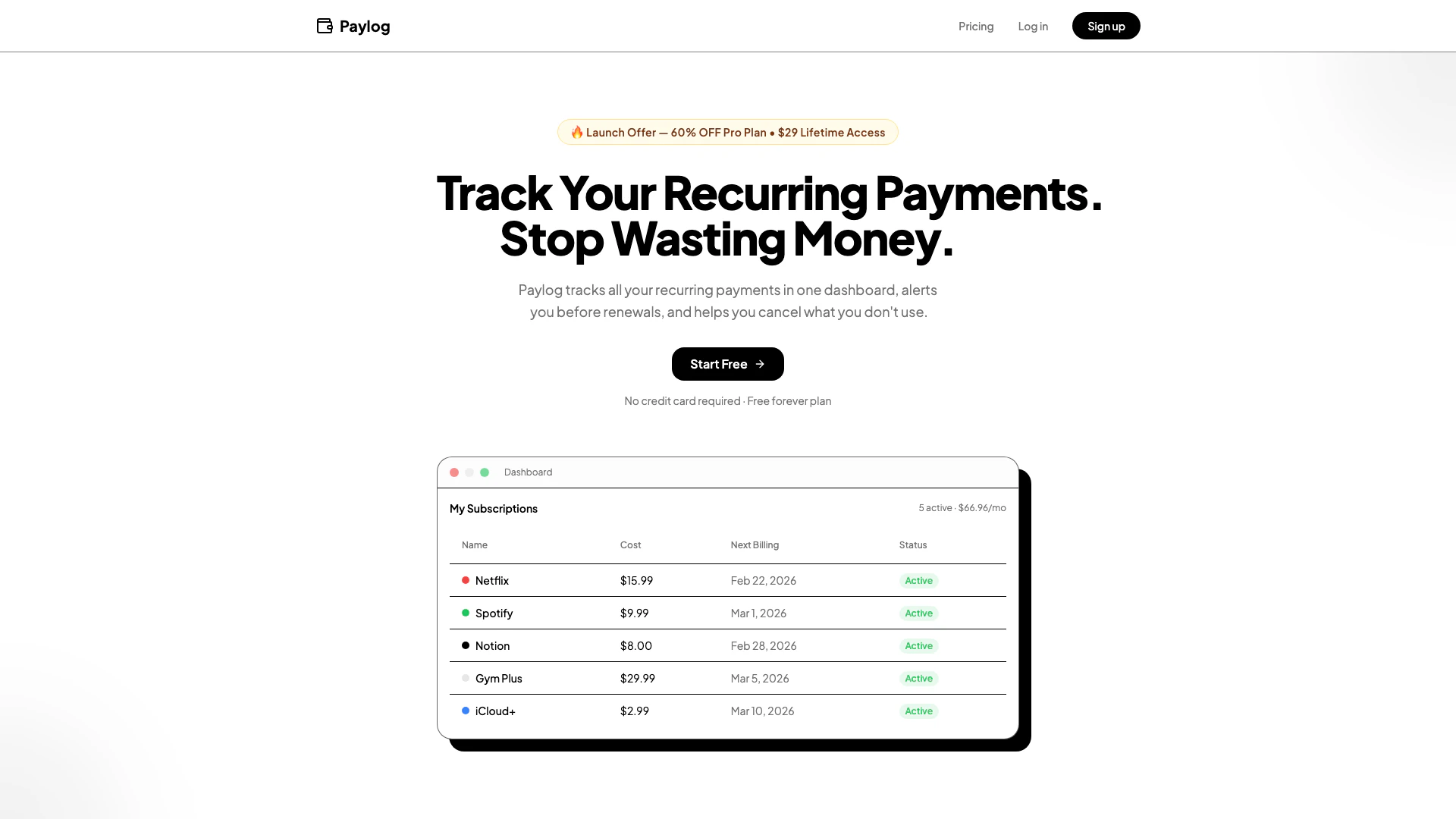
Paylog is a subscription management[1] tool designed to help users track their recurring payments efficiently. With Paylog, you can monitor all your subscriptions in one centralized dashboard[2], receive alerts for upcoming renewals, and ultimately save money by managing your expenses better. The tool caters to over 10,000 users who are currently managing popular services like Netflix, Spotify, and more. By offering a user-friendly interface and smart reminders[3], Paylog ensures that you never miss a renewal date or pay for services you no longer use.
How to use Paylog?
- Sign up for a free account on the Paylog website.
- Log in to your dashboard and click on 'Add Subscription'.
- Enter the name, cost, and renewal date of your subscription.
- Save the subscription, and Paylog will start tracking it for you.
- Receive notifications three days before each renewal to decide whether to keep or cancel the subscription.
What are the main features of Paylog?
- Centralized Dashboard: Manage all your subscriptions from one convenient location.
- Smart Reminders: Get notified three days before renewal dates to avoid unwanted charges.
- Category Organization[5]: View subscriptions sorted by categories such as entertainment, productivity, and health.
- Manual Tracking: Log subscriptions quickly and let Paylog handle the rest.
- Cost Analysis[4]: Monitor total monthly expenses and track savings over time.
Who is Paylog for?
Paylog is ideal for anyone who has multiple recurring subscriptions and wants to manage them effectively. This includes individuals, families, and professionals who subscribe to various services like streaming platforms, software tools, fitness memberships, and more. If you find it challenging to keep track of renewal dates and want to avoid unnecessary charges, Paylog is a perfect solution for you.
What are the use cases of Paylog?
- Managing Streaming Services: Keep track of subscriptions to services like Netflix and Hulu, ensuring you only pay for what you watch.
- Organizing Software Licenses: Monitor renewal dates for productivity tools such as Notion or Adobe Creative Cloud.
- Budgeting for Monthly Expenses: Analyze your total monthly subscription costs to better manage your budget and identify areas to save.
Paylog Pros and Cons
Pros
- Comprehensive Subscription Tracking: Paylog allows users to track all their recurring subscriptions in one dashboard, making it easy to manage finances.
- Smart Renewal Alerts: Users receive notifications 3 days before each renewal, giving them ample time to decide whether to keep or cancel subscriptions.
- User-Friendly Interface: The tool is designed for easy use, allowing users to add subscriptions quickly and manage them effortlessly.
Cons
No cons data detected for this tool
Paylog Pricing
Free
Get started and track your first subscriptions. Up to 3 subscriptions, Renewal reminders (3 days before), Basic dashboard & spending overview, Category tagging, Monthly & yearly summaries, Advanced analytics, Data export.
Pro
Pay once, unlock everything forever. Unlimited subscriptions, Custom reminder timing, Full analytics & trends, Advanced visualizations, Budget tracking & alerts, CSV & PDF export.
For the latest pricing, please visit this link: https://www.paylog.space/pricing
Prices are subject to change. Please visit the official website for the most up-to-date pricing information.