



Twitter-color Created with Sketch. Amazon-color Created with Sketch. Facebook-color Created with Sketch. github [#142] Created with Sketch. meta_fill Pinterest-color Created with Sketch. ProductHunt-color Created with Sketch. Spotify-color Created with Sketch. Threads Logo Streamline Icon: https://streamlinehq.com Yelp-color Created with Sketch. Youtube-color Created with Sketch.
TopAIToolsTopAITools
  • Free Tools
  • Category
  • Leaderboard
  • Deals
  • Submit
EN
TopAIToolsTopAITools
TopAI

TopAITools

TopAITools, The Best Top AI Tools

AI Glossary|English简体中文繁體中文한국어日本語PortuguêsEspañolDeutschFrançaisTiếng Việt|Map

© 2026 TopAITools. All rights reserved.

About

  • Privacy Policy
  • Terms of use

Contact Us

business@topaitoolsreview.com
Home
AI Image Generator
Osig
Last updated: June 8, 2026
Osig logo

Osig

Get deal
5.0|0 Comments|0 Saved
Introduction:
Create stunning OG images effortlessly.
Launch Date:
September 26, 2024
Monthly Visits:
--
Inputs:
TextImage
Outputs:
Image
Supported Languages:
EN
AI Models:
OSIG Image Generation
Website
Free
🎨Creativity
AI Image Generator795AI Photo Editor268AI Wallpaper Generator43
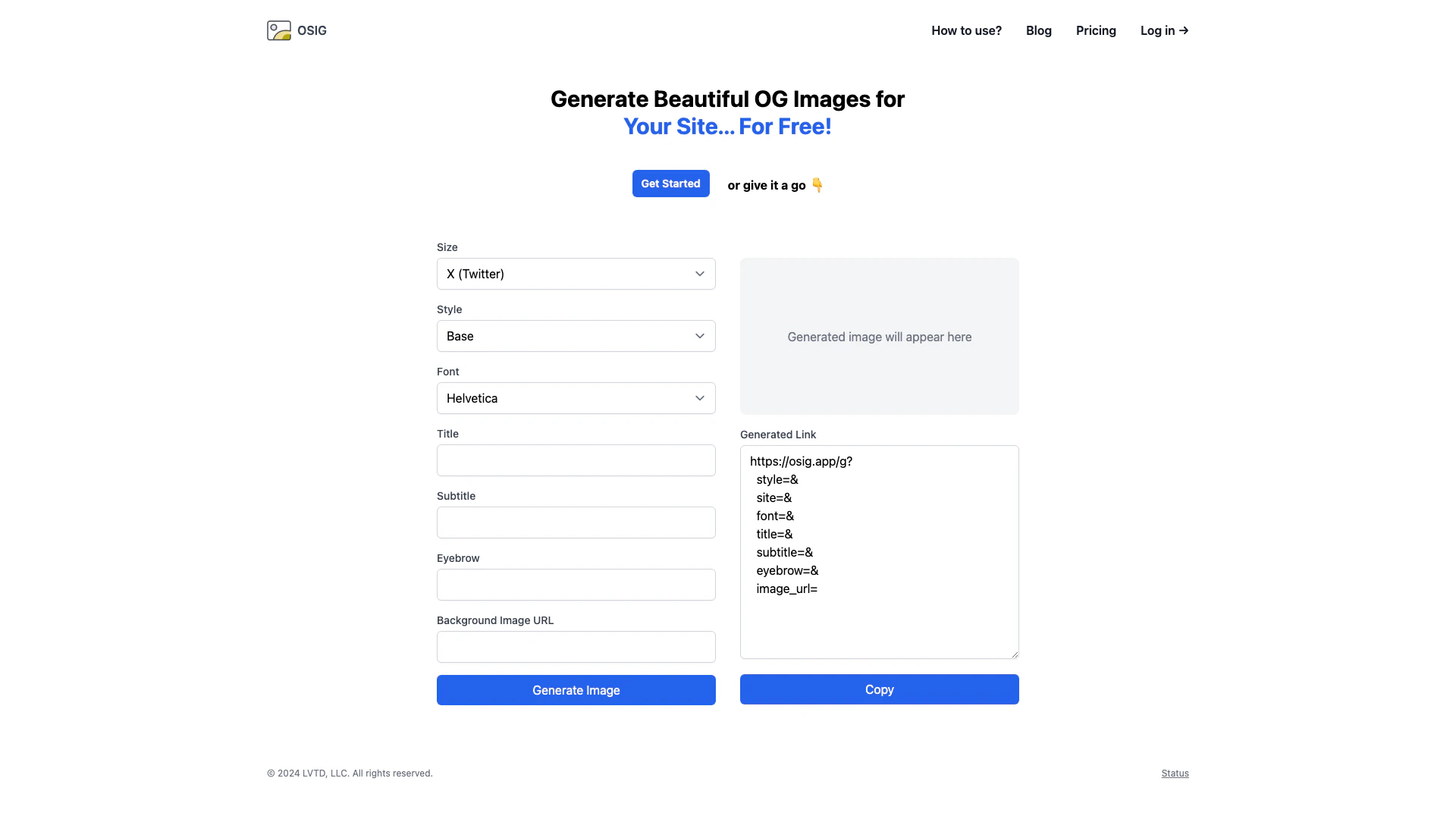
Osig website screenshot showing Create stunning OG images effortlessly. interface and features
Use tool
Update this tool
Zoom logo

Zoom

Connect and collaborate seamlessly with Zoom's all-in-one platform.

AI Models logo

AI Models

We believe our research will eventually lead to artificial general intelligence, a system that can solve human-level problems. Building safe and beneficial AGI is our mission.

Notion 1771246560178 logo

Notion 1771246560178

Notion AI enhances productivity by integrating AI tools directly into your workspace.

Microsoft logo

Microsoft

Easily create and edit high-quality videos with Clipchamp.

Apple logo

Apple

Apple Creator Studio offers a suite of creative tools for video, music, and design.

Osig Overview

What is Osig?

Osig is a free online tool designed to help users generate beautiful Open Graph[1] (OG) images for their websites. Open Graph images are essential for enhancing the appearance of shared links on social media platforms, as they provide a visually appealing representation of the content. With Osig, users can easily customize various elements of their OG images, including logos, fonts, titles, subtitles, and background images, ensuring that their website stands out in social media feeds.


How to use Osig?

  1. Visit the Osig website at https://osig.app/.
  2. Click on 'Get Started' to create an account or log in if you already have one.
  3. Select the desired elements for your OG image, such as the logo, font style, title, subtitle, and background image URL.
  4. Once you have customized your image, click on the 'Generate Image' button.
  5. The generated image will appear on the screen, and you can copy the generated link to use it on your website.

What are the main features of Osig?

  • Free Image Generation[2]: Osig allows users to create OG images at no cost.
  • Customization Options[3]: Users can customize various aspects of their images, including logos, fonts, titles, and backgrounds.
  • User-Friendly Interface: The platform features an intuitive interface that makes it easy for anyone to create professional-looking images.
  • Instant Preview: Users can see a preview of their generated image immediately after customization.
  • Link Generation: Osig provides a direct link to the generated image for easy sharing and implementation.

Who is Osig for?

Osig is designed for website owners, bloggers, and digital marketers who want to enhance their social media presence. It is particularly useful for those who frequently share links to their content on platforms like Facebook and Twitter, where visually appealing images can significantly increase engagement. Additionally, Osig caters to users with limited design skills by providing an easy-to-use tool that allows anyone to create attractive OG images.


What are the use cases of Osig?

  1. Social Media Sharing: Create eye-catching OG images for blog posts and articles to improve click-through rates when shared on social media.
  2. Marketing Campaigns: Design unique images for promotional campaigns that can be used across various digital platforms.
  3. Branding: Generate consistent OG images that align with your brand identity, helping to reinforce brand recognition in social media feeds.

Osig Pros and Cons

Pros

  • Free Image Generation: Osig allows users to generate beautiful OG images for free, making it accessible for everyone.
  • User-Friendly Interface: The tool features a simple and intuitive interface that makes it easy for users to create images without any technical skills.
  • Customizable Options: Users can customize various elements such as size, style, and fonts to create unique images tailored to their needs.

Cons

No cons data detected for this tool

Osig Pricing

Free Plan

Contact Us

OSIG is completely free to use for anyone and can be self-hosted.

Monthly Plan

$10/month

Access to OSIG features for $10 per month.

Annual Plan

$100/year

Access to OSIG features for $100 per year.

One-time Plan

$500

One-time access to OSIG features for $500.

For the latest pricing, please visit this link: https://osig.app/pricing

Prices are subject to change. Please visit the official website for the most up-to-date pricing information.


Osig Compare

Tool NameIntroductionPricing
Type
RatingLaunch DateLearn more
Promptvibes logo
Promptvibes
Explore Prompt Vibes to create unique prompts with our ChatGPT Prompt generator. Discover a collection of the best prompts designed for various uses.
Free
🙋‍♂️Personal🎨Creativity
February 25, 2023
Get deal
Facetune logo
Facetune
Edit your selfies to get the results you want with powerful and easy-to-use tools. Give your selfies the VIP treatment. Touch up, reshape & apply digital makeup.
Free
🙋‍♂️Personal🎨Creativity
December 1, 2012
Get deal
Outfits Ai logo
Outfits Ai
Try on any outfits using AI!
Free
🙋‍♂️Personal🎨Creativity
January 7, 2023
Get deal

Info current as of post date. Offers and availability may vary by location and are subject to change.

Osig Launch embeds

Use website badges to drive support from your community for your TopAITools Review. They're easy to embed on your homepage or footer.

FEATURED ONTopaitoolsreview.com

Osig Alternatives

Dreamina screenshot

Dreamina

Generate stunning images and videos effortlessly with Dreamina's AI.

Website
Free
🎨Creativity
Image Generation & EditingAI Avatar GeneratorAI Image GeneratorAI Romantic Image & Video Generator
  • Image Generation & Editing
  • AI Avatar Generator
  • AI Image Generator
  • AI Romantic Image & Video Generator
Use tool
15.7M
Direct60.15%
Search26.08%
Referrals10.44%
Adobe screenshot

Adobe

Adobe Firefly is an AI-driven tool for creating unique images, videos, and audio.

Website
Free
💼Work🎨Creativity
Image Generation & EditingAI Image GeneratorAI Photo EditorAI Realistic Image Generator
  • Image Generation & Editing
  • AI Image Generator
  • AI Photo Editor
  • AI Realistic Image Generator
Use tool
15.7M
Direct60.39%
Referrals34.84%
Search3.54%
Picsart screenshot

Picsart

Picsart is a versatile platform for creating stunning visual content using AI tools.

Website
Free
🙋‍♂️Personal💼Work🎨Creativity
Image Generation & EditingAI Image GeneratorAI Photo EditorGallery Creation Tool
  • Image Generation & Editing
  • AI Image Generator
  • AI Photo Editor
  • Gallery Creation Tool
Use tool
15.1M
Search66.78%
Direct31.18%
Referrals1.59%

Osig Tags

OG Images GeneratorFree Image Creationsocial media imagescustomizable templatesImage Generation ToolWebsite Promotion

Also used for

AI Image Generator795AI Photo Editor268AI Wallpaper Generator43AI Dating Profile Photo Generator13NSFW AI Art Generator5AI Vectorization Tool11AI Romantic Image & Video Generator58Gallery Creation Tool22SVG Optimization Tool9SVG Compression Tool7Text Behind Image Design Tool1Text To 3d Generator8AI Car Wrap Generator1AI Device Mockup Generator6Code Snippet Image Generator2

Sources (1)

Osig logo
OsigFree
Get deal

Osig Comments (0)

Your rating

?
0/2000

No comments yet

Be the first to share your thoughts!

Osig Prompts (0)

Prompts And Results

Add your own prompts and outputs to help others understand how to use this AI.

🚀0
🚀0



