Macbid


What is MacBid?
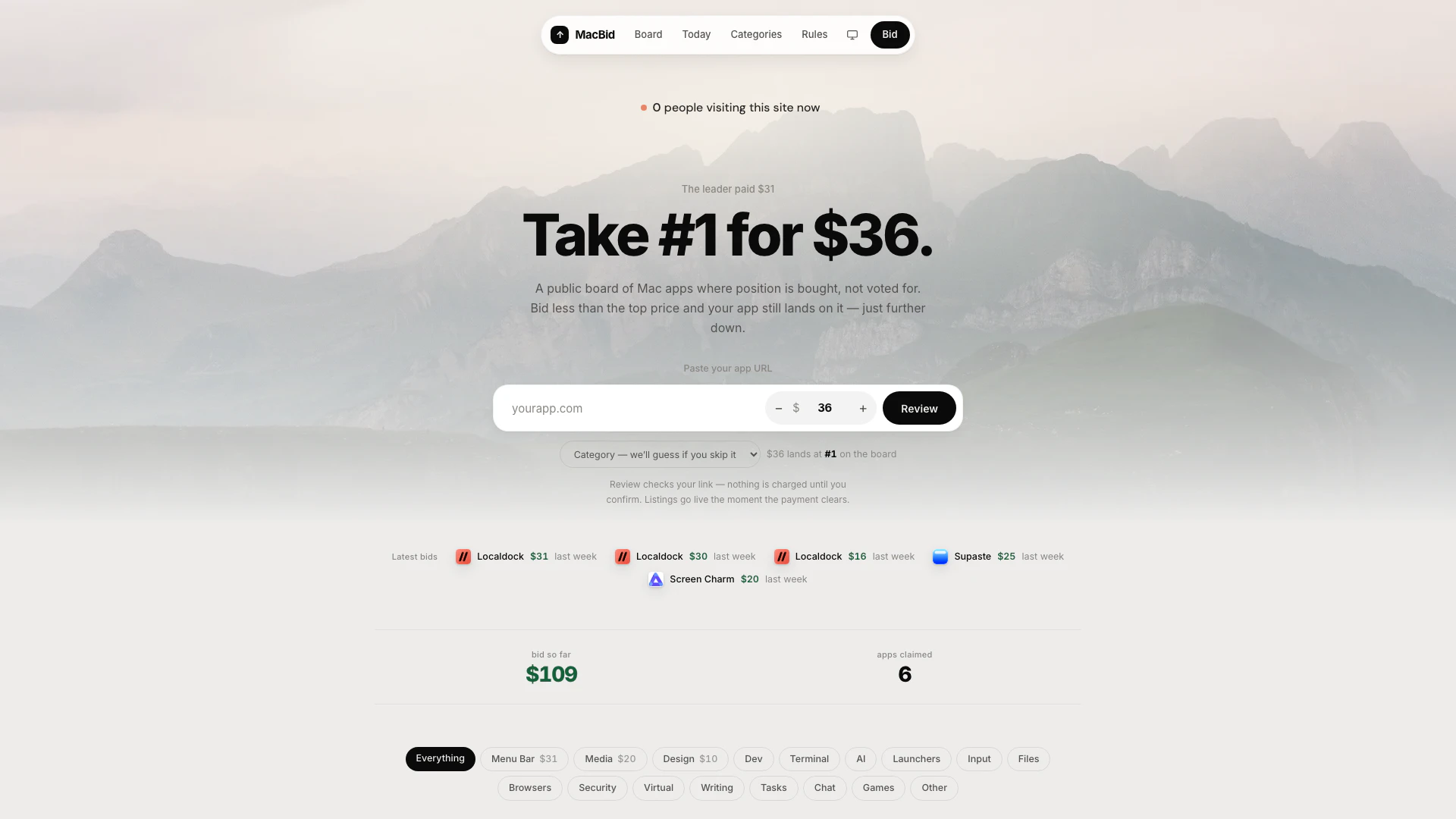
MacBid is an innovative platform designed for Mac app developers, offering a unique public leaderboard where app positions are determined by monetary bids rather than votes or editorial reviews. This means that developers can buy their app's ranking on the leaderboard, creating a transparent and competitive environment. With MacBid, the app that offers the highest bid secures the top spot, allowing developers to easily elevate their visibility in the Mac app marketplace. This approach not only simplifies the ranking process but also encourages developers to invest in their app's promotion effectively.
How to use MacBid?
- Visit the MacBid website at [Macbid.app](https://macbid.app/).
- Paste the URL of your Mac app into the designated field on the homepage.
- Choose a bid amount that is less than the current top bid to secure a position on the leaderboard.
- Select the appropriate category for your app from the dropdown menu.
- Confirm your bid and complete the payment process. Your app will go live on the leaderboard as soon as the payment is processed.
What are the main features of MacBid?
- Public Leaderboard: Displays Mac apps ranked by the amount paid for their position, with no voting or editorial influence.
- Bidding System: Users can bid to secure a position above other apps, promoting a competitive marketplace.
- Instant Listing: Apps are listed immediately upon payment confirmation, allowing for quick visibility.
- Transparency: All bids are public, ensuring that users can see the pricing and positioning of apps.
- Categorization: Apps can be categorized into various segments like Developer Tools, Media, and Productivity for easier navigation.
Who is MacBid for?
MacBid is tailored for Mac app developers and publishers who seek to enhance their app's visibility in a competitive marketplace. This platform is particularly beneficial for those looking to launch new applications or improve the rankings of existing ones. Entrepreneurs, small software companies, and independent developers can all leverage MacBid's bidding system to attract more users and increase downloads by securing prime positions on the leaderboard. Additionally, marketers and digital strategists can utilize this tool to implement effective promotional strategies for their apps.
What are the use cases of MacBid?
- Marketing New Apps: Developers can use MacBid to promote their newly launched applications and gain immediate visibility on the leaderboard.
- Competitive Positioning: Existing app developers can bid to outpace competitors and maintain a prominent position in their respective categories.
- Category-Specific Promotions: Apps can be strategically placed in specific categories to attract targeted users looking for particular functionalities.
Macbid Video

Macbid Pros and Cons
Pros
- Unique Ranking System: MacBid allows users to buy their app's position on a public leaderboard, providing a unique ranking system based on monetary bids.
- Instant App Visibility: The platform enables immediate visibility for apps once the payment clears, allowing for quick promotion.
- Transparent Process: No voting or editorial reviews are involved, making the ranking process straightforward and transparent.
Cons
- Continuous Engagement Required: Users need to continuously monitor bids to maintain their app's position, which may require constant engagement.
- Budget Constraints for Developers: The bidding system may favor those with larger budgets, potentially sidelining smaller developers.
- Mac-Only Platform: The service is exclusively for Mac apps, limiting its usability for developers of apps on other platforms.
Macbid Pricing
Localdock
A macOS menubar app that names every dev server — dashboard.localhost on this Mac, dashboard.local on your Wi-Fi, or a public HTTPS link.
Supaste
Supaste is a local-first clipboard and screenshot history app for Mac. Save copied text, links, images, files, code, colors, and screenshots in a beautiful searchable timeline.
Screen Charm
Mac screen recorder with smart zoom effect, webcam overlay, motion blur, background music, 4K export, and built-in editor.
Cooldock
Cooldock adds a beautiful second Dock to your Mac with live widgets for music, todos, calendar events, weather, search, system stats, quick actions, and more.
Screen Movie
Record your screen, capture screenshots, edit videos, animate text, images and captions, add music and export beautiful product videos with the ultimate native macOS screen recorder and video editor.
Envly
A native Mac app for your .env files. See, edit, and switch environments across every project in one window — a structured editor instead of raw text, dev/staging/prod as tabs. Envly collects nothing — your secrets stay on your Mac.
For the latest pricing, please visit this link: https://macbid.app/
Prices are subject to change. Please visit the official website for the most up-to-date pricing information.