Logier




What is Logier?
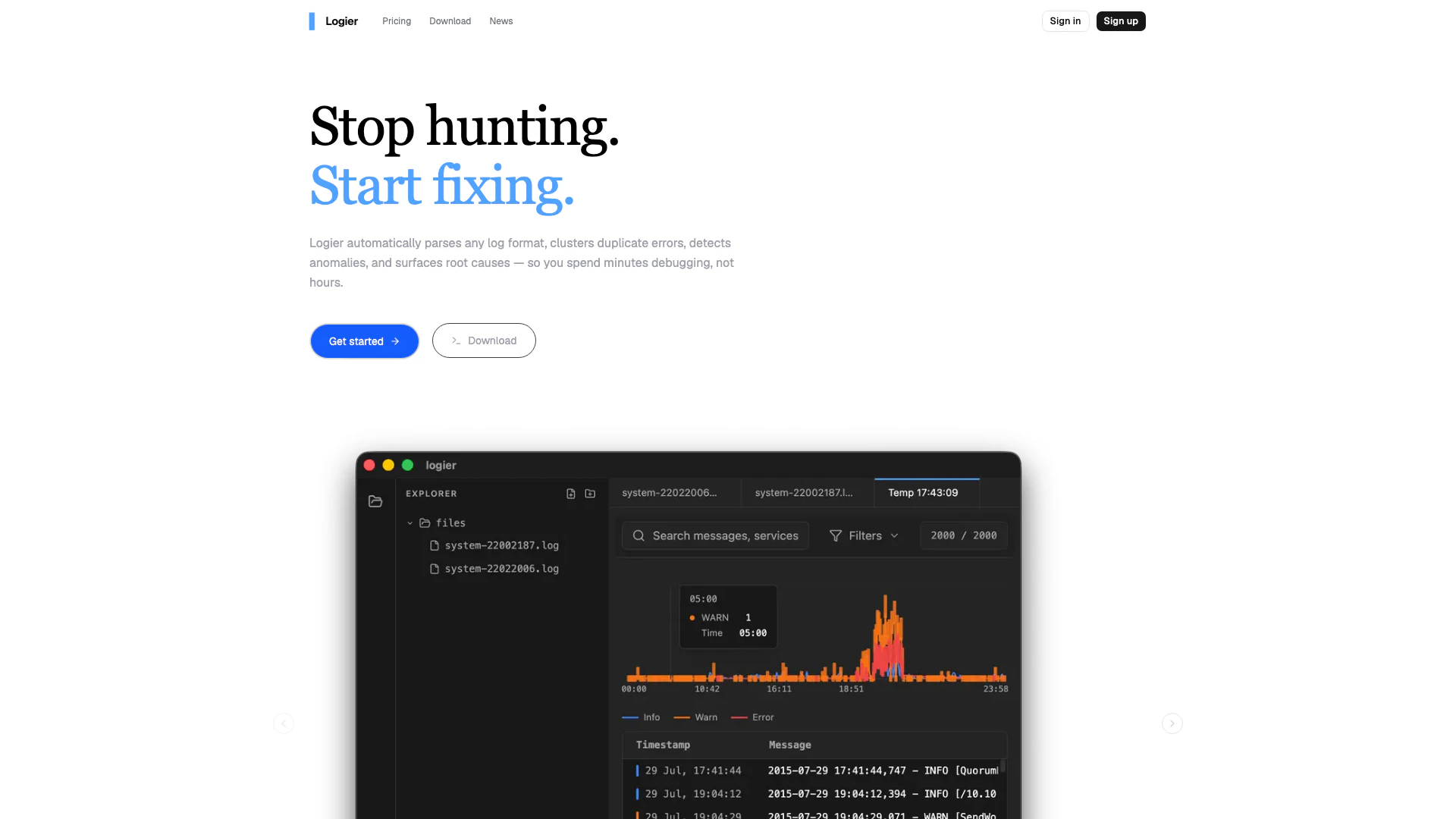
Logier is an advanced log analysis tool designed to streamline the debugging process for developers. By automatically parsing various log formats, clustering duplicate errors, detecting anomalies, and surfacing root causes, Logier allows users to spend significantly less time debugging. With its user-friendly interface and powerful features, Logier transforms the often tedious task of log analysis into a quick and efficient process, enabling developers to focus on fixing issues rather than hunting for them.
How to use Logier?
- Upload or Paste Logs: Start by dropping any log file into Logier or pasting the log lines directly into the interface. The tool can handle any format and size of log files.
- Instant Analysis: Once your logs are uploaded, Logier will automatically detect the format, parse the entries, cluster similar errors, and score any anomalies present in the logs.
- Fix Faster: Utilize one-click filters, AI-generated summaries, and timeline views to quickly jump to the root cause of issues, allowing for faster resolution.
What are the main features of Logier?
- Auto-format Detection: Logier can identify various log formats, including JSON, logfmt, Apache, syslog, and custom patterns, in milliseconds without requiring any configuration.
- Error Clustering: Similar error messages are grouped together, making it easier to view and address issues, such as displaying 'Query timeout ×47' instead of multiple identical lines.
- AI Root Cause Analysis: The tool features an AI copilot that reads through logs and provides a plain-English summary of what went wrong, including when and why the error occurred.
- Timeline View: Users can visualize error spikes over time, allowing them to pinpoint exactly when issues began.
- Anomaly Detection: Logier detects sudden changes in frequency, outlier values, and unusual patterns within the logs.
- Secure by Default: Logs are processed in-memory, ensuring that they do not leave the user's system without consent.
Who is Logier for?
Logier is primarily designed for software developers, system administrators, and IT professionals who regularly work with log files and need to debug applications efficiently. It is ideal for those who seek to minimize the time spent on manual log analysis and wish to enhance their debugging capabilities. Whether you are a solo developer or part of a larger team, Logier provides the tools necessary to quickly identify and resolve issues, making it suitable for anyone involved in software development and maintenance.
What are the use cases of Logier?
- Debugging Applications: Quickly identify and resolve issues in application logs, reducing debugging time and increasing overall productivity.
- Monitoring System Performance: Use Logier to analyze logs from servers and applications to detect anomalies and performance bottlenecks.
- Error Reporting: Streamline the error reporting process by clustering similar errors and providing clear insights into root causes, aiding in faster resolutions.
Logier Pros and Cons
Pros
- Automatic Log Parsing: Logier automatically detects and parses any log format, eliminating the need for manual configuration and saving time.
- Error Clustering: The tool clusters similar error messages, allowing users to see a summary of issues instead of scrolling through repetitive logs.
- AI-Powered Root Cause Analysis: Logier provides AI-generated explanations of errors, helping users quickly understand the root causes of issues.
Cons
No cons data detected for this tool