
Flowtext Io



What is Flowtext Io?
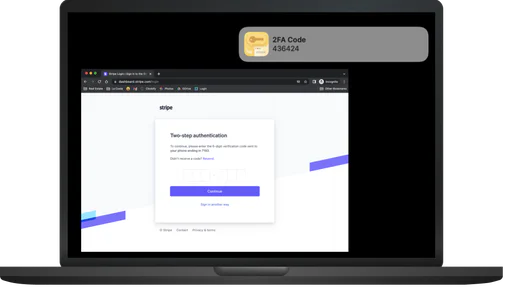
Flowtext Io is a MacOS application designed to streamline the process of entering two-factor authentication (2FA) codes. It automatically detects and copies 2FA codes sent via SMS, allowing users to effortlessly paste them into their browsers or applications without the hassle of manual copying. This tool enhances security and user experience by making the 2FA process more efficient, particularly for users who frequently need to authenticate their logins.
How to use Flowtext Io?
- Download the Flowtext Io app from the official website or your Mac’s app store.
- Install the application on your MacOS device and follow the on-screen setup instructions.
- Ensure that you have iMessage enabled for receiving SMS messages.
- Once set up, Flowtext Io will automatically monitor incoming SMS messages for 2FA codes.
- When a 2FA code is detected, Flowtext Io will copy it to your clipboard, ready for pasting into the required field.
What are the main features of Flowtext Io?
- Automatic detection of incoming SMS messages containing 2FA codes.
- Instant copying of detected codes to the clipboard for easy pasting.
- Seamless integration with MacOS and Chrome for a smooth user experience.
- Enhanced security measures to protect user data and privacy.
- Compatibility with various services that utilize 2FA, including banks and social media platforms.
Who is Flowtext Io for?
Flowtext Io is designed for MacOS users who frequently engage with services requiring two-factor authentication. This includes professionals who manage sensitive accounts such as banking, social media, and online work platforms. It is particularly beneficial for users who find the manual process of entering 2FA codes tedious and time-consuming, allowing them to enhance their online security without the hassle.
What are the use cases of Flowtext Io?
- Quickly log into banking applications by pasting 2FA codes received via SMS without delay.
- Authenticate access to social media accounts like Instagram and GitHub with minimal effort.
- Streamline login processes for various online services that require two-factor authentication, enhancing overall security and efficiency.
Flowtext Io Pros and Cons
Pros
- Automatic 2FA Code Detection: Flowtext.io automatically detects and copies 2FA codes from SMS messages, simplifying the process for users.
- User Security and Privacy: The app is designed with user security in mind, keeping sensitive information safe by not sending data out from the computer.
- Ease of Use: The application streamlines the 2FA process, making it easy for users to paste codes without manual copying.
- Affordable Pricing: Flowtext.io is priced at $5.00, offering a cost-effective solution for managing 2FA codes.
Cons
- Limited Platform Compatibility: Currently, Flowtext.io is only compatible with MacOS and iMessage SMS messages, limiting its user base.
- Lack of Comprehensive Support: Information regarding customer support and community resources appears to be limited.
Analytics of Flowtext Io
Flowtext Io Website Traffic Analysis
Visits Over Time
Traffic Sources
Oct 2025 - Dec 2025 Worldwide Desktop Only
- Direct: 39.93%
- Search: 35.19%
- Referrals: 13.20%
- Social: 8.69%
- Paid Referrals: 1.81%
- Mail: 0.22%
Top Keywords
| Keyword | Volume | CPC | Estimated Value |
|---|---|---|---|
| flowtext | 230 | $0.00 | $210.00 |
| chrome extension to copy mac messages codes | 230 | $0.00 | $0.00 |
| how to make chrome on mac recognize passcodes from text messages | 200 | $0.00 | $0.00 |
| autofill security codes on mac chrome | 10 | $0.00 | $0.00 |
| sms verifcation code mac chrome | 10 | $0.00 | $0.00 |




