

Firebender





What is Firebender?
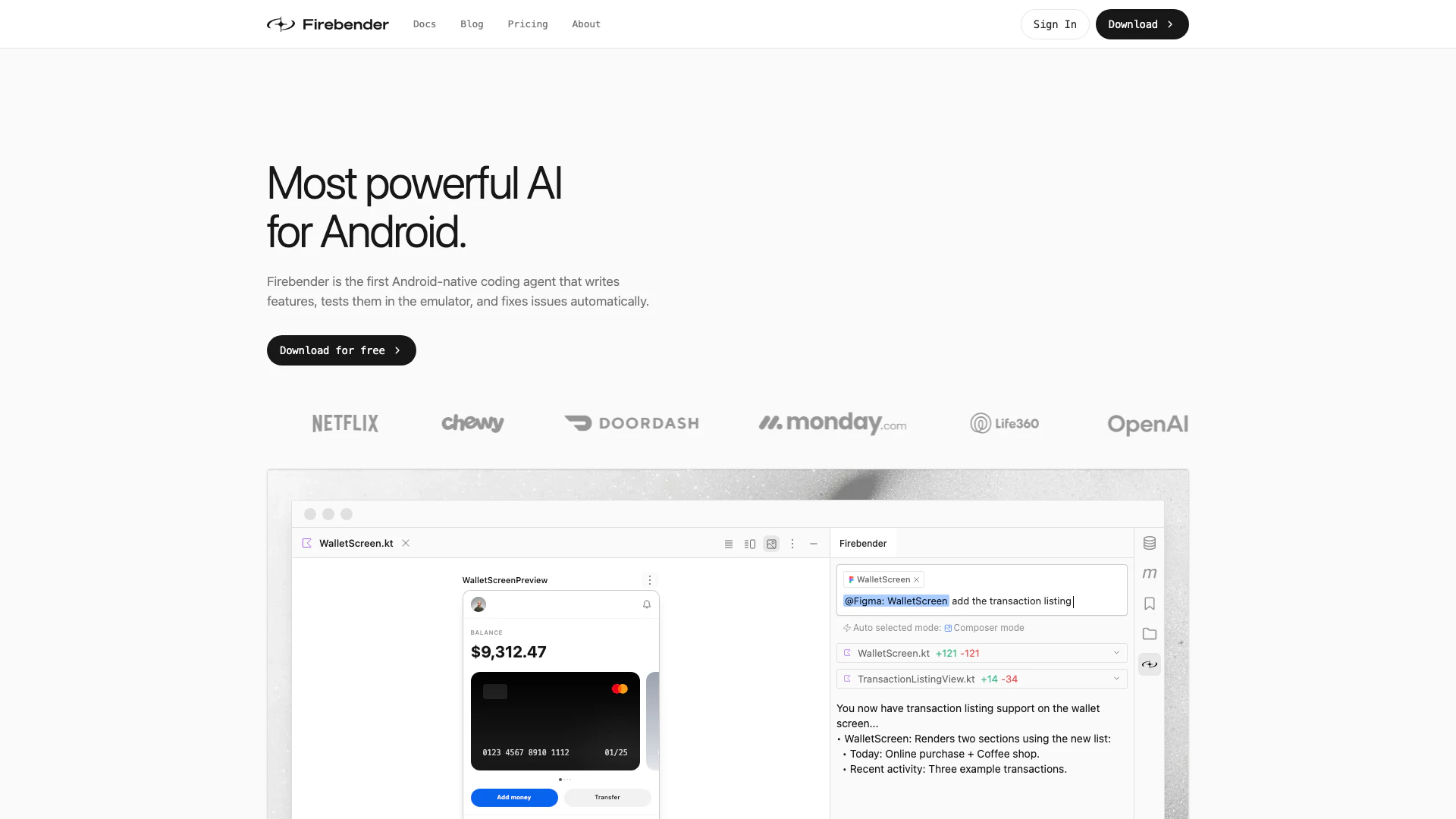
Firebender is a cutting-edge coding agent specifically designed for Android Studio, known as the most powerful AI tool for Android development. This innovative tool automates the coding process by writing features, conducting tests within the emulator, and automatically fixing issues that arise. Its seamless integration into Android Studio allows developers to enhance their productivity significantly, making coding more efficient and less error-prone.
How to use Firebender?
- Install Firebender: Download and install the Firebender plugin directly from the JetBrains plugin repository.
- Launch Android Studio: Open your Android Studio IDE where Firebender is integrated.
- Create or open a project: Start a new project or open an existing Android project.
- Use coding commands: Utilize Firebender's voice mode or commands to describe the features you want to implement.
- Review and test: Firebender will write the code, run it in the emulator, and fix any issues automatically, allowing you to focus on refining your app.
What are the main features of Firebender?
- Code Automation: Automates coding tasks, including writing features and fixing bugs.
- Integration with Android Studio: Deeply integrated into Android Studio, leveraging built-in tools for seamless coding.
- Emulator Interaction: Tests features in the emulator, verifying functionality without manual testing.
- Custom Agents: Allows users to create custom agents tailored to specific coding workflows.
- Voice Mode: Enables hands-free coding by allowing users to dictate commands.
Who is Firebender for?
Firebender is designed for Android developers, ranging from beginners to seasoned professionals. It is particularly beneficial for teams looking to enhance their coding efficiency, reduce manual testing, and automate repetitive tasks. Startups and established companies alike can leverage Firebender to streamline their development processes, allowing developers to focus on creativity and innovation rather than mundane coding tasks.
What are the use cases of Firebender?
- Feature Development: Quickly write and implement new features in Android applications without extensive manual coding.
- Automated Testing: Conduct automated tests in the emulator to ensure that new features work correctly before deployment.
- Bug Fixing: Automatically identify and fix bugs in the codebase, improving overall code quality and stability.
Product Images

Firebender Pros and Cons
Pros
- Powerful Coding Automation: Firebender automates coding tasks by writing features, testing them in the emulator, and fixing issues automatically, enhancing developer productivity.
- Deep Integration with Android Studio: The tool is deeply integrated into Android Studio, leveraging built-in refactor tools and the debugger to ensure production-ready code.
- Custom Agents for Workflows: Users can create custom agents tailored to their specific workflows, allowing for greater flexibility and efficiency in coding.
Cons
No cons data detected for this tool
Firebender Pricing
Hobby
Includes: Limited agent requests, Limited autocomplete requests.
Developer
Everything in Hobby, plus: Unlimited autocomplete, Extended agent requests, Maxed context windows, Android compose UI tools, Custom agents and subagents, Intellij refactor tools.
Developer+
Everything in Developer, plus: 2.5x usage on all OpenAI, Claude, Gemini models.
Ultra
Everything in Developer, plus: 5x usage on all OpenAI, Claude, Gemini models.
Business
Team usage analytics, Central billing, SSO SAML / OIDC, Model controls / Per member limits.
Enterprise
Everything in Business, plus: Custom usage limits, Dedicated support, Advanced security controls, PO and invoicing, Custom service agreements.
For the latest pricing, please visit this link: https://firebender.com/pricing
Prices are subject to change. Please visit the official website for the most up-to-date pricing information.
Analytics of Firebender
Firebender Website Traffic Analysis
Visits Over Time
Traffic Sources
Nov 2025 - Jan 2026 Worldwide Desktop Only
- Direct: 49.49%
- Search: 35.06%
- Referrals: 8.74%
- Social: 5.27%
- Paid Referrals: 1.24%
- Mail: 0.09%
Top Keywords
| Keyword | Volume | CPC | Estimated Value |
|---|---|---|---|
| firebender | 4.61K | $0.00 | $3300.00 |
| firebender dashboard | 510 | $0.00 | $860.00 |
| firebender pricing | 150 | $0.00 | $140.00 |
| how long do firebender limits last in the developer plan | 130 | $0.00 | $180.00 |
| firebender limits development | 130 | $0.00 | $130.00 |
Firebender Reviews
Firebender is a no brainer. It has the best integration compared to other alternative solutions in the market.
Firebender is by far the best tool to use with Android Studio. I've tried Windsurf, Cursor, Claude Code, Antigravity, and none matched it.
With Firebender I don't need to write boilerplate code anymore. I can choose which model works best for me.
For more reviews, visit this link: https://firebender.com/#testimonials





Firebender Social Listening
Code like a Senior Dev with Fi...
My Online Courses https://link...
Firebender - Most powerful AI ...
droidcon Berlin is the premier...
Firebender Plugin for Android ...
Firebender might just be the s...
Unlock to view 5 social media results.