Cornercue




What is Cornercue?
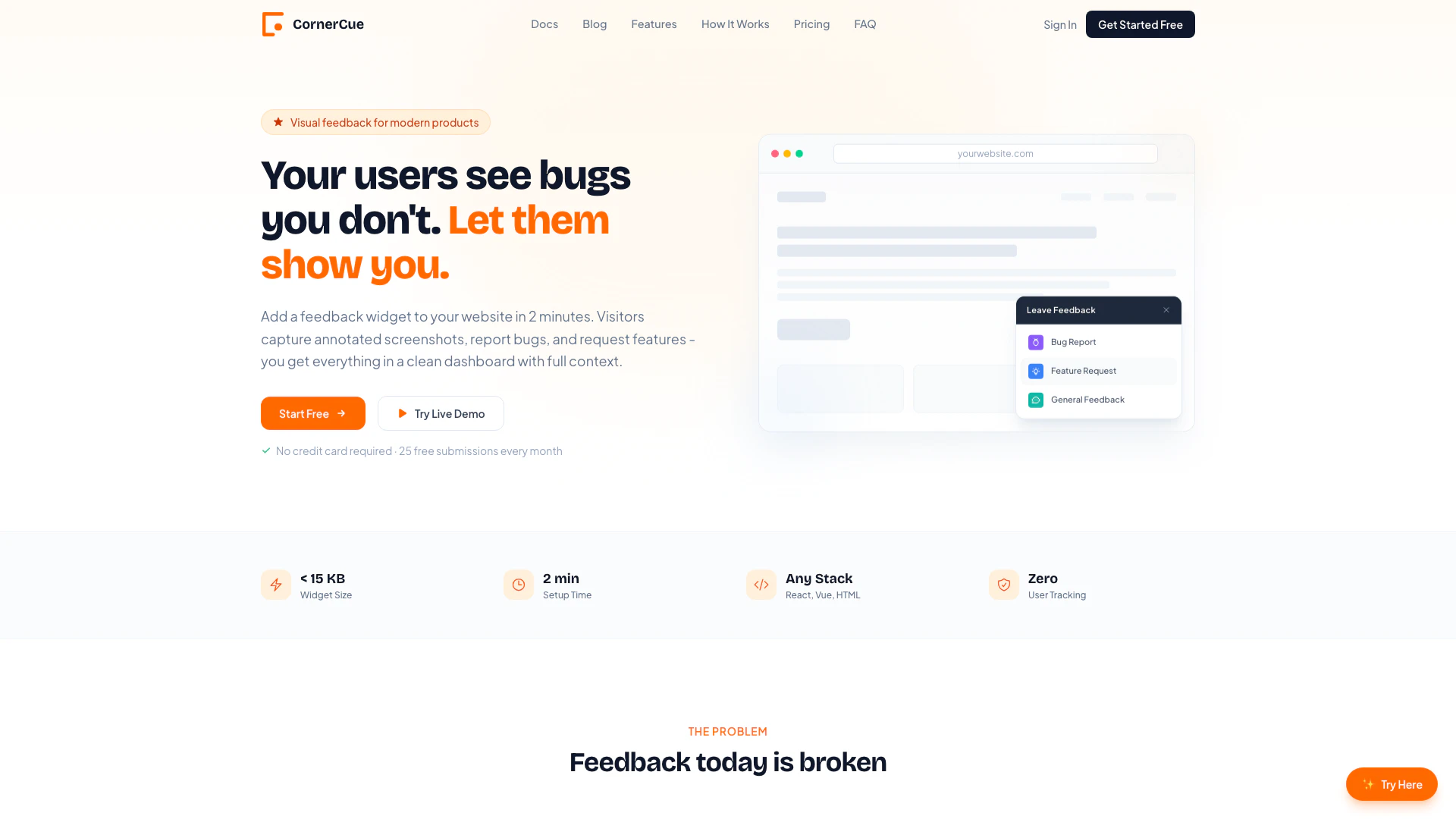
Cornercue is an innovative feedback tool[1] designed to enhance user engagement by allowing visitors to capture bugs, feature requests, and feedback through annotated screenshots[2] directly from your website. With a simple setup that takes less than 2 minutes and requires no credit card, Cornercue provides a seamless way for users to communicate their experiences and issues, ensuring that developers receive clear, contextual feedback that aids in product improvement.
How to use Cornercue?
To start using Cornercue, follow these simple steps: 1. Add the Widget: Insert two lines of code into your website's HTML. This includes a script tag and a button to trigger the feedback interface. 2. Users Give Feedback: When visitors click the feedback button, they can select the type of feedback (bug, feature request, or general feedback), capture an annotated screenshot, and submit their input. 3. View Submissions: All feedback submissions will be collected in your Cornercue dashboard, complete with screenshots, browser information, and other contextual data.
What are the main features of Cornercue?
Cornercue offers a range of powerful features designed to streamline user feedback collection: - Screenshot & Annotation: Users can capture their screen and annotate it with tools like pens, boxes, and arrows, making it easy to highlight specific issues. - Full Browser Context: Each submission includes essential details such as browser type, operating system, page URL, and timestamp for better context. - Smart Dashboard: Manage all feedback from a clean interface where you can filter, search, and organize submissions. - Framework Agnostic: Works with various frameworks including React, Vue, and plain HTML, allowing for easy integration into any web application. - Lightweight & Fast: The widget is under 15 KB, ensuring it does not impact page loading speed.
Who is Cornercue for?
Cornercue is ideal for product teams, developers, and website owners who want to gather actionable feedback from their users efficiently. It caters to both small startups and larger enterprises, enabling them to understand user experiences and improve their products. Whether you're a solo founder or part of a larger team, Cornercue provides the tools necessary to capture valuable insights directly from your audience.
What are the use cases of Cornercue?
Cornercue can be utilized in various scenarios, including: 1. Bug Reporting: Users can easily report bugs with visual context, helping developers reproduce and fix issues faster. 2. Feature Requests: Gather user suggestions for new features, complete with screenshots to illustrate their ideas clearly. 3. General Feedback: Collect overall user feedback to improve the user experience and interface of your website.
Product Images

Cornercue Pricing
Free
Perfect for testing and small projects. 25 submissions / month. After 25, feedback is still captured (text only, no screenshots). Resets on the 1st of each month.
Pro
For products that want real user insight. One-time payment of $29 for a year. Everything in Free, plus unlimited submissions and unlimited screenshot storage.
For the latest pricing, please visit this link: https://cornercue.com/#pricing
Prices are subject to change. Please visit the official website for the most up-to-date pricing information.